EasyManua.ls Logo

Boss DM-101 - MIDI Configuration Details

Boss DM-101
22 pages
Print Icon
To Next Page IconTo Next Page
To Previous Page IconTo Previous Page
Loading...
Various Settings
16
MIDI Settings
1.
Press and hold down the [ON/OFF] switch, and turn on the power.
2.
Turn the Mode knob to select the parameter to set.
3.
Use the [MEMORY] button to select the setting.
4.
Press the [ON/OFF] switch to exit the settings.
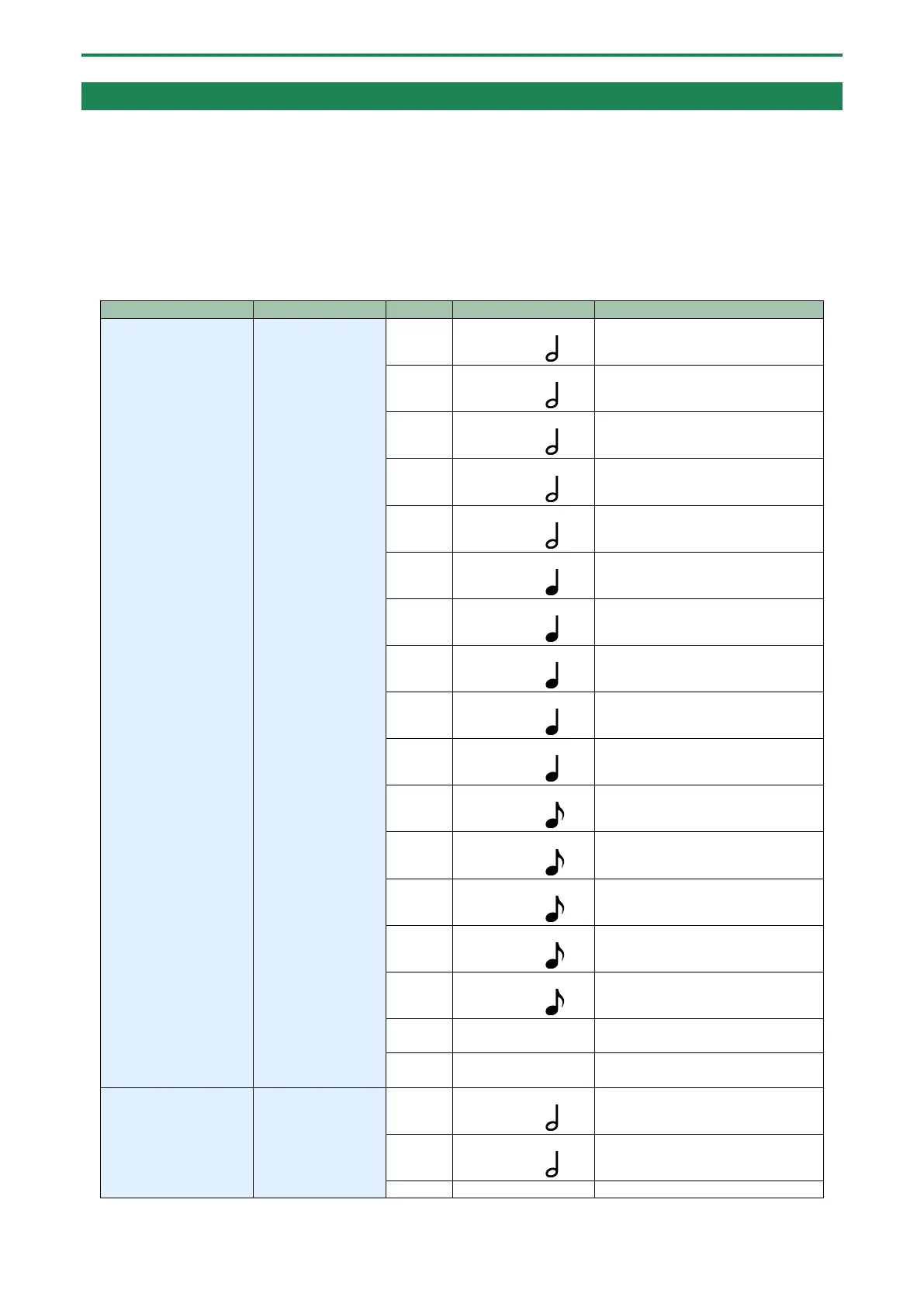
Setting
Mode knob
Value
Indicators that are lit
Explanation
Receive channel
(RX CH)
CLASSIC
OFF
MEMORY: MANUAL
TAP DIVISION:
Off
1
MEMORY: 1
TAP DIVISION:
CH. 1
2
MEMORY: 2
TAP DIVISION:
CH. 2
3
MEMORY: 3
TAP DIVISION:
CH. 3
4
MEMORY: 4
TAP DIVISION:
CH. 4
5
MEMORY: MANUAL
TAP DIVISION:
CH. 5
6
MEMORY: 1
TAP DIVISION:
CH. 6
7
MEMORY: 2
TAP DIVISION:
CH. 7
8
MEMORY: 3
TAP DIVISION:
CH. 8
9
MEMORY: 4
TAP DIVISION:
CH. 9
10
MEMORY: MANUAL
TAP DIVISION:
CH. 10
11
MEMORY: 1
TAP DIVISION:
CH. 11
12
MEMORY: 2
TAP DIVISION:
CH. 12
13
MEMORY: 3
TAP DIVISION:
CH. 13
14
MEMORY: 4
TAP DIVISION:
CH. 14
15
MEMORY: MANUAL
TAP DIVISION: TRI
CH. 15
16
MEMORY: 1
TAP DIVISION: TRI
CH. 16
Transmit channel
(TX CH)
VINTAGE
OFF
MEMORY: MANUAL
TAP DIVISION:
Off
1
MEMORY: 1
TAP DIVISION:
CH. 1
2
MEMORY: 2
CH. 2

Related product manuals