Using the Tempo Delay
11
* Never switch o the power while the CHECK indicator is
ashing rapidly.
* This setting is retained even while the power is turned o.
Setting the tempo using the Pedal switch
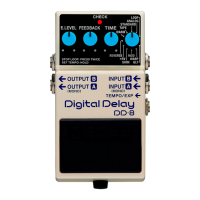
1. Select the mode.
Use the [MODE] knob to select the mode to be used.
* Tempo input cannot be used in LOOP mode.
2. Switch to TEMPO mode.
Hold down the pedal switch for at least two seconds (the CHECK
indicator lights green).
* When a footswitch (the FS-5U, FS-6, FS-7; sold separately) is
connected to the TEMPO/EXP jack, you won’t be able to enter
TEMPO mode by pressing the pedal switch.
3. Begin inputting the tempo.
Press the pedal switch at quarter-note intervals in
synchronization with the tempo of the song. (If the eect is o,
the CHECK indicator blinks red; if the eect is on, the CHECK
indicator blinks red/green.)
The delay time is set according to the tempo and the TAP
DIVISION value.
For example if TAP DIVISION is set to a dotted eighth note
(WARM), and you press the pedal switch at quarter-note
intervals in synchronization with the tempo of the song,
the tempo is calculated based on that spacing, and the
delay is applied with a length of a dotted eighth note at
the calculated tempo.
4. Finish inputting the tempo.
Hold down the pedal switch for at least two seconds to
complete the setting (the CHECK indicator lights red).
* The tempo may become confused momentarily when you go
from Step 3 to Step 4.
* Turning the [TIME] knob resets the delay time to that
indicated by the knob’s position.


 To Next Page