Need help?
Do you have a question about the Boss DD-7 and is the answer not in the manual?
Accepts connection of an AC Adaptor (PSAseries; optional).
Indicates effect status and functions as battery check indicator.
Output jacks connect the unit to an amplifier or another effects unit.
Input jacks accept input signals and double as power switches.
Jack for connecting external footswitch or expression pedal for tempo/parameter control.
Used for switching the effect on/off and between functions.
Used to open the pedal for battery changes.
Adjusts the volume of the effect sound.
Adjusts the feedback level, controlling the number of delay repeats.
Adjusts the delay time.
Switches the delay effect mode.
Produces an effect like playing back a tape in reverse.
Press the pedal switch to turn the effect on; the CHECK indicator lights red.
Use the MODE knob to select the desired delay mode.
Adjust the delay time using the D.TIME knob.
Use the F.BACK knob to adjust the feedback level.
Adjust the effect sound volume with the E.LEVEL knob.
How to set delay time by tapping the pedal switch to match song tempo.
How to set delay time using an optional footswitch connected to the TEMPO/EXP jack.
Set the MODE knob to HOLD to enable the recording function.
Press the pedal switch to start recording audio performance.
Press pedal twice to stop recording; playback begins simultaneously.
Press pedal during playback to add new layers of sound.
Use the E.LEVEL knob to control the volume of the recorded sound.
Press the pedal twice in succession to stop playback.
Produces panning delay with A input and A/B output.
Produces effect + direct output with B input and A/B output.
Produces long delay with A input and B output.
Produces stereo delay with A/B input and A/B output.
Produces effect output with B input and A output.
Completely independent delay for A and B outputs.
Stereo delay that creates a panning effect.
Stereo delay imparting spatial broadness to reverberant sound.
Hold pedal, connect expression pedal to enable function-setting mode.
Adjust E.LEVEL, F.BACK, D.TIME knobs to set parameter ranges for expression pedal.
Press pedal switch to save configured expression pedal settings.
Allows checking the function of each mode.
Allows checking functions according to input/output connections.
Hold pedal, loosen thumbscrew, then open pedal upward.
Remove the old battery and its connected snap cord.
Connect the snap cord to the new battery and place it in housing.
Slip coil spring onto spring base, then close the pedal.
Insert thumbscrew into guide bush hole and fasten securely.
Recommended setting for playing guitar solos.
Delay sound suitable for riffs with hard distortion.
Produces a progressively deeper chorus effect with E.LEVEL knob.
Produces gradual changes in reverberant sound, like the BOSS DM-2.
Provides a delay effect similar to reverse playback.
Simulates sound picked up by an ambience mic.
Provides an effect similar to layering two guitars.
Uses delayed sound repetitions to create an oscillating sound.
Lists included accessories such as manuals and stickers.
Lists optional accessories like AC adaptor and footswitches.
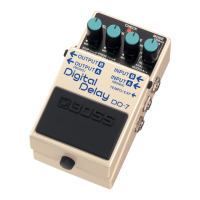
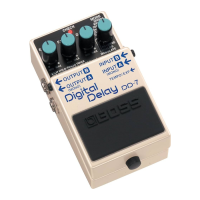
The BOSS DD-7 Digital Delay is a versatile effects pedal designed to enhance guitar and other musical instrument sounds with a wide range of delay effects. It offers extensive delay times, multiple modes, and flexible control options, making it suitable for various musical applications from subtle ambience to complex soundscapes.
The core function of the DD-7 is to produce delay effects, repeating an input sound after a set period. It achieves long delay times of up to 6.4 seconds, allowing for expansive and atmospheric sounds. Beyond simple repeats, the pedal offers a "HOLD" mode, which enables loop play or "sound on sound" recording for up to 40 seconds with monaural input, or 20 seconds with stereo input. This allows users to record a phrase and then layer additional performances over it, creating continuous backing tracks or intricate sonic textures.
The DD-7 features several specialized delay modes:
The pedal also supports stereo operation, offering two new stereo modes in addition to 2-in/2-out true stereo connections. These modes enable stereo effects such as "Panning," where the delay sound moves between the left and right channels, and "Effect + Direct," which outputs the effect sound and the direct sound separately. When used as a stereo delay, the DD-7 offers three distinct operation modes: a completely independent delay for A and B, panning delay, and a stereo delay that imparts spatial broadness to the reverberant sound.
The DD-7 is controlled via a set of knobs and a pedal switch, providing intuitive access to its various parameters and functions.
The DD-7 offers various output configurations by changing how it's connected to other devices, providing different delay effects:
 General
| Effect Type | Digital Delay |
|---|---|
| Tap Tempo | Yes |
| Input Impedance | 1 MΩ |
| Output Impedance | 1 kΩ |
| Recommended Load Impedance | 10 kΩ or greater |
| Delay Time | 1 ms to 6400 ms |
| Modes | Modulation, Analog, Reverse |
| Outputs | Mono/Stereo |
| Power Supply | 9V DC |
| Dimensions | 73 x 129 x 59 mm |
| Weight | 430 g |
| Current Draw | 55 mA (DC 9V) |

 To Next Page