13
Operation
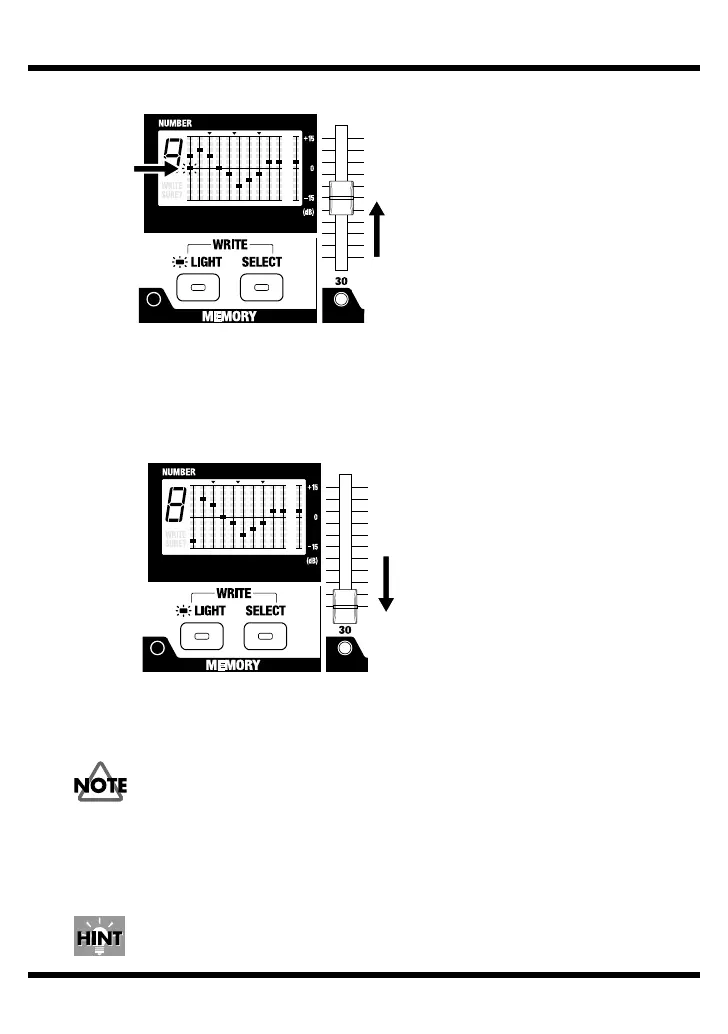
fig.16
The unit enters a state where you can make changes from when the positions
of the sliders stored in memory and the present slider positions match, and the
sound quality and levels start to change.
* It only flashes once, even if you move more than one slider at the same time. Move the
sliders one at a time to make the settings.
fig.17
4.
Press the LIGHT button and the SELECT button at the same time.
The text “WRITE SURE?” flashes in the display, and the unit enters write standby.
* To cancel the write operation, press the MANUAL/MEMORY pedal.
If only the SELECT button is pressed, the display changes to show the contents
of the next memory number, and the changes made in change 3 are canceled.
5.
Press the SELECT button to choose the number of the memory (1 through 9) to
store the settings.
6.
Again press the LIGHT button and the SELECT button at the same time.
“OK” appears in the display and the write operation finishes.
By changing the level of the setup in memory and writing it to a different memory, you
can create a booster, where the equalizer settings stay the same and the level is raised.
Flashing


 To Next Page