2
Panel Descriptions
Rear Panel (Connecting Your Equipment)
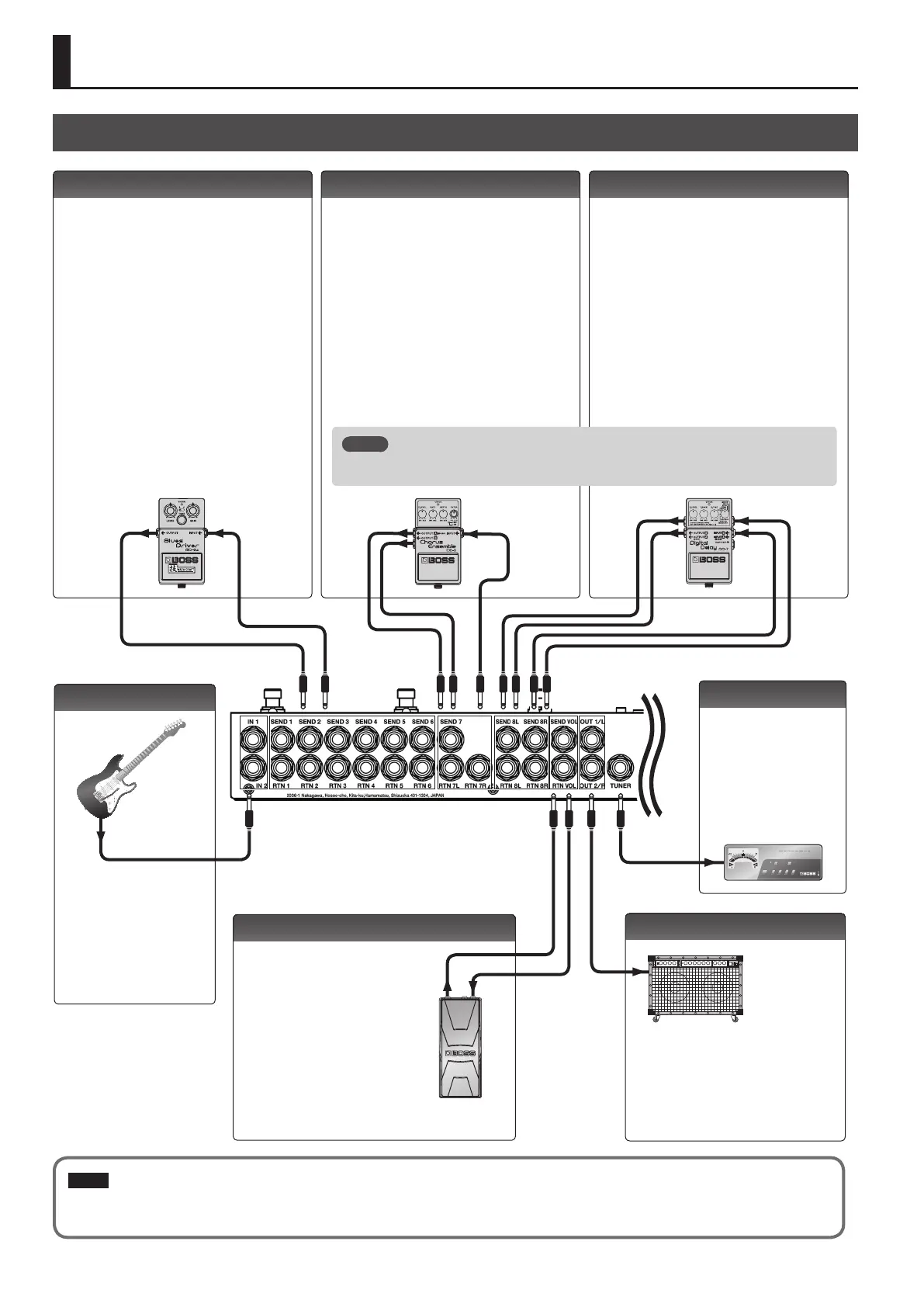
IN 1, 2 jacks
SEND 1–6, RTN 1–6 jacks
These jacks provide mono-send mono-return eect
loops.
Signals are sent from SEND 1–6 jacks to each eect
unit, and the signals from each eect unit are received
at the RTN 1–6 jacks.
Connect the SEND 1–6 jacks to the INPUT jack of each
eect unit, and connect the OUTPUT jack of each
eect unit to the RTN 1–6 jacks.
Connect your guitars or basses
to these jacks.
The settings determine which
input is selected.
It is not possible for both inputs
to be selected simultaneously.
SEND 7, RTN 7L/R jacks
These jacks provide a mono-send stereo-return eect
loop.
* If the last stage of the chain is the stereo-send eect
loop or the output, the signal is output in stereo. If
the last eect loop in the chain is the mono-send
eect loop, only the signal received at the RTN 7L
jack is output.
* A mono-return eect can also be connected here.
Connect it to the RTN 7L jack. In this case, if a
stereo-send eect loop or the output is connected
later, the signal received at the RTN 7L jack is
output.
SEND 8L/R, RTN 8L/R jacks
These jacks provide a stereo-send stereo-return eect
loop.
* If the stereo output is connected as the last stage,
the output is stereo. If the last eect loop is mono-
send, only the signal received at the RTN 8L jack is
output.
* A mono-send/return eect can also be connected
here. Connect it to the SEND 8L/RTN 7L jacks. In this
case, if a stereo-return eect loop or the output is
connected later, the signal received at the RTN 8L
jack is output.
SEND VOL, RTN VOL jacks
OUT 1/L, 2/R jacks
TUNER jack
This jack is for connecting an
external tuner.
The signal that is input from
the jack selected by Input Sel
(p. 9) is output from this jack
even if mute is on.
These jacks are for
connecting a volume pedal.
* You can also use these
jacks as send/return for a
preamp (p. 15).
These are the output jacks.
OUT 1/L and OUT 2/R can be turned on/o
independently.
Pressing the [MUTE] switch mutes the output
from the OUT 1/L and 2/R jacks.
SENDRTN SEND
RTN
L
RTN
R
SEND
L
SEND
R
RTN
R
RTN
L
SENDRTN
NOTE
To prevent malfunction and equipment failure, always turn down the volume, and turn o all the units before making any connections.
For the returns of eect loops 7 and 8, set the system setting Preference to select mono-
return or stereo-return (p. 12).
MEMO


 To Next Page