AM
and FM Antennas
The Duo-i
plus
comes
out
of
the
box ready
to
use.
The internal
AM
antenna
is
connected. The
FM
antenna
is
also connected. Just extend the wire connected
to
the
plug. With
the
standard antennas you'll probably pull
in
more stations than any other radio you own. But
if
you
want
to
listen
to
stations that
are
very far away then
external antennas can be connected
to
the antenna inputs.
,·6'
..•
··~'\··O·
@-;:@
..C0!0..0:
0 .0)
~Xl~'"
(bB?~t~rl..
'.:
..c
-:::'.o~·.1
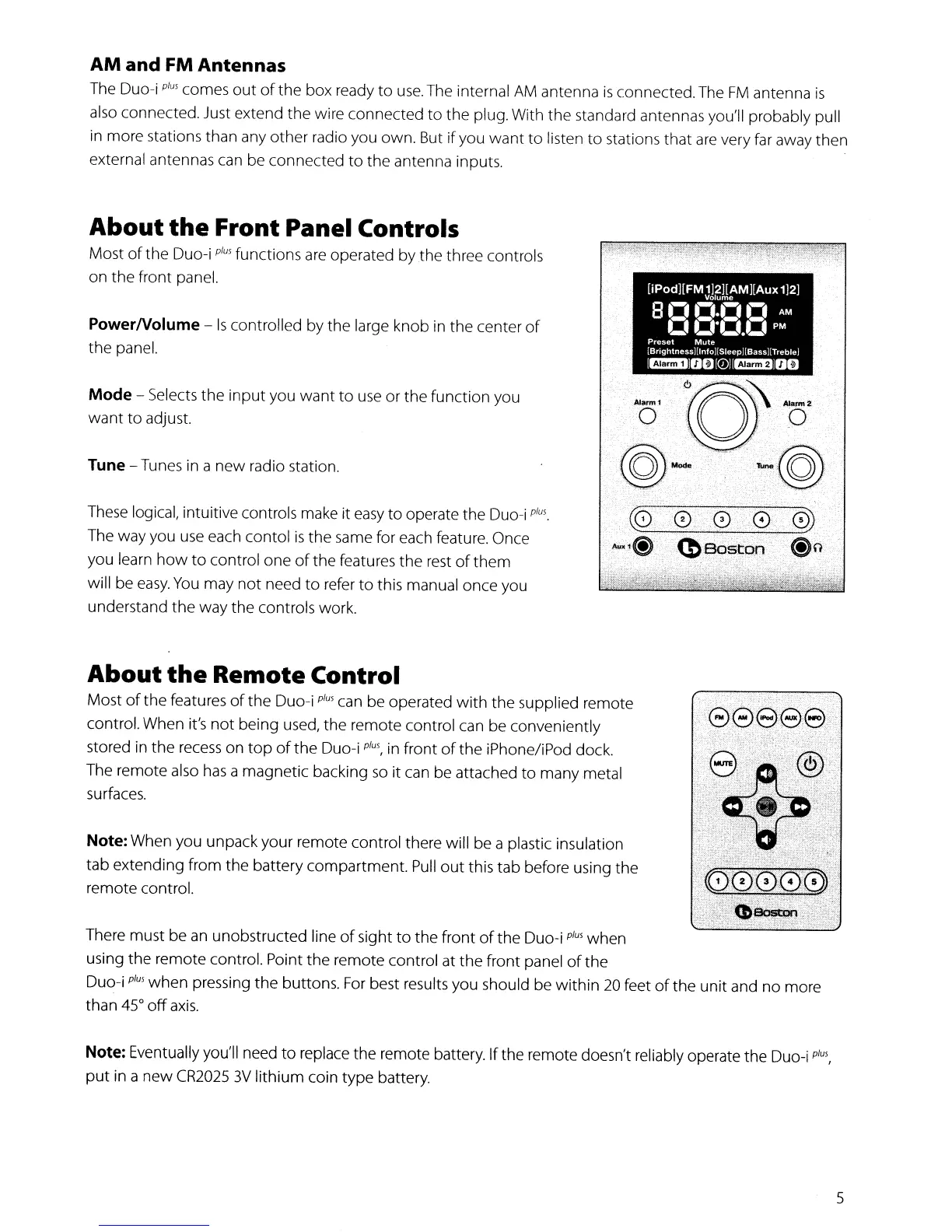
Tune - Tunes in a
new
radio station.
PowerNolume -
Is
controlled by
the
large knob
in
the center
of
the
panel.
These logical, intuitive controls make it
easy
to operate the Duo-i
plus.
The way you
use
each contol
is
the same for each feature. Once
you learn
how
to
control one
of
the
features
the
rest
of
them
will be
easy.
You
may
not
need
to
refer
to
this manual once you
understand
the
way
the
controls work.
Mode - Selects the
input
you
want
to
use
or the function you
want
to
adjust.
About
the
Front Panel Controls
Most
of
the
Duo-i
plus
functions
are
operated by
the
three controls
on the front panel.
About
the
Remote Control
Most
of
the
features
of
the Duo-i
plus
can be operated
with
the
supplied remote
control. When it's
not
being used,
the
remote control can be conveniently
stored in
the
recess
on
top
of
the
Duo-i
plus,
in
front
of
the iPhone/iPod dock.
The remote also
has
a magnetic backing
so
it can be attached
to
many metal
surfaces.
Note: When you unpack your remote control there will be a plastic insulation
tab extending from
the
battery compartment.
Pull
out
this tab before using the
remote control.
There must be
an
unobstructed line
of
sight
to
the
front
of
the
Duo-i
plus
when
using
the
remote control. Point the remote control at
the
front panel
of
the
Duo-i
plus
when
pressing
the
buttons.
For
best results you should be
within
20
feet
of
the
unit
and no more
than 45°
off
axis.
Note: Eventually you'll need to replace
the
remote battery.
If
the remote doesn't reliably operate the Duo-i
plus,
put
in
a
new
CR2025
3V
lithium coin type battery.
5


 To Next Page