EasyManua.ls Logo

Boston Duo-i Plus - Radio Station Management; Setting and Selecting Radio Presets

Boston Duo-i Plus
20 pages
Print Icon
To Next Page IconTo Next Page
To Previous Page IconTo Previous Page
Loading...
.0008(~~
,_
-
......
1 - -
LiD~~~
eeeee
"i@
0'
Q'o'
~"-
...
~
(0 .
0·0~.0':·0)
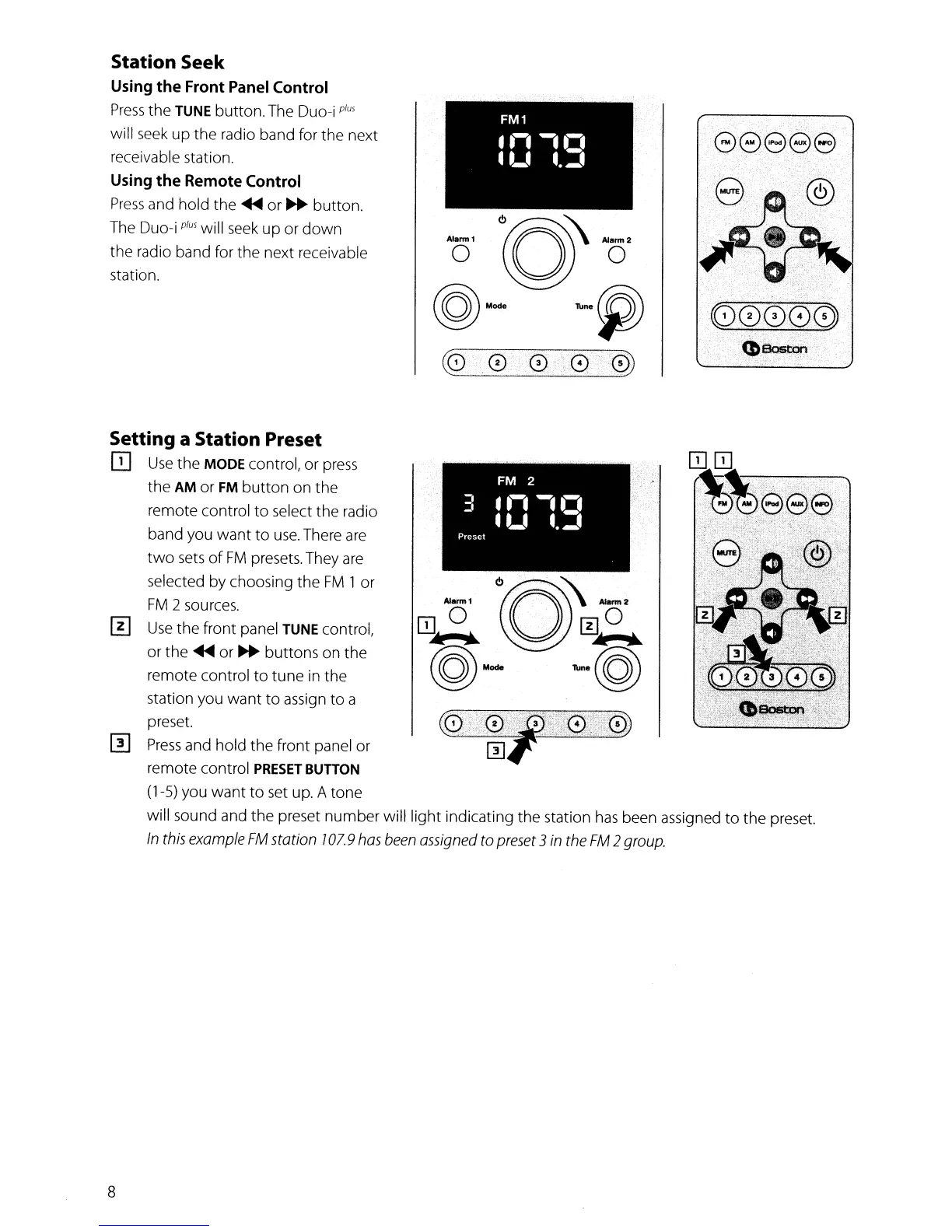
Station Seek
Using
the
Front Panel Control
Press
the
TUNE
button.
The Duo-i
plus
will seek
up
the
radio band for
the
next
receivable station.
Using
the
Remote Control
Press
and hold the
~
or
...
button.
The Duo-i
plus
will seek
up
or
down
the
radio band for
the
next receivable
station.
Setting a Station Preset
Q]
Use
the
MODE control,
or
press
the
AM
or
FM
button
on
the
remote
control
to
select
the
radio
band you
want
to
use.
There are
two
sets
of
FM
presets. They are
selected
by
choosing
the
FM
1
or
FM
2 sources.
[!]
Use
the
front
panel
TUNE
control,
or
the
~
or
...
buttons
on
the
remote control
to
tune
in
the
station you
want
to
assign
to
a
preset.
m
Press
and
hold
the
front panel
or
remote control
PRESET
BunON
(1-5) you
want
to
set up. A
tone
will sound and
the
preset
number
will
light
indicating
the
station
has
been assigned
to
the
preset.
In
this
example
FM
station ]07.9
has
been
assigned
to
preset
3
in
the
FM
2
group.
8

Other manuals for Boston Duo-i Plus