Basic Control Operations
Turning
the
Duo-i plus On or
Off
Press
the POWERNOLUME control on the
center
of
the front panel or the green
<!>
button
on the remote control.
Adjusting
the
Volume
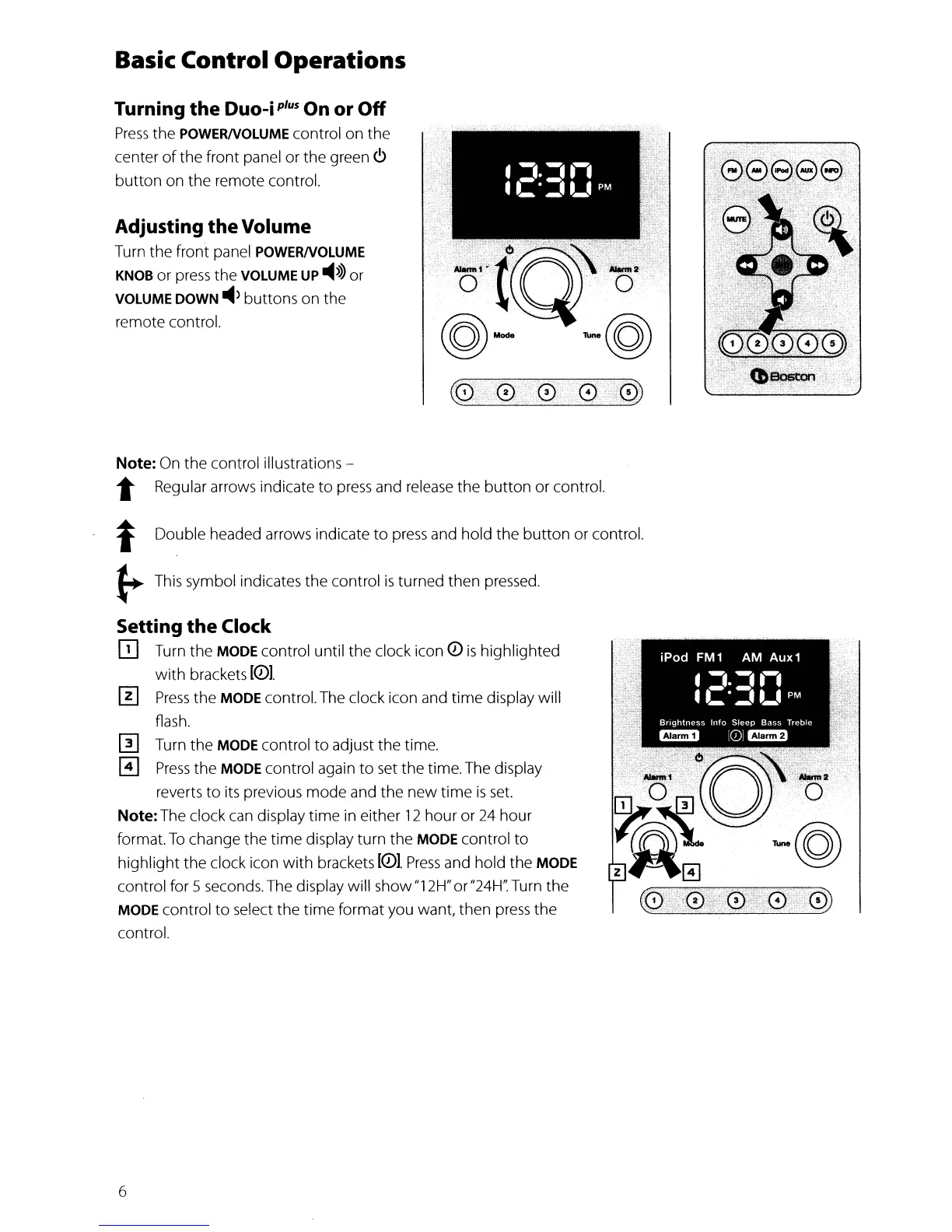
Turn the front panel POWERNOLUME
KNOB
or
press
the VOLUME UP
-4>>>
or
VOLUME DOWN
~>
buttons on the
remote control.
Note: On the control illustrations -
t Regular arrows indicate
to
press
and release the
button
or control.
t Double headed arrows indicate
to
press
and hold the
button
or control.
~
This symbol indicates the control
is
turned then pressed.
Setting
the
Clock
ED
Turn the MODE control until the clock icon Q)
is
highlighted
with
brackets
[Q)I.
III
Press
the MODE control. The clock icon and time display will
flash.
[II Turn the MODE control
to
adjust the time.
o
Press
the MODE control again
to
set the time. The display
reverts
to
its previous mode and the
new
time
is
set.
Note:The clock
can
display
time
in either
12
hour
or
24
hour
format.
To
change the time display turn the MODE control
to
highlight
the clock icon
with
brackets
[Q)I.
Press
and hold
the
MODE
control for 5 seconds. The display will show"12H" or"24H': Turn the
MODE control
to
select the time format you want, then
press
the
control.
6


 To Next Page