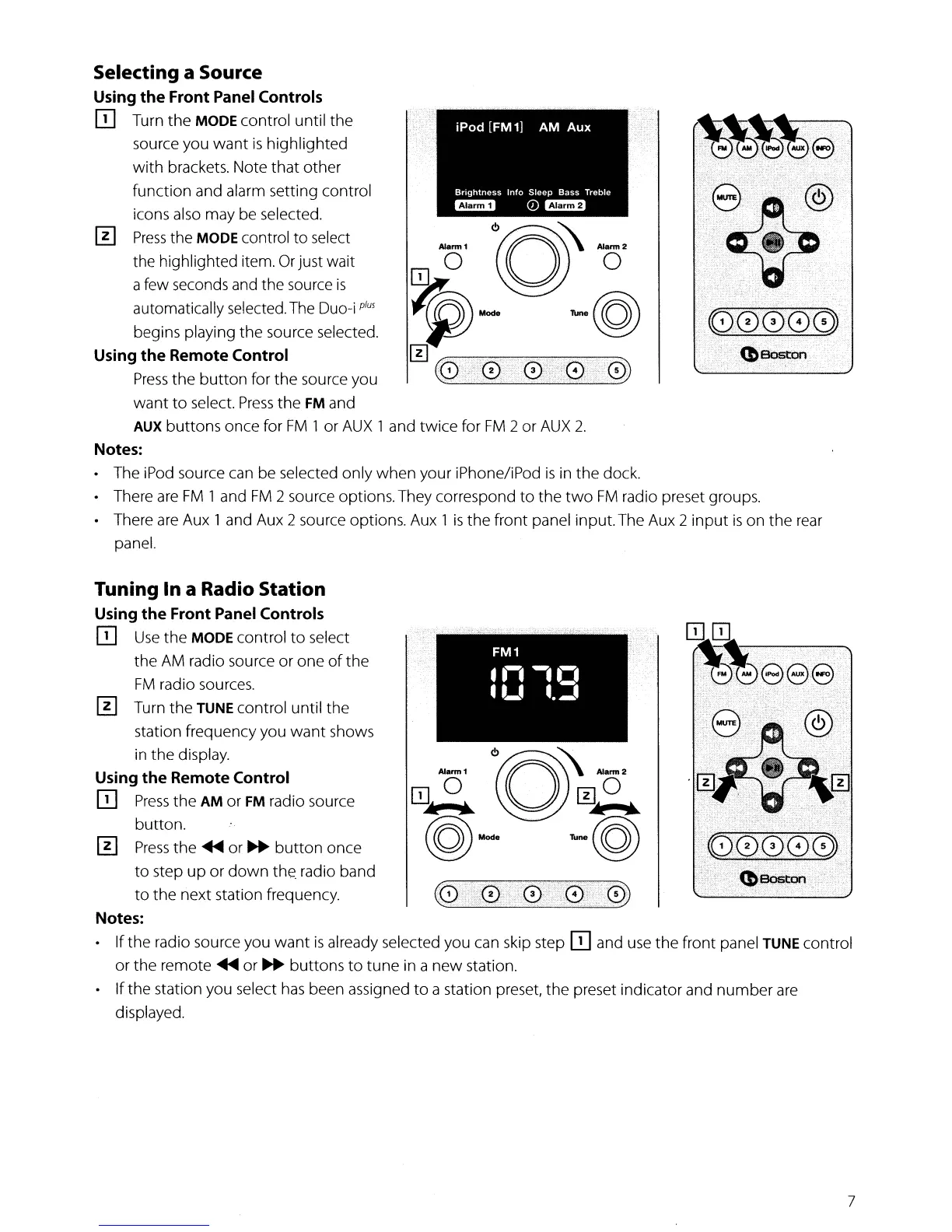
Selecting a Source
Using
the
Front Panel Controls
IT]
Turn
the
MODE control until
the
source you
want
is
highlighted
with
brackets. Note that other
function and alarm setting control
icons also may be selected.
[!]
Press
the MODE control
to
select
the highlighted item.
Or
just wait
afew seconds and the source
is
automatically selected.
The
Duo-i
plus
begins playing
the
source selected.
Using
the
Remote Control
Press
the
button
for
the
source you
want
to
select.
Press
the
FM
and
AUX
buttons once for
FM
1 or
AUX
1 and
twice
for
FM
2 or
AUX
2.
Notes:
• The iPod source can be selected only
when
your iPhone/iPod
is
in
the
dock.
• There
are
FM
1 and
FM
2 source options.They correspond
to
the
two
FM
radio preset groups.
• There
are
Aux 1 and Aux 2 source options. Aux 1
is
the
front panel input.The Aux 2
input
is
on
the
rear
panel.
Tuning In a Radio Station
Using
the
Front Panel Controls
IT]
Use
the
MODE control
to
select
the
AM
radio source or one
of
the
FM
radio sources.
[!]
Turn
the
TUNE control until
the
station frequency you
want
shows
in
the
display.
Using
the
Remote Control
IT]
Press
the
AM
or
FM
radio source
button.
[!]
Press
the'"
or
~
button
once
to
step
up
or
down
the.
radio band
to
the
next station frequency.
Notes:
• If the radio source you
want
is
already selected you can skip step
IT]
and use
the
front panel TUNE control
or
the
remote'"
or
~
buttons
to
tune in a
new
station.
• If
the
station you select
has
been assigned
to
a station preset,
the
preset indicator and
number
are
displayed.
7


 To Next Page