EasyManua.ls Logo

Boston Duo-i Plus - Audio Settings and Presets; Adjusting Bass and Treble Levels

Boston Duo-i Plus
20 pages
Print Icon
To Next Page IconTo Next Page
To Previous Page IconTo Previous Page
Loading...
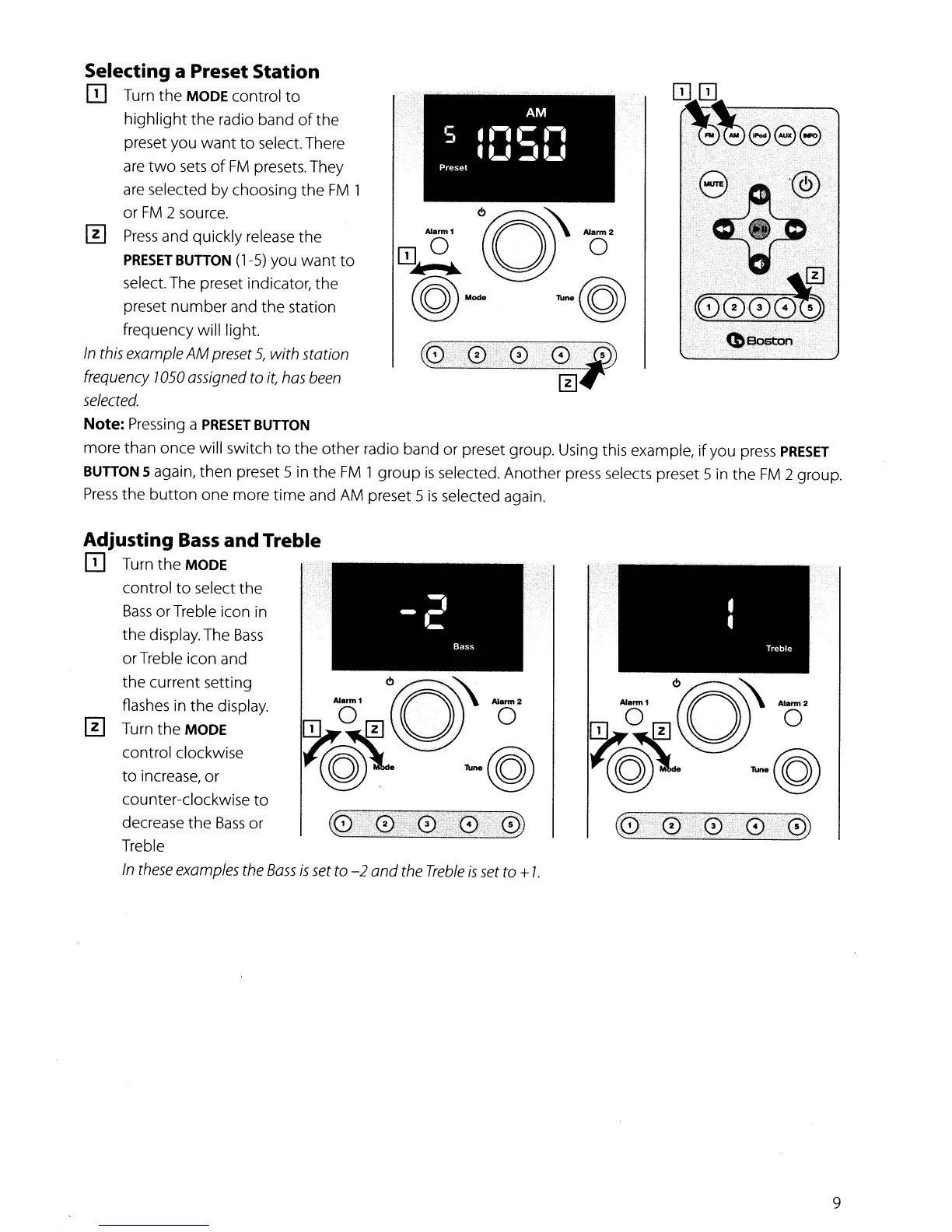
Selecting a Preset Station
II]
Turn
the
MODE control
to
highlight
the
radio band
of
the
preset you
want
to
select. There
are
two
sets
of
FM
presets. They
are selected by choosing
the
FM
1
or
FM
2 source.
[II
Press
and quickly release
the
PRESET
BUTTON
(1-5) you
want
to
select. The preset indicator,
the
preset
number
and
the
station
frequency will light.
In
this
example
AM
preset
5,
with
station
frequency
1050
assigned
to
it,
has
been
selected.
Note:
Pressing a
PRESET
BUTTON
more than
once
will switch
to
the
other
radio band
or
preset group. Using this example,
if
you press
PRESET
BUTTON
5 again,
then
preset 5 in
the
FM
1
group
is
selected.
Another
press selects preset 5 in
the
FM
2 group.
Press
the
button
one
more
time
and AM preset 5
is
selected again.
~~1
6rRQ\\_'
OJ
O[!]~
0
~~
-@
to
increase,
or
counter-clockwise
to
decrease
the
Bass
or
Treble
In
these
examples
the
Bass
is
set
to
-2
and
the
Treble
is
set
to
+
I.
Adjusting
Bass
and
Treble
II]
Turn
the
MODE
control
to
select
the
Bass
orTreble icon in
the
display. The
Bass
orTreble icon and
the
current setting
flashes in
the
display.
[II
Turn
the
MODE
control clockwise
9

Other manuals for Boston Duo-i Plus