7
OPERATION
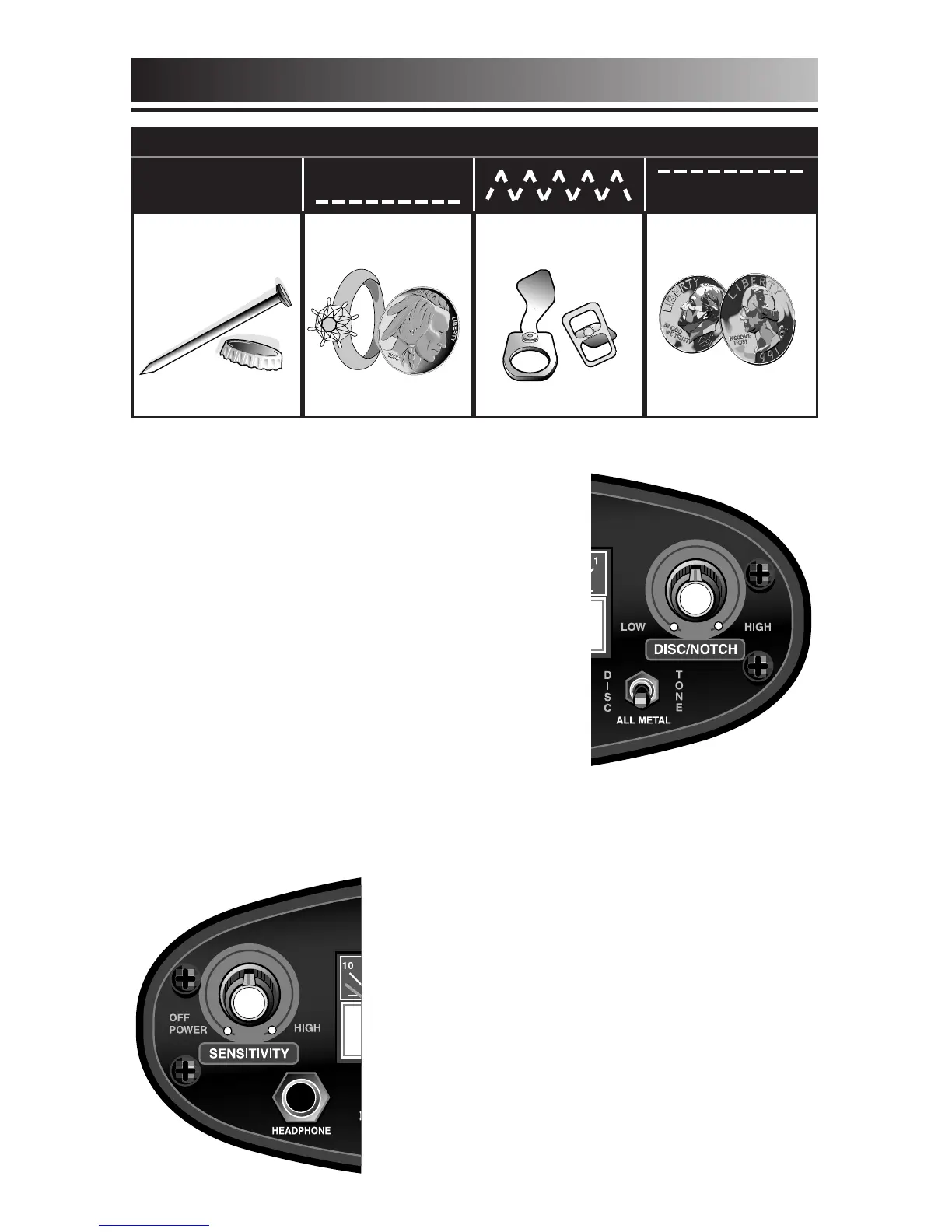
TONE MODE AUDIO RESPONSES
NO
RESPONSE
Iron & Steel
LOW
TONE
Gold & Nickel
BROKEN
TONE
Old & New Pull Tabs
HIGH
TONE
Copper, Silver & Brass
TONE DISCRIMINATION
(continued)
(Toggle switch to the Right)
Classifies
detected metal objects by emitting a low
or high tone.
Adjust the DISCRIMINATE control higher to
increase the range of the low tone. It is
possible to set the DISCRIMINATE level so
that nickels have a low tone, larger coins
have a high tone, and pull-tabs have a low
tone or in-between “broken” tone. The
"broken" tone makes pull-tabs and trash easily recognizable.
Sensitivity will be reduced slightly when
using the Tracker IV in the Tone
Discrimination mode. If you want optimal
depth capability, operate in the All Metal
mode by turning the Discriminate control
completely counterclockwise; then turn the
Sensitivity control clockwise to its highest
clockwise position without chatter. If your
Tracker IV chatters or beeps erratically,
reduce the Sensitivity by turning the left
knob counterclockwise.




 To Next Page