113
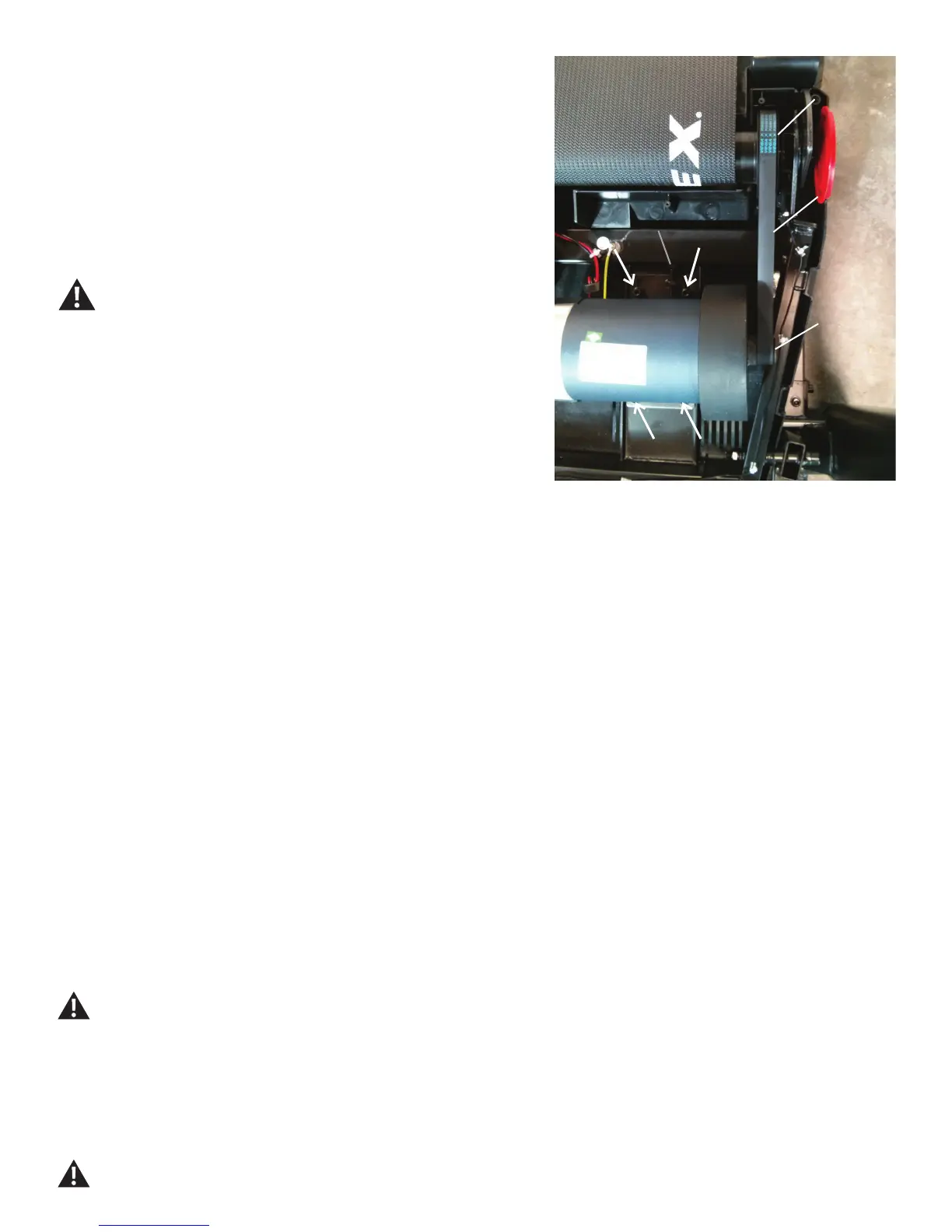
16.LightlyattachtheMotorAssemblytotheFrame.Besuretoonlyngertighten
the hardware.
17. Loop the Drive Belt onto the Motor Pulley. With the Drive Belt looped onto the
Motor, carefully roll the Drive Belt onto the Drive Pulley.
18. Wrap the new Drive Belt around the Motor Pulley. Start the Drive Belt on the
Drive Pulley and roll it in a clockwise motion. Be sure the Belt does not come off of
the Motor Pulley.
Keep ngers out of any pinch opportunities when turning the Pulleys.
19. Roll the Drive Pulley clockwise until the Drive Belt is fully installed. Continue to
rolltheBeltforwardwhileaddingsidepressurewithngerstoalignasnecessary.
20. With the Motor Assembly loosely attached to the Frame, turn the Belt Tensioner
Screw to the previous level. This will tighten the Drive Belt to the previous tension
level.
Motor
Drive Belt
Motor Pulley
21.Usinga6mmhexwrench,fullytightenthescrewsthatattachtheMotorAssemblytotheFrame.
22. Connect the Motor Connectors to the Motor Control Board following the previous route.
Note: Be sure to attach the cables to the proper locations on the Motor Control Board. Do not crimp any cables.
23. Secure the Motor Cables using the replacement Zip-Ties.
24. Re-install all remaining parts that were removed in reverse order.
25.AttachthepowercordandturnontheTreadmillbyippingthepowerswitchtoON.
26. From the Power Up (or Welcome) screen, push and hold down the PAUSE/STOP button and Down arrow button for about 5 seconds to go into
the Machine Setting Mode. The Console display will show the TOTAL HOURS screen.
27. Push and hold down the PAUSE/STOP button and Down arrow button for about 5 seconds to go into the Engineering Mode.
28. Push the Down arrow button 14 times until the Console displays “ENTR MCB CLB”.
Be sure the area around the Treadmill is clear of all bystanders, children and pets. Be sure there is nothing on or under the Walking
Belt, or near the Treadmill.
29. The Console will display “MCB CALIB”.
30. With the area clear, push the ENTER button. The calibration procedure will begin by automatically moving the Walking Belt.
Be sure not to touch or allow anyone else to touch the machine while calibration is occurring.
Drive Pulley
Belt Tensioner Screw














 To Next Page