Troubleshooting
Problem Solution
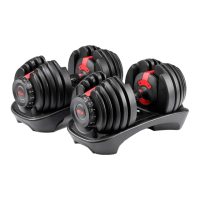
Dumbbell handle does not fully insert into base
when no plates are selected (handle has no plates
attached).
1. Make certain that both adjustment knobs are set directly to the number 2.
Dumbbell handle does not fully insert into base when
plates are selected (handle has plates attached).
1. Check to see if you have selected different weights on each side of the dumbbell
(for example one adjustment knob is set to 2 and the other is set to 3). If this is
the case, you must replace the dumbbell in the base with the same orientation
from which it was withdrawn. This is to allow the plates to settle back into the
correct and vacant openings in the base.
2. Verify that the plates not selected (those plates remaining in the dumbbell
base) are in their correct spots and have not been moved to different support
slots. This may be blocking the dumbbell from fitting back into the base.
Adjustment knob will not turn while handle is in base. 1. Check to assure that the dumbbell handle is fully depressed into the dumbbell
base. If not fully depressed, the locking mechanism will not be released and
may prevent the adjustment knobs from rotating.
2. Check to see if any weight plates have been put into the base assembly
backwards with the “Locking Tab” facing the grip of the dumbbell handle. All
weight plates must have the selection tongue facing away from the grip of the
dumbbell handle.
3. Check to see if there is any dirt, debris or other obstruction in the dumbbell
base. You may need to remove the weight plates from the base to accomplish
this check. Remember to put each weight plate back in its appropriate location
with the selection tongue facing away from the dumbbell grip.
Plates are not secured to the handle and drop out. 1. Confirm that all of the weight plates have the “Locking Tab” facing away from
the dumbbell grip. If one or more of the weights are inserted backwards with
“Locking Tab” facing inward toward the grip, the handle can get blocked, and
the plates may wedge into the handle.
2. Verify that the plates not selected (those plates remaining in the dumbbell
base) are in their correct spots and have not been moved to different support
slots. This may be blocking the dumbbell from fitting back into the base.
9



 To Next Page