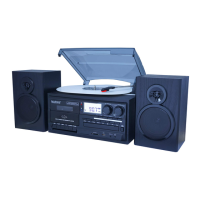
PC, TV, DVD
AUX
USB, SD/MMC MP3
BT-25
//FEATURES
BT//33/45/78RPM
• Bluetooth Receiver
• 33/45/78 RPM
Multi-Speed Turntable Player
• CD Player
• Automatic Pause and Stop
Feature
• Stereo Cassette Tape
Player Function
• Stereo FM Radio
• Encode to MP3
• SD/USB Playback
• Aux In
• 3.5mm Headphone Jack
• RCA Audio Output
• 2 Built-in Stereo Speakers
CONNECTING BLUETOOTH
1. Select “SH” mode
2. Flick switch by Stylus arm
3. On your transmitting device,
search for bluetooth devices.
4. Pair/Connect “Boytone/BT.”
PLAYING A RECORD
1. Select “PHONO” mode
2. Set appropriate speed (33, 45
or 78) depending on record
3. Set the auto stop control to ON
if you want the turntable to stop
turning when it has reached the
end of the record.
4. Use lift lever to move stylus (it is
recommended over doing it
manually)
25 SERIES
BT25CB | BT25MB | BT25WB
QUICK START GUIDE
A
PLAYBACK
SELECT CD MODE USING THE FUNCTION
SELECTOR (7).
OPEN CD TRAY USING CD OPEN/CLOSE
BUTTON (21).
PLACE CD IN TRAY. UNIT MAY TAKE A
FEW SECONDS TO READ DISC.
PRESS PLAY ONCE TOTAL PLAY TIME OF
CD IS DISPLAYED.
PRESS STOP, NEXT OR PREVIOUS
TRACK. GO NUTS. ENJOY!
B
CD PLAYBACK
RADIO:
USE TUNING KNOB (16) TO SELECT STATION.
CASSETTE:
INSERT TO PLAY. PRESS HALFWAY TO FAST
FORWARD. PRESS FULLY TO EJECT.
AUX-IN: USE 3.5mm CABLE TO CONNECT
SD CARD OR USB DRIVE:
INSERT MEDIA. USE (13), (14), (17), (18)
1 Lid Arm
2 Main Body
3 Tuning Knob
4 Tuning Pointer
5 Frequency Dial
6 LED Indicator
7 Function Selector
8 Play/Pause Button
9 Stop button
10 Previous/Rewind Button
11 Next/Forward Button
12 Dust Cover
13 45RPM Adaptor
14 Tone Arm
15 Accoustical Pickup
16 Cassette Player
17 Cassette Play/Skip button
18 Power Button
19 CD Disc Tray
20 Speaker
21 CD Tray Open/Close Button
22 USB/SD Player
1. MUTE
2. PLAY/PAUSE
3. PROGRAM
4. PREV: skip to the previous track
5. REPEAT
6. INPUT/SOURCE (FOR USB/SD ONLY)
7. REC
8. STOP
9. NEXT: skip to the previous track
10. FOLDER SELECT (FOR USB/SD PLAYBACK ONLY)
NOTE: Your remote may vary depending on production
batch. Rev. 11/1/2016
PC, TV, DVD
AUX
USB, SD/MMC MP3
BT-25
//FEATURES
BT//33/45/78RPM
• Bluetooth Receiver
• 33/45/78 RPM
Multi-Speed Turntable Player
• CD Player
• Automatic Pause and Stop
Feature
• Stereo Cassette Tape
Player Function
• Stereo FM Radio
• Encode to MP3
• SD/USB Playback
• Aux In
• 3.5mm Headphone Jack
• RCA Audio Output
• 2 Built-in Stereo Speakers
CONNECTING BLUETOOTH
1. Select “SH” mode
2. Flick switch by Stylus arm
3. On your transmitting device,
search for bluetooth devices.
4. Pair/Connect “Boytone/BT.”
PLAYING A RECORD
1. Select “PHONO” mode
2. Set appropriate speed (33, 45
or 78) depending on record
3. Set the auto stop control to ON
if you want the turntable to stop
turning when it has reached the
end of the record.
4. Use lift lever to move stylus (it is
recommended over doing it
manually)
25 SERIES
BT25CB | BT25MB | BT25WB
QUICK START GUIDE
A
PLAYBACK
SELECT CD MODE USING THE FUNCTION
SELECTOR (7).
OPEN CD TRAY USING CD OPEN/CLOSE
BUTTON (21).
PLACE CD IN TRAY. UNIT MAY TAKE A
FEW SECONDS TO READ DISC.
PRESS PLAY ONCE TOTAL PLAY TIME OF
CD IS DISPLAYED.
PRESS STOP, NEXT OR PREVIOUS
TRACK. GO NUTS. ENJOY!
B
CD PLAYBACK
RADIO:
USE TUNING KNOB (16) TO SELECT STATION.
CASSETTE:
INSERT TO PLAY. PRESS HALFWAY TO FAST
FORWARD. PRESS FULLY TO EJECT.
AUX-IN: USE 3.5mm CABLE TO CONNECT
SD CARD OR USB DRIVE:
INSERT MEDIA. USE (13), (14), (17), (18)
1 Lid Arm
2 Main Body
3 Tuning Knob
4 Tuning Pointer
5 Frequency Dial
6 LED Indicator
7 Function Selector
8 Play/Pause Button
9 Stop button
10 Previous/Rewind Button
11 Next/Forward Button
12 Dust Cover
13 45RPM Adaptor
14 Tone Arm
15 Accoustical Pickup
16 Cassette Player
17 Cassette Play/Skip button
18 Power Button
19 CD Disc Tray
20 Speaker
21 CD Tray Open/Close Button
22 USB/SD Player
1. MUTE
2. PLAY/PAUSE
3. PROGRAM
4. PREV: skip to the previous track
5. REPEAT
6. INPUT/SOURCE (FOR USB/SD ONLY)
7. REC
8. STOP
9. NEXT: skip to the previous track
10. FOLDER SELECT (FOR USB/SD PLAYBACK ONLY)
NOTE: Your remote may vary depending on production
batch. Rev. 11/1/2016
PC, TV, DVD
AUX
USB, SD/MMC MP3
BT-25
//FEATURES
BT//33/45/78RPM
• Bluetooth Receiver
• 33/45/78 RPM
Multi-Speed Turntable Player
• CD Player
• Automatic Pause and Stop
Feature
• Stereo Cassette Tape
Player Function
• Stereo FM Radio
• Encode to MP3
• SD/USB Playback
• Aux In
• 3.5mm Headphone Jack
• RCA Audio Output
• 2 Built-in Stereo Speakers
CONNECTING BLUETOOTH
1. Select “SH” mode
2. Flick switch by Stylus arm
3. On your transmitting device,
search for bluetooth devices.
4. Pair/Connect “Boytone/BT.”
PLAYING A RECORD
1. Select “PHONO” mode
2. Set appropriate speed (33, 45
or 78) depending on record
3. Set the auto stop control to ON
if you want the turntable to stop
turning when it has reached the
end of the record.
4. Use lift lever to move stylus (it is
recommended over doing it
manually)
25 SERIES
BT25CB | BT25MB | BT25WB
QUICK START GUIDE
A
PLAYBACK
SELECT CD MODE USING THE FUNCTION
SELECTOR (7).
OPEN CD TRAY USING CD OPEN/CLOSE
BUTTON (21).
PLACE CD IN TRAY. UNIT MAY TAKE A
FEW SECONDS TO READ DISC.
PRESS PLAY ONCE TOTAL PLAY TIME OF
CD IS DISPLAYED.
PRESS STOP, NEXT OR PREVIOUS
TRACK. GO NUTS. ENJOY!
B
CD PLAYBACK
RADIO:
USE TUNING KNOB (16) TO SELECT STATION.
CASSETTE:
INSERT TO PLAY. PRESS HALFWAY TO FAST
FORWARD. PRESS FULLY TO EJECT.
AUX-IN: USE 3.5mm CABLE TO CONNECT
SD CARD OR USB DRIVE:
INSERT MEDIA. USE (13), (14), (17), (18)
1 Lid Arm
2 Main Body
3 Tuning Knob
4 Tuning Pointer
5 Frequency Dial
6 LED Indicator
7 Function Selector
8 Play/Pause Button
9 Stop button
10 Previous/Rewind Button
11 Next/Forward Button
12 Dust Cover
13 45RPM Adaptor
14 Tone Arm
15 Accoustical Pickup
16 Cassette Player
17 Cassette Play/Skip button
18 Power Button
19 CD Disc Tray
20 Speaker
21 CD Tray Open/Close Button
22 USB/SD Player
1. MUTE
2. PLAY/PAUSE
3. PROGRAM
4. PREV: skip to the previous track
5. REPEAT
6. INPUT/SOURCE (FOR USB/SD ONLY)
7. REC
8. STOP
9. NEXT: skip to the previous track
10. FOLDER SELECT (FOR USB/SD PLAYBACK ONLY)
NOTE: Your remote may vary depending on production
batch. Rev. 11/1/2016

 Need help?

 To Next Page
 General