Need help?
Do you have a question about the boytone BT-38SM and is the answer not in the manual?
Instructions to prevent fire, shock, and ensure safe operation of the appliance.
Steps for removing the unit from packaging and initial placement.
Information on the correct voltage and power source for operation.
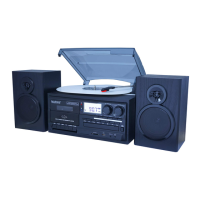
Identification of buttons, displays, and ports on the main unit.
Details on the controls specific to the turntable mechanism.
Description of ports and connections located on the rear of the unit.
Explanation of buttons and their functions on the remote control.
Instructions for tuning stations and adjusting volume for radio playback.
Steps for setting up and playing records on the turntable.
Process for encoding vinyl records to memory devices.
Overview of buttons, indicators, and basic cassette playback functions.
Detailed steps for playing cassette tapes.
Procedure for recording audio from various sources onto cassette tapes.
Steps to encode cassette audio to digital formats on memory devices.
Instructions for inserting, playing, and navigating CDs.
Process for encoding CD audio to digital formats on memory devices.
How to play MP3/WMA files from USB drives and SD cards.
Detailed controls for navigating and playing media from USB/SD.
How to create custom playlists for MP3/WMA playback.
Instructions for copying single files between devices.
Steps for copying entire folders or all files on USB/SD media.
Procedure for removing individual files from USB/SD storage.
How to delete entire folders or all files from USB/SD storage.
Proper procedures for disconnecting USB drives and SD cards.
Connecting and listening to external audio devices via AUX IN.
Steps to record audio from auxiliary sources to memory devices.
Instructions for pairing and playing audio from Bluetooth devices.
Procedure for encoding Bluetooth audio to memory devices.
Solutions for issues related to audio output and playback.
Tips for enhancing AM and FM radio signal quality.

 To Next Page
 General