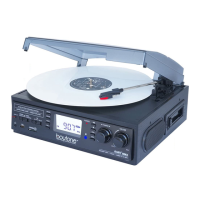
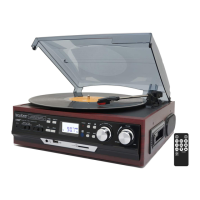
Need help?
Do you have a question about the boytone BT28SPB and is the answer not in the manual?
Critical warnings regarding electrical shock, fire hazards, and proper usage environment.
Essential guidelines for safe operation, cleaning, installation, and maintenance.
Advice on avoiding unsuitable installation locations and proper cleaning methods.
Specifies the required AC mains voltage and frequency for safe operation.
Description of turntable parts and controls like the adaptor, lift lever, and speed selector.
Identification of rear ports such as RCA Line out, FM antenna, and AC power cord.
Overview of buttons on the remote control for CD/USB/SD functions.
Steps for tuning into AM and FM radio stations and adjusting volume.
Guidance on playing records, setting speed, and using the auto-stop feature.
Steps for inserting CDs and playing tracks, including track skipping.
Instructions for converting audio CDs to digital MP3 format.
Guide to playing MP3/WMA files from USB devices and SD cards.
Explanation of playback controls like Play/Pause, Stop, Skip, and Tuning Knob.
How to program a sequence of tracks for MP3/WMA playback.
Procedures for copying files between USB and SD/MMC storage devices.
Instructions for deleting single files, folders, or all files from USB/SD.
Safe procedures for removing USB devices and SD/MMC cards.
How to connect and play audio from external devices via the AUX IN socket.
Process for encoding audio from external sources to digital format.
Solutions for issues related to volume, connections, and playback modes.
Tips for improving AM/FM reception and resolving interference problems.
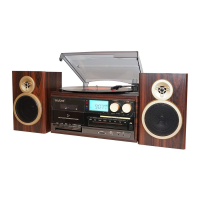
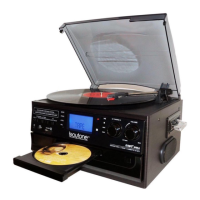
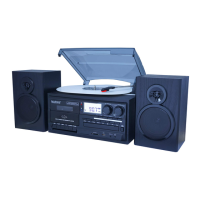
This document describes the Boytone BT28SPB / BT28SPS, a versatile audio system that combines a turntable, CD player, AM/FM radio, cassette player, and MP3 encoding capabilities. It is designed for users who appreciate various audio formats and wish to digitize their analog music collections.
The Boytone BT28SPB / BT28SPS is an all-in-one entertainment system that offers multiple audio playback and recording options.
Turntable (Phonograph): The unit features a 3-speed turntable (33/45/78 RPM) allowing playback of various vinyl records. It includes a 45 RPM adaptor for singles. The turntable has a lift lever for precise tone arm placement and an auto-stop control that can be set to stop rotation at the end of a record or continue spinning. The tone arm can be locked for protection during transport.
CD Player: An integrated CD player supports standard audio CDs. It features a disk tray door that opens and closes via a dedicated button. Playback controls include skip up/down for track navigation.
AM/FM Radio: The system includes an AM/FM radio tuner. It has a built-in AM bar antenna and an FM wire antenna for reception. The radio supports FM-Stereo, with an indicator lighting up when a stereo signal is received. Tuning is done via a tuning knob, which can be held to automatically search for stations.
Cassette Player: A cassette player is integrated into the unit, featuring a cassette door and dedicated control buttons for record, play, reverse, forward, stop/eject, and pause. It supports playback of cassette tapes and can also record from other sources onto a blank tape.
MP3 Encoding (USB/SD): One of the key features of this system is its MP3 encoding capability. It allows users to convert audio from the turntable, CD player, AM/FM radio, cassette player, or auxiliary input directly to MP3 files and save them onto a USB drive or SD/MMC card. The encoding speed is 1:1, meaning recording takes as long as playback, and the recording format is preset at an MP3 bit rate of 128 kbps.
USB/SD Playback: The unit includes a USB port and an SD/MMC card slot, enabling playback of MP3/WMA files stored on these memory devices. It can display the total number of folders and files. Playback controls include play/pause, stop, skip up/down for file/track navigation, and a tuning knob for folder selection.
Auxiliary Input (AUX-IN): A 3.5mm auxiliary input jack is located on the front panel, allowing connection of external audio devices such as smartphones, MP3 players, or other CD players. Audio from the auxiliary input takes priority over cassette playback when connected. The auxiliary input can also be a source for MP3 encoding.
Headphone Output: A 3.5mm headphone socket is provided for private listening.
General Operation: The system is turned on and off using the volume knob, which rotates clockwise to power on and counter-clockwise to power off. A function selector button allows users to switch between different modes: PHONO, TUNER (AM/FM), CD, USB/SD, and TAPE/AUX. The volume level is adjusted via the volume knob.
Radio Listening: To listen to the radio, select the TUNER mode and then the desired band (AM, FM, or FM-Stereo). The tuning knob is used to find stations, with an auto-search function available by holding the knob. For optimal FM reception, the FM wire antenna at the rear should be fully unraveled and extended. For AM, rotating or repositioning the unit may improve reception.
Phono Operation: After opening the dust cover and selecting PHONO mode, the user places a record on the turntable and sets the appropriate speed (33, 45, or 78 RPM). The auto-stop control can be engaged to stop the turntable at the end of a record. The lift lever is used to gently raise and lower the tone arm onto the record. The tone arm lock should be engaged when not in use to prevent accidental movement.
Cassette Operation: To play a cassette, select TAPE mode, open the cassette door using the EJECT key, insert the tape, and close the door. Pressing the PLAYER key starts playback. The PAUSE button can temporarily halt playback. REVERSE and FORWARD buttons are available for tape navigation.
MP3 Encoding from Analog Sources (Phono, Radio, AUX-IN, Cassette): To encode from an analog source, select the corresponding function mode (e.g., PHONO mode for records) and insert a USB drive or SD/MMC card. Press the REC button, wait for the memory device to be read, and then select the desired encoding destination (USB or SD) using the skip buttons. Press REC again to confirm. Start playback of the analog source, and the system will begin encoding. The USB or SD icon will flash on the display during encoding. To stop, press the STOP button.
MP3 Encoding from CD: Similar to analog sources, select CD/USB/SD mode, insert a memory device, and press REC. After selecting USB or SD as the destination, press REC again. Start CD playback, and the system will encode the audio.
USB/SD Playback and Management: To play MP3/WMA files, select USB/SD mode. The system automatically reads the storage medium and begins playback. Users can skip tracks, fast forward/reverse, and navigate folders using the skip buttons and tuning knob. The system also supports programming tracks for playback, allowing up to 64 tracks to be played in a specific order. This is done by entering STOP mode, pressing PROG, selecting tracks with skip buttons, and pressing PROG again to store them. File management features include copying files or folders between USB and SD/MMC cards, or copying all files/tracks. To copy, select USB/SD mode, press STOP, then press REC. Select "ONE" for a single file, "FOL" for a folder, or "ALL" for all files using the skip buttons, then press REC again. Files can also be deleted from USB or SD cards. To delete, select USB/SD mode, press STOP, then press DEL. Select "ONE" for a single file, "DIR" for a folder, or "ALL" for all files using the skip buttons, then press DEL again.
Remote Control: A remote control is provided for convenient operation, primarily for CD/USB/SD functions. It includes buttons for mute, program, repeat, function mode, skip, play/pause, record, stop, and folder navigation.
Cleaning: The unit should be cleaned only with a dry cloth. Chemical solvents should not be used as they may damage the finish.
Power Cord Protection: The power cord should be protected from being walked on or kinked, especially where it connects to the unit and the wall outlet.
Ventilation: Ventilation openings should not be blocked to prevent overheating. The unit should not be installed near heat sources or in dusty areas.
Stylus Protection: The phonograph stylus comes with an opaque white plastic cover that should be removed by sliding it forward and down before use and discarded.
Tone Arm Security: During shipment, the tone arm is secured with a twist-tie, which should be removed. The tone arm lock lever should be released before use and engaged when the turntable is not in operation or when moving the unit.
Furniture Protection: The unit is equipped with non-skid rubber 'feet'. To prevent potential marks or stains on fine wooden furniture, especially from oil-based polishes or wood preservatives, it is recommended to apply small self-adhesive felt pads to the bottom of the rubber feet.
Cassette Care: To avoid damaging cassettes, it is strongly recommended to remove them from the equipment after playing. Cassettes also have anti-erase taps (write protection) that can be removed to finalize recorded tapes, preventing new content from being written over them.
CD Care: When playing CDs, ensure they are placed face up and are clean and undamaged. If the unit will not be used for a long time, it is advisable to remove the CD from the disk tray door.
USB/SD Device Handling: USB devices should be inserted face up and fully inserted to prevent damage. Memory cards should be inserted in the direction of the arrow indicated on the slot. Incorrect insertion can damage the audio system or storage media. To remove a memory card, press it inwards and then release it for partial ejection.
Troubleshooting: The manual provides a troubleshooting guide for common issues related to sound, radio reception, and playback from various sources. Users are advised to check basic settings like volume, power connection, function selection, and proper insertion of media. If problems persist, users are instructed to contact after-sales support and not attempt to open or repair the equipment themselves.
Environmental Considerations: The unit should not be exposed to rain or moisture, and no objects filled with liquids, such as vases, should be placed on it. It should also be kept away from direct sunlight and strong magnetic fields.
 General
| Speed Settings | 33 1/3, 45, 78 RPM |
|---|---|
| Built-in Speakers | Yes |
| Cartridge | Ceramic |
| Power Source | AC Adapter |
| Connectivity | RCA Output |
| Material | Wood |
| Weight | 6.6 lbs |
| Type | Belt Drive Turntable |

 To Next Page