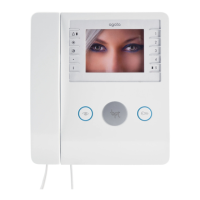
PROGRAMMING
26
ENGLISH
Bell volume setup
Lift the receiver
or
press the hands-free key.
Press the PROGRAMMING
key.
Press key 5. The ring
melody can be heard throu-
gh the loudspeaker with the
previously set volume level.
÷
Press key in the range 1 to 3
to select the desired volume
(see section entitled TECH-
NICAL FEATURES).
Press key 5 again to comple-
te the setup.
Press the PROGRAMMING
key.
Replace the receiver
or
press the hands-free key.
Bell tone setup
Lift the receiver
or
press the hands-free key.
Press the PROGRAMMING
key.
Press key 6. The ring
melody can be heard throu-
gh the loudspeaker with the
previously set volume level.
÷
Press key in the range 1 to 4
to select the desired tone
(see section entitled TECH-
NICAL FEATURES).
Press key 6 again to com-
plete the setup.
Press the PROGRAMMING
key.
Replace the receiver
or
press the hands-free key.
XT/200 2403-7422 11.2001 31-05-2002 11:32 Pagina 26



 To Next Page