English
BMP
®
21-PLUS 1
REGISTER YOUR PRINTER
Register your printer online at www.bradycorp.com/
register.
For complete instructions on how to use all keys, functions,
and label types, download the BMP
®
21-PLUS User’s Manual.
Go to: https://www.bradyid.com/en-us/product/bmp21-plus
TECHNICAL ASSISTANCE
For troubleshooting and FAQs, visit:
http://www.qualityserviceandsupport.com/brady
Other techncial assistance
contact numbers can be
found on the back cover of
this manual. When
contacting a
representative, have your
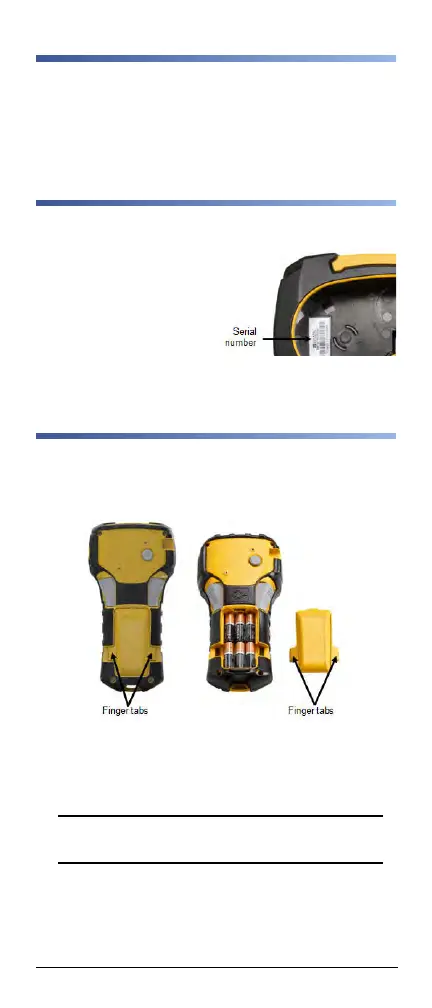
serial number (located
inside the cartridge bay)
available.
BATTERIES
1. On the back of the printer, squeeze the finger tabs
located on both sides of the battery compartment door,
then swing the battery compartment door up and out.
(The door will come off.)
2. Insert 6 AA alkaline batteries or the optional BMP21-
PLUS-BATT rechargeable battery pack. (Do not use
rechargeable AA batteries or Ultimate Lithium AA bat-
teries).
Note: The lithium Ion battery pack accessory cannot
be charged within the printer.
3. Re-insert the battery door hinge at the top of the com-
partment and push down on the battery compartment
door, snapping it into place.



 To Next Page