9 Installer Guide
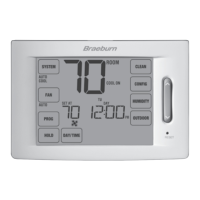
Thermostat TouchPads
TM
NOTE: Thermostat TouchPads are located on the left, right and bottom portions of the display screen. They are
the “touch sensitive” segments used to adjust your thermostat. Depending on the equipment installed, all touch
pads may not show.
SYSTEM SelectsAUTO(Heat/Cool),COOL,OFFHEATorEMER(EmergencyHeat)
FAN SelectsAUTO,ON,CIRC(Circulation)andPROG(Program)fanmodes
PROG Selectsprogrammingmodeorpressfor3secondstoselectSpeedSet
TM
mode
HOLD Enters/ExitstheHOLDmode(programbypass)
DAY/TIME Setsthecurrenttimeanddayoftheweek
BACK Movesbackinsettingandprogrammingmodes
NEXT Movesforwardinsettingandprogrammingmodes
RETURN Returnstonormalmodefromprogramorsettingsmodes
OUTDOOR DisplaystheoutdoortemperatureifaBraeburn
®
outdoorsensorisinstalled
HUMIDITY Displaysoradjustthecurrenthumiditylevel(6400only)
CONFIG EnterstheUserandInstallersettingsmodes
CLEAN Entersabriefscreencleaningmode
RESET
RESET


 To Next Page
 Loading...