Installer Guide 10
No. Installer Setting Factory Setting Comments
(
Notes follow this table) Default Options (More information follows this table)
13 FossilFuel AE AUX AE AUX SelectforElectricAuxiliaryheat(withcompressor)
BackupHeat[note 4] AG AUX SelectforGasAuxiliaryheat(withoutcompressor)
14
CompressorPowerOutage
oF CPOP oF CPOP DisablesPowerOutageLockoutDelay
Protection [notes 4, 6] on CPOP EnablesPowerOutageLockoutDelay
15 ACPowerInterrupt
AC oF MONR
AC oF MONR DisablesACPowerInterruptWarning
Warning[note 6] AC on MONR EnablesACPowerInterruptWarning
16 CompressorShort 5 CSCP 5, 4, 3, 2or Selectacompressorshortcycleprotectiondelayof5,
CycleProtection 0 CSCP 4,3,2or0minutes
17 ResidualCooling 60 FAN 90, 60, 30 SelectaResidualCoolingFanDelayof90,60,
FanDelay or0 FAN 30or0seconds.
18 CirculatingFanLock oF CIRC oF CIRC DisablesCirculatingFanLockmode
on CIRC EnablesCirculatingFanLockmode
19 AdaptiveRecovery oF REC oF REC DisablesAdaptive(early)Recoverymode
Mode(ARM™) [note 7] on REC EnablesAdaptive(early)Recoverymode
20 IndoorRemoteSensor I SENS I SENS Temperatureissensedfromthermostatonly.
Control*[note 8] E SENS Temperatureissensedfromremotesensor(s)only.
(wirelesssensorsmust (averagedifmorethanone)
bepaired) A SENS Temperatureisaveragedwiththethermostatand
theremotesensor(s).
21 LockoutSecurityLevel 2 LOCK 2 LOCK Iflocked–Completelockoutisenabled
(set3-digitcodein 1 LOCK Iflocked–Partiallockoutisenabled(SpeedBar
®
is
usersettings) stillfunctional)
22 AutoChangeover 3 BAND 2, 3, 4or5 SelectaDeadBandof2°,3°,4°or5˚F
DeadBand[note 10] BAND (1°,2°or3°C)forAutoChangeovermode.
23 CompressorBalance NO BALC NO BALC DisablesBalancePoints
Point[notes 4, 10] 0-50 BALC SelectaCompressorBalancePointof0°-50°F
(-18°-10°C)
24 AuxiliaryHeatBalance NO BALA NO BALA DisablesBalancePoints
Point[notes 4, 10]
70-40 BALA
SelectaAuxiliaryHeatBalancePointof70°-40°F
(21°-4°C)
25 EconomizerFreshAiror OA NONE OA NONE DisablesFreshAirIntakeoption
OutputControl[note 11] OA ECON EnablesFreshAirIntake(EconomizerMode)
OA TOD EnablesFreshAirIntake(TimeofDayMode)
26
HeatSetPointUpperLimit
90LIM 90-60 LIM
SelectaHeatSetPointUpperLimitof90°-60°F(32°-10°C)
27
CoolSetPointLowerLimit
45LIM 45-80 LIM
SelectaCoolSetPointLowerLimitof45°-80°F(7°-27°C)
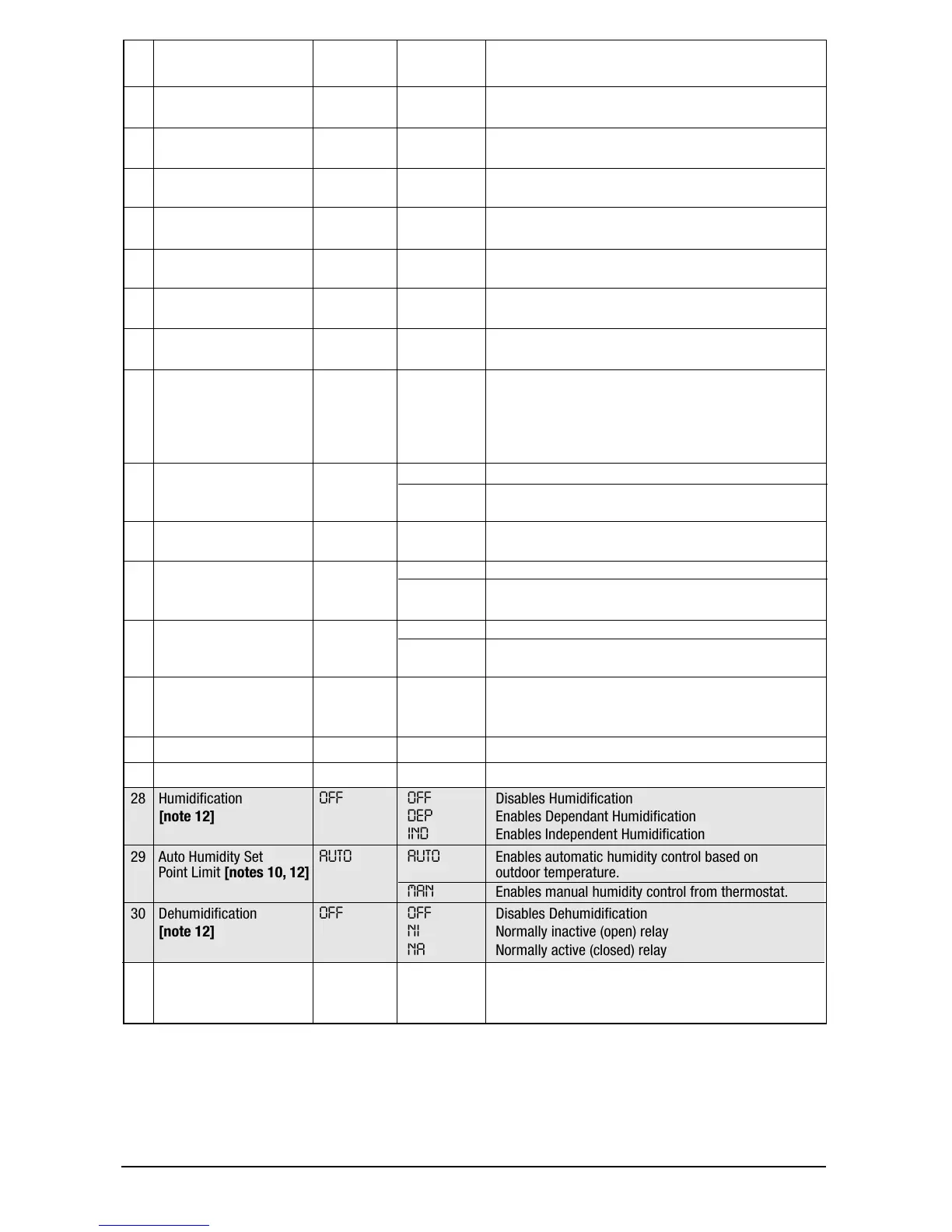
28 Humidication OFF OFF DisablesHumidication
[note 12] DEP EnablesDependantHumidication
IND EnablesIndependentHumidication
29 AutoHumiditySet AUTO AUTO Enablesautomatichumiditycontrolbasedon
PointLimit[notes 10, 12] outdoortemperature.
MAN Enablesmanualhumiditycontrolfromthermostat.
30 Dehumidication OFF OFF DisablesDehumidication
[note 12] NI Normallyinactive(open)relay
NA Normallyactive(closed)relay
31 InstallerClear CLR0 CLR0 ClearOff-Nochangesmadetosettings
CLR1 Clearswirelessremotesensorsettings
CLR2 Clearsallthermostatsettings(factorydefaults)
Options(shaded)28-30onlyappearifoptionalwirelessremotehumiditysensorisinstalled.
*Whenanoutdoorsensorisconnected,thethermostatautomaticallyrecognizesit.Pressroomtemperaturedigitsto
displayoutdoortemperature.
NOTE: Additional options such as Service Monitors, Setting the lock code, audible tone, etc. are
located in the User Settings – See User manual for information on setting these options.



 To Next Page
 Loading...