8
ED-593 : 8 Thermocouple Inputs
3. Connecting your ED Device
ED-593 : 8 Thermocouple Inputs
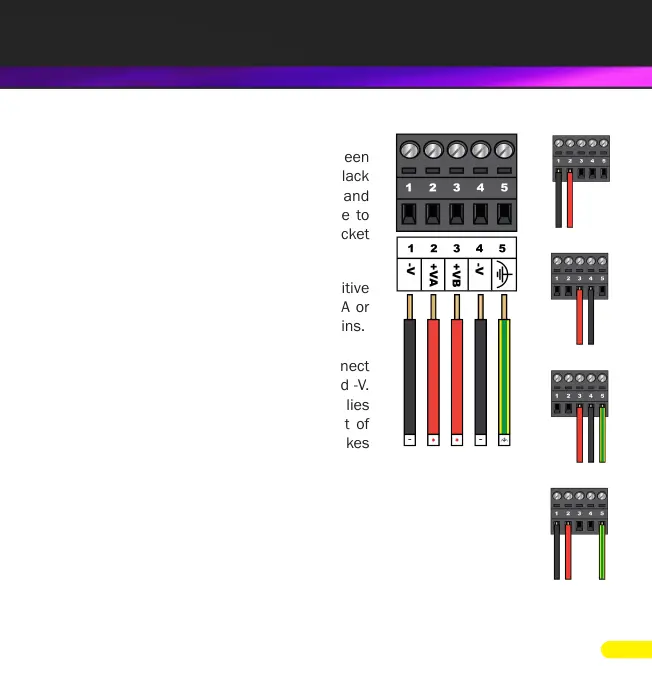
1. Connect a power supply providing a minimum
of 1.1 Watts with an output voltage between
+5VDC and +30VDC to the removable black
terminal block. The optional PW-600 and
PW-650 power supplies enable the device to
be plugged easily into a standard power socket
or powered via USB.
Using one power supply: connect the positive
terminal of the power supply to either +VA or
+VB pin and the negative to one of the -V pins.
Using two separate power supplies: connect
one to +VA and -V and the other to +VB and -V.
The higher voltage of the two power supplies
is selected by the device and in the event of
a failure the other supply automatically takes
over to keep the device running.
2. The LED’s will ash when the power is rst applied. When the Status
LED turns steady green (after 5-60 seconds) the device is ready to
use.
The status of the power supply inputs can be monitored visually via a
browser from the ED devices home page and also programmatically.



 To Next Page