Description of Front Panel Indicators
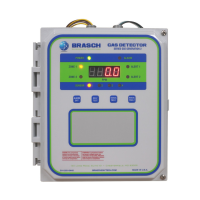
The front panel indicators convey to the user the operational status of the detector. The
following table describes the function of each indicator. Please refer to the detector’s front
panel label for the indicator’s location.
Front Panel Indicators
Indicator Color Description
Power Green Glows whenever power is on
Alert 1 Red Blinks or flashes to indicate the condition of Zone 1
Alert 2 Red Blinks or flashes to indicate the condition of Zone 2
Alarm Red Glows after remaining in High Alert for 15 minutes
Zone 1 Yellow Glows whenever the active sensor is assigned to Zone 1
Zone 2 Yellow Glows whenever the active sensor is assigned to Zone 2
Sensor 1 Yellow Glows whenever Sensor 1 is active
Sensor 2 Yellow Glows whenever Sensor 2 is active
Sensor 3 Yellow Glows whenever Sensor 3 is active
Sensor 4 Yellow Glows whenever Sensor 4 is active
4-digit Display Red
Indicates the gas concentration or error code associated
with the active sensor
IOM01
Rev 1.0 – December 22, 2020 8


 To Next Page