~~.~~
~~
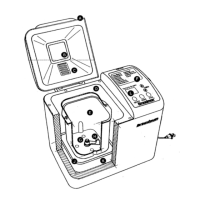
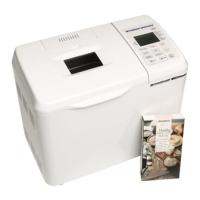
YOUR
BREADMAN®
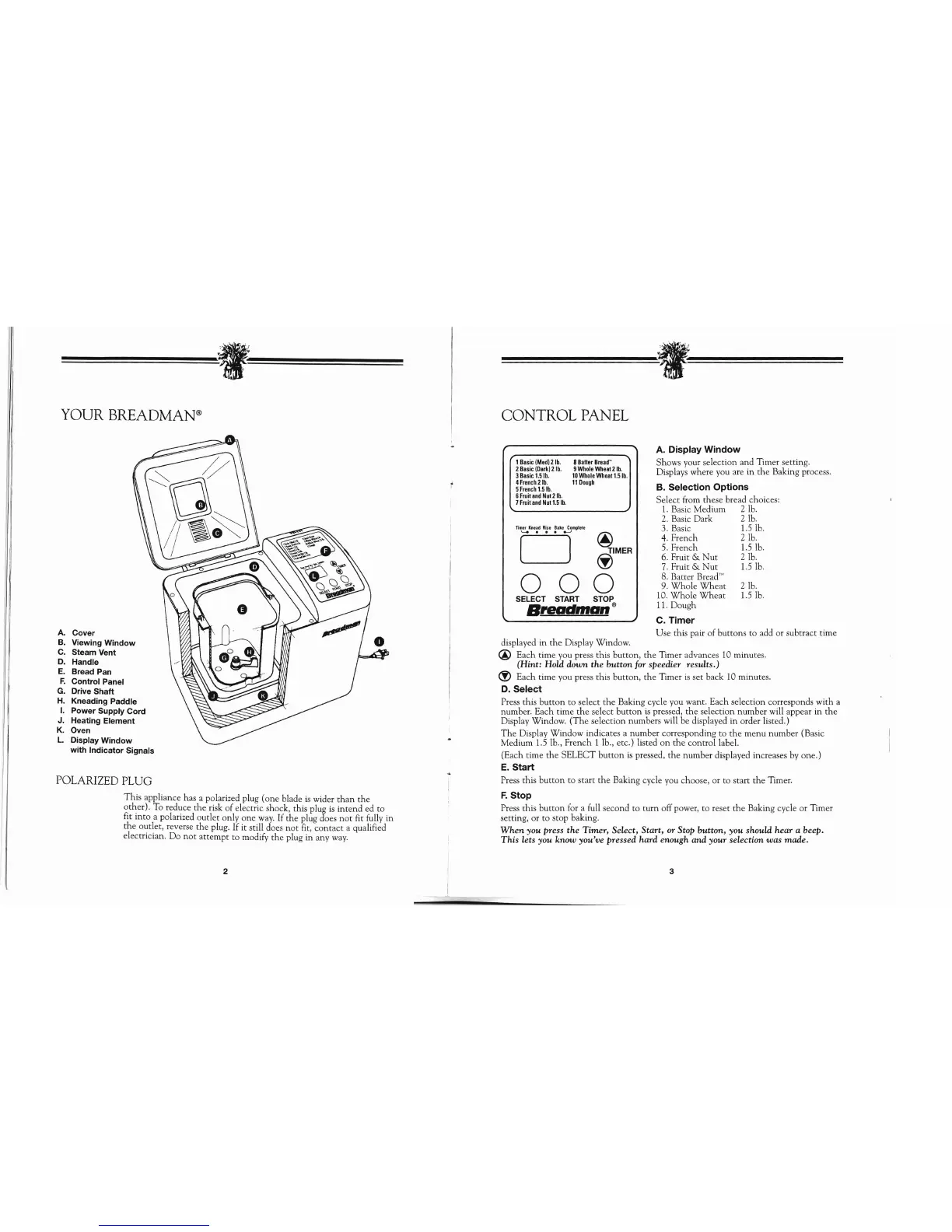
A. Cover
B. Viewing
Window
C.
Steam Vent
D.
Handle
E.
Bread Pan
F.
Control Panel
G.
Drive
Shaft
H.
Kneading Paddle
I.
Power Supply Cord
J.
Heating Element
K.
Oven
L.
Display
Window
with
Indicator
Signals
POLARIZED
PLUG
This
appliance has a polarized plug
(one
blade
is
wider
than
the
other). To reduce
the
risk
of
electric shock, this plug
is
intend
ed to
fit into a polarized outlet only
one
way.
If
the
plug does
not
fit fully in
the
outlet, reverse
the
plug. If it still does
not
fit,
contact
a qualified
electrician. Do
not
attempt
to modify
the
plug in any
way.
~~.~~
~~
CONTROL
PANEL
1
Basic
(Med)
21b.
8
Batter
Bread"
2
Basic
(Dark)
2
lb.
9
Whole
Wheal
2
lb.
3
Basic
1.5
lb.
10
Whole
Wheal
1.5
lb.
4
French
21b.
11
Dough
5
French
1.5
lb.
6
Fruiland
NUl2
lb.
7
Fruiland
Nul
1.5
lb.
Timer
Knead
Rise
Bake
Complete
..........
.....,
@
o
~MER
000
SELECT
START
STOP
Breadman®
displayed in
the
Display Window.
A.
Display
Window
Shows your selection and Timer setting.
Displays where you are in
the
Baking process.
B.
Selection
Options
Select from these bread choices:
1.
Basic Medium 2 lb.
2.
Basic Dark 2 lb.
3. Basic 1.5 lb.
4.
French 2 lb.
5. French 1.5 lb.
6.
Fruit &
Nut
2 lb.
7.
Fruit &
Nut
1.5 lb.
8.
Batter Bread'"
9.
Whole
Wheat
2 lb.
10.
Whole
Wheat
1.5
lb.
11. Dough
C.
Timer
Use this pair
of
buttons to add or subtract time
@ Each time you press this button,
the
Timer advances 10 minutes.
(Hint: Hold down the
button
for
speedier results.)
<!>
Each time you press this button,
the
Timer
is
set back 10 minutes.
D.
Select
Press this
button
to select
the
Baking cycle you want. Each selection corresponds with a
number. Each time
the
select
button
is
pressed,
the
selection number will appear in
the
Display Window.
(The
selection numbers will be displayed in order listed.)
The
Display Window indicates a number corresponding to
the
menu number (Basic
Medium 1.5 lb.,
French
1 lb., etc.) listed
on
the
control label.
(Each time
the
SELECT
button
is
pressed,
the
number displayed increases
by
one.)
E.
Start
Press this
button
to
start
the
Baking cycle you choose, or to start
the
Timer.
F.
Stop
Press this
button
for a full second to
turn
off power, to reset
the
Baking cycle or Timer
setting, or to stop baking.
When
you press the Timer, Select, Start, or Stop button, you should hear a beep.
This
lets you know you've pressed hard enough and your selection was made.
2 3



 To Next Page