70
4.4.3 UNIT SETTING
Use the [ UNIT ] key to change the unit of the readings on the console display.
Below is the operation step:
- Press and hold [ UNIT ] key for 2 seconds to enter the unit setting mode.
- Short press [ UNIT ] key to proceed to the next setting step.
- Press [
/ FORECAST ] or [ / INDEX ] key to change the value. Press and hold the key
for quick-adjust.
- Press and hold [ UNIT ] key for 2 seconds to exit the unit setting mode at any time.
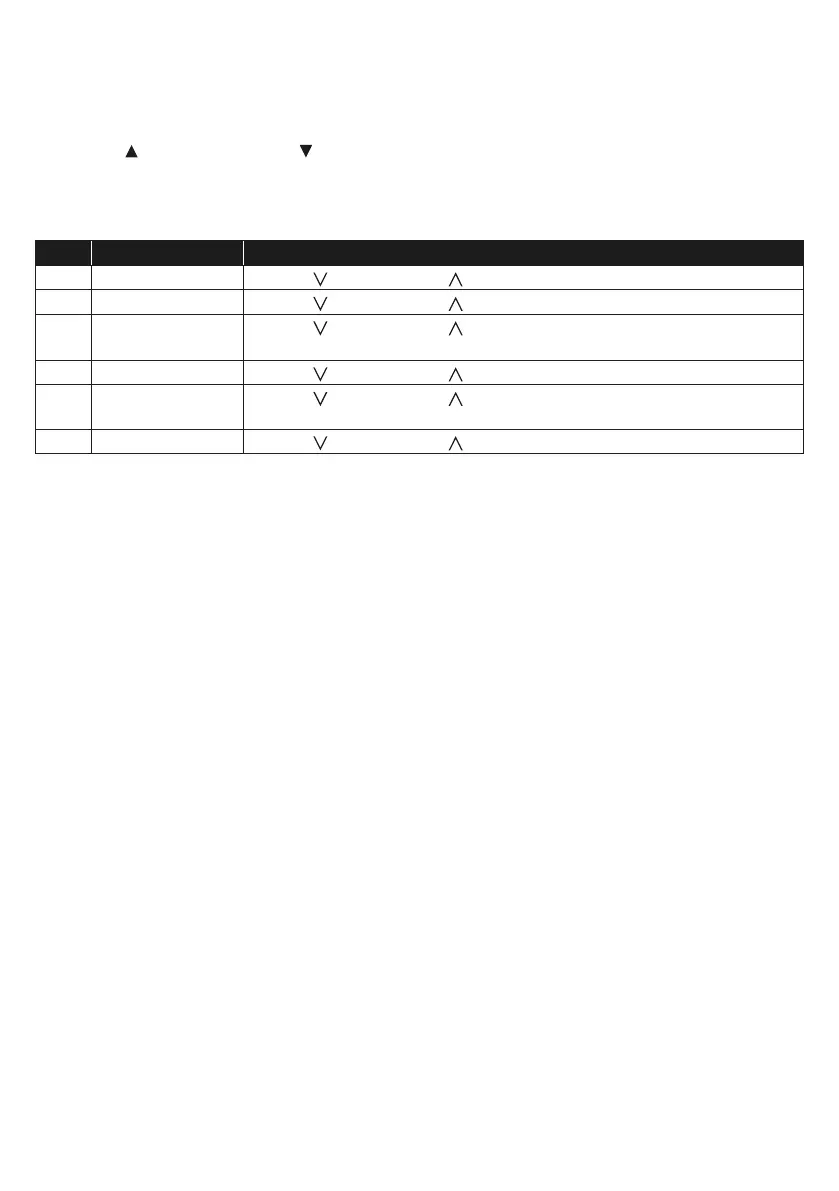
Setting items table:
Step Mode Setting procedure
1s Temperature unit Press [
/ INDEX ] or [ / MODE ] key to select °C or °F
2 Rain unit Press [
/ INDEX ] or [ / MODE ] key to select mm or in
3 Wind speed unit Press [
/ INDEX ] or [ / MODE ] key to select m/s, km/h, knots
or mph
4 Distance unit Press [
/ INDEX ] or [ / MODE ] key to select k/m or mi (miles)
5 Baro pressure
unit
Press [
/ INDEX ] or [ / MODE ] key to select hPa, inHg or
mmHg
6 Light intensity Press [
/ INDEX ] or [ / MODE ] key to select Klux, Kfc or W/m
2
4.4.4 BACK LIGHT
The main unit back light can be adjust, using the [ HI / LO / AUTO ] sliding switch to select the
appropriate brightness:
- Slide to the [ HI ] position for the brighter back light.
- Slide to the [ LO ] position for the dimmer back light.
- Slide to the [ AUTO ] position for the auto adjust back light that according to environment light level




 To Next Page