13
OPERATING YOUR BREVILLE PRODUCT
SETTING THE UNIT WEIGHT
CONVERSION MEASURE
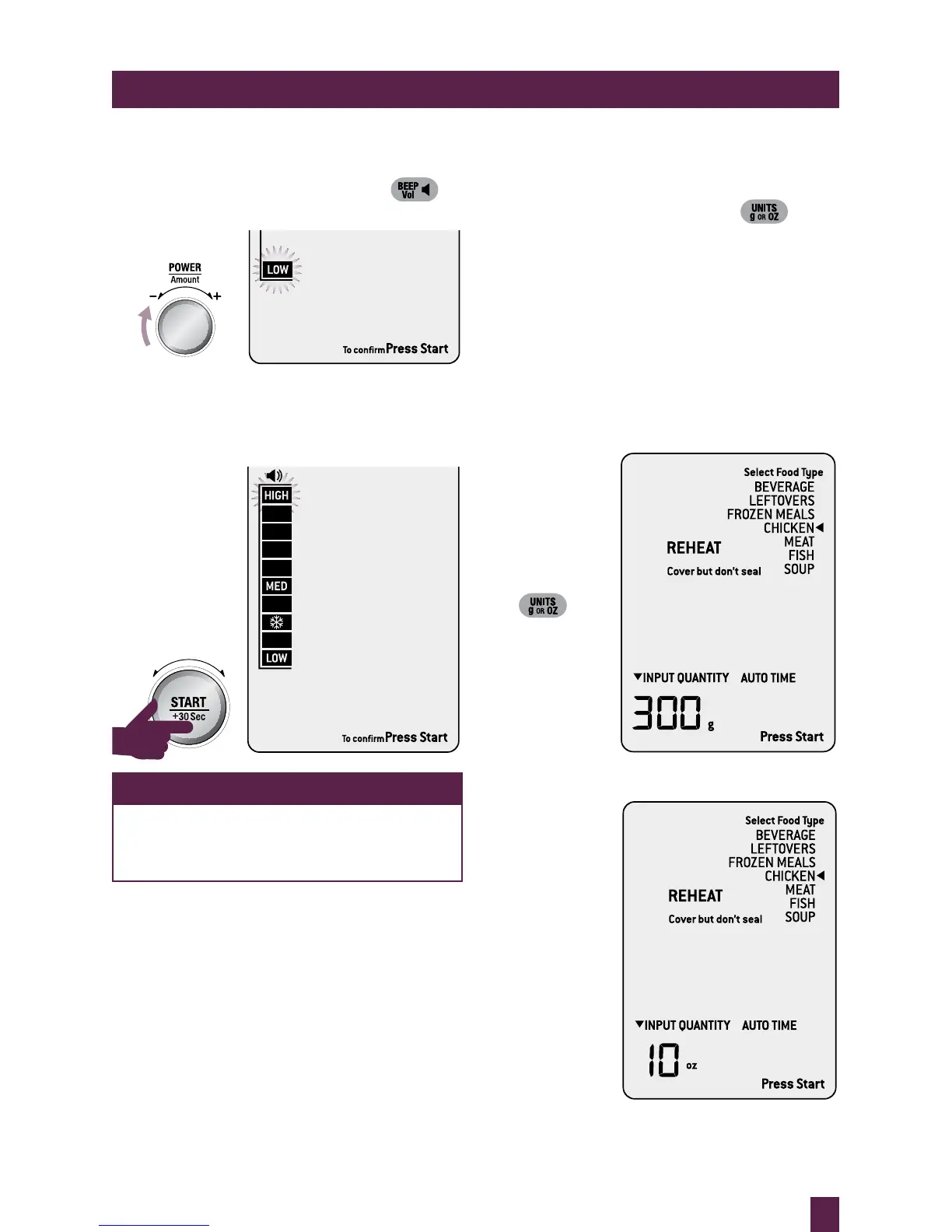
Press UNITS on shortcuts panel.
The highlighted ounces (oz) will flash to show
it can be adjusted. Turn POWER dial to toggle
between ounces (oz) and grams (g). Press
START button to confirm.
Unit Weight Conversion During Operation
When weight is on the screen, as seen below in
SMART REHEAT CHICKEN setting, pressing
UNITS on shortcuts panel will convert the
weight from grams (g) to ounces (oz).
SETTING THE BEEP VOLUME
Press BEEP VOL on shortcuts panel.
The default beep volume is LOW.
Turn POWER dial to toggle between LOW,
MEDIUM and HIGH beep volume. Each
position will sound the BEEP VOL selected.
Press START button to confirm.
NOTE
If you forget to press START to confirm
BEEP VOL, the volume level will default
to your selected setting after 1 minute.



 To Next Page