21
OPERATING YOUR SMART DEFROST SETTING
SMART DEFROST
The SMART DEFROST setting is designed to
gently defrost foods without overheating and
drying out of edges.
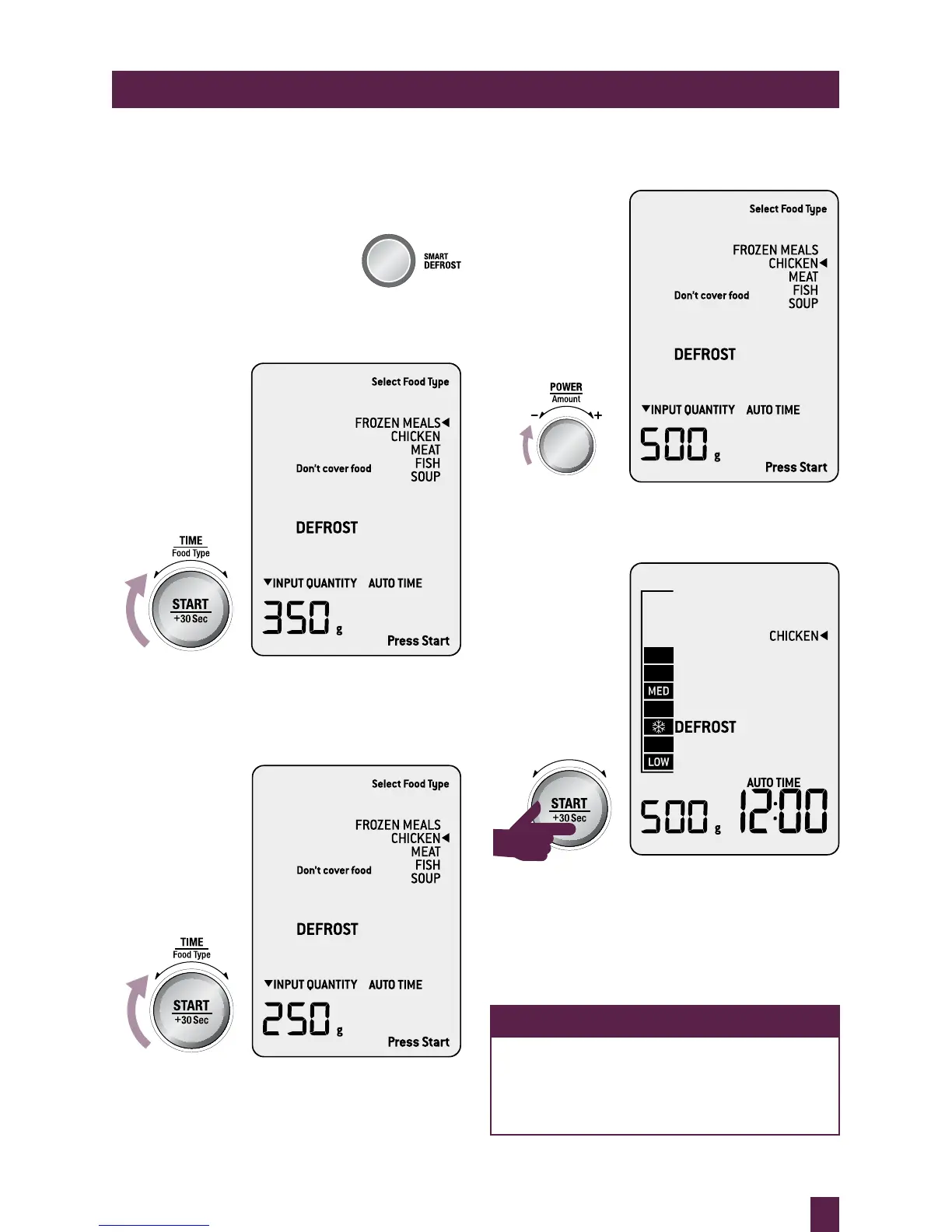
Press SMART DEFROST button
to enter SMART DEFROST
setting, the microwave will beep once.
Turn TIME/FOOD TYPE dial to select the
food type.
As the TIME/FOOD TYPE dial is turned
the arrow shifts and points to what food type
is selected.
Once you have chosen FOOD TYPE, turn
AMOUNT dial to adjust quantity or weight.
Press START to commence defrosting.
All unselected FOOD TYPES, the Press Start
and Input Quantity prompts are no longer
displayed on the LCD screen. The TIME
appears and begins to countdown.
NOTE
While the microwave is defrosting
time can be increased or decreased.
Adjusting the defrosting time does not
affect selected weight or quantity.
OPERATING YOUR SMART DEFROST SETTING



 To Next Page