24
A BIT MORE™
A BIT MORE™
A BIT MORE™ BUTTON
Use A BIT MORE™ when cooking
is finished and your food is not
quite cooked or hot enough.
One simple press of A BIT MORE™ will add
a little extra cooking time.
If A BIT MORE™ is pressed and there is no
previous SMART REHEAT, DEFROST or
shortcut setting the microwave will
default to the basic mode and add 20 seconds
at 100% power.
The A BIT MORE™ button can also be used
after any Smart REHEAT, SMART DEFROST
or shortcut setting.
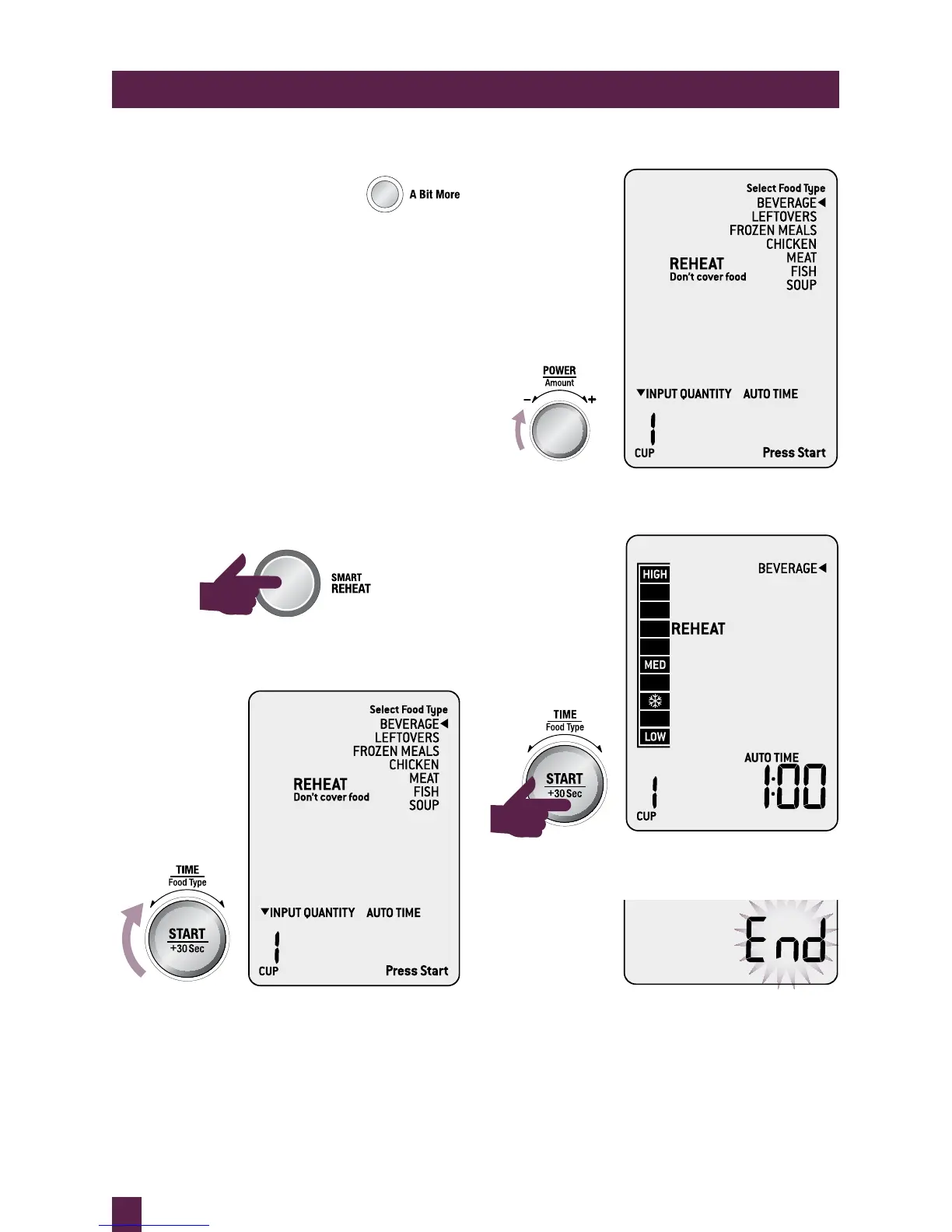
For example
1. User presses the SMART REHEAT button.
2. Using the TIME/FOOD TYPE dial,
select BEVERAGE.
3. Using the AMOUNT dial select 1 Cup.
4. Press START to begin reheating.
5. Reheat process ends.



 To Next Page