Note: The hot water faucet is designed to deliver 5 ounces of hot water in approximately 15
to 20 seconds. If the volume is set too high there may be a significant drop in water
temperature. Release the handle and wait a few seconds for the temperature to recover.
Using The Pour-In Feature:
(Models 1034505 & 1034506 only.)
If the automatic brewing function fails, this pour-in feature will allow you to continue to make coffee
until necessary repairs are made. Follow the steps below to brew coffee using this feature.
WARNING: If the ready light does not come on, or if this coffee brewer fails to heat, do not pour
water into the pour-in opening. Unplug the power supply cord and call for service.
1. Place a paper coffee filter into the brew cone. Add the
desired amount of fresh ground coffee into the paper filter.
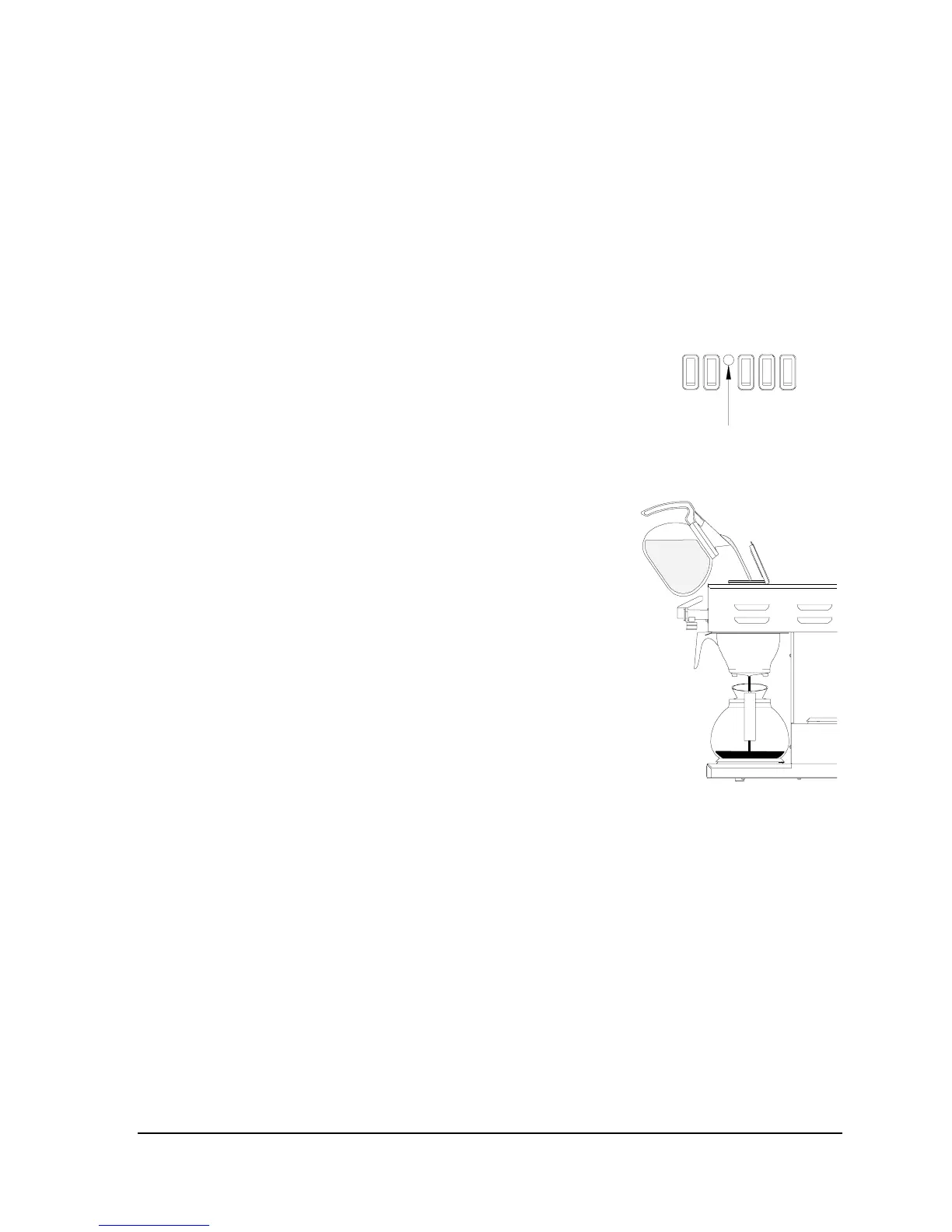
Fig. 22. Ready Light.
2. Place the brew cone, with coffee and filter, into the cone rails
and gently push the brew cone all the way in until it stops.
3. Place an empty decanter on the warmer under the brew cone.
4. Wait for the “Ready” light (Fig. 22) to come on.
Fig. 23. Pour water in to start a
brew cycle.
5. Pour one decanter of water into the pour-in opening (Fig.
23). In approximately a minute, fresh hot coffee will begin
to flow from the brew cone into the decanter.
WARNING: Hot coffee can cause serious burns. Handle hot
coffee carefully.
6. Push the warmer switch on.
7. After the brewing cycle is complete, remove the brew cone
and discard the used coffee grounds and paper filter. Rinse
the brew cone with water and place back into the coffee
brewer.
WARNING: Hot coffee can cause serious burns. Make sure
that the coffee has stopped coming out of the brew cone
before you remove it from the coffee machine.
Please Note: Brewmatic recommends that when this unit is not in use overnight, or for other
prolonged periods of time, that the "Power" switch be pushed to the off (down) position.
Warning: There are no user serviceable parts inside. All adjustments should have been performed
during installation. Under no circumstance should the operator attempt to open or service this unit.
If this coffee brewer should fail to function properly, unplug it and contact your nearest Brewmatic
Representative or you can contact Brewmatic direct at 800-421-6860.
Page 11
COMK211


 To Next Page