19. Empty the water from the decanter, and put the decanter back on the warmer under the brew
cone.
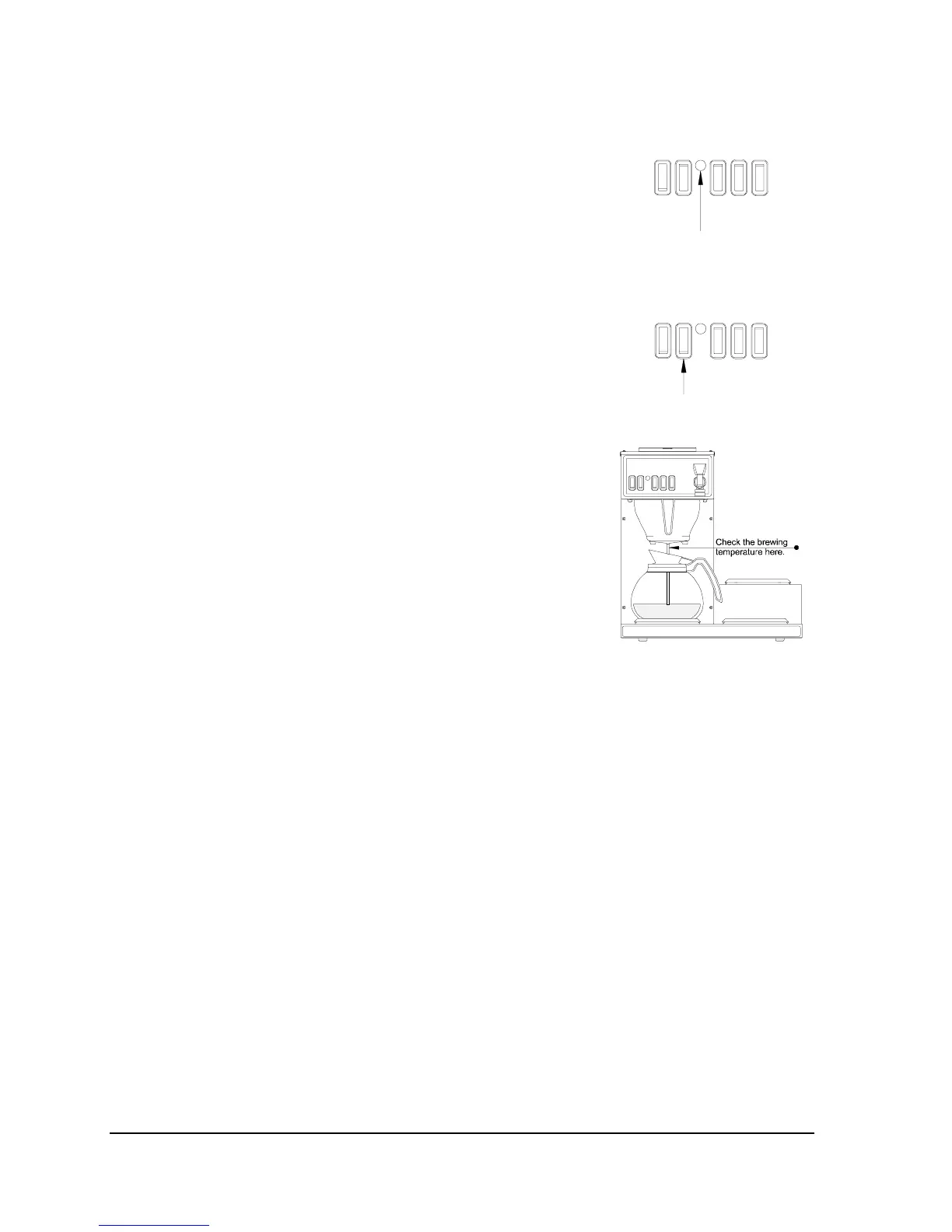
Fig. 11. Ready light.
Testing The Brewing Temperature And Volume:
20. Wait for the "Ready" light (Fig. 11) to come on again. This
will occur in approximately 5 minutes.
21. Press the “Start” switch (Fig. 12) momentarily and release it.
Fig. 12. Start switch.
22. Check the temperature of the water as it comes out of the
bottom of the brew cone (Fig. 13). The maximum temperature
reached during the cycle should be between 192° to 196°F.
23. After the water has stopped flowing from the brew cone,
measure the water volume in the decanter. The water volume
should be approximately 60 oz.
Fig. 13. Checking the brewing
temperature.
Note: If the water temperature or water volume are not to
specifications, they will need to be adjusted. (See the
“Adjustments” section for thermostat and timer adjustments.)
Note: If any adjustments were made to the water
temperature or water volume, repeat the tests starting from
installation step #20.
24. The coffee brewer is now ready for use. Refer to the
operating instructions for complete information on how to
brew coffee in this coffee brewer.
If this coffee brewer should fail to function properly, refer to the trouble shooting guide for further
instructions.
These installation instructions are for the installers use only.
Operators should refer to the operating instructions only.
Page 8
COMK211


 To Next Page