15
Accessing remote program mode
To access remote program mode, the System Operator must key the remote access PIN, followed by the
pound (#) symbol. Not just any user can enter the PIN – the repeater must also detect the presence of the
System Operator’s CTCSS tone / DCS code. If the System Operator’s tone/code is detected, then the repeater
will not repeat the call, so don’t worry about the PIN being transmitted to other users.
Once you enter the PIN and press the # key, the repeater will transmit 3 –1500 Hz tones to indicate that
remote mode was entered. The LCD will also display REMOTE.
Commands
Each commands is composed of a sequence of DTMF tones containing a two-digit command prefix, followed by
a series of command parameters, followed by the # key. The commands are executed once the # key is
received and the calling party de-keys their radio.
De-keying after each command is necessary so that the repeater can respond to each command with a series
if either success or failure tones. A response of four 1500 Hz tones indicates the operation was a success. A
response of four 500 Hz tones indicates the operation failed.
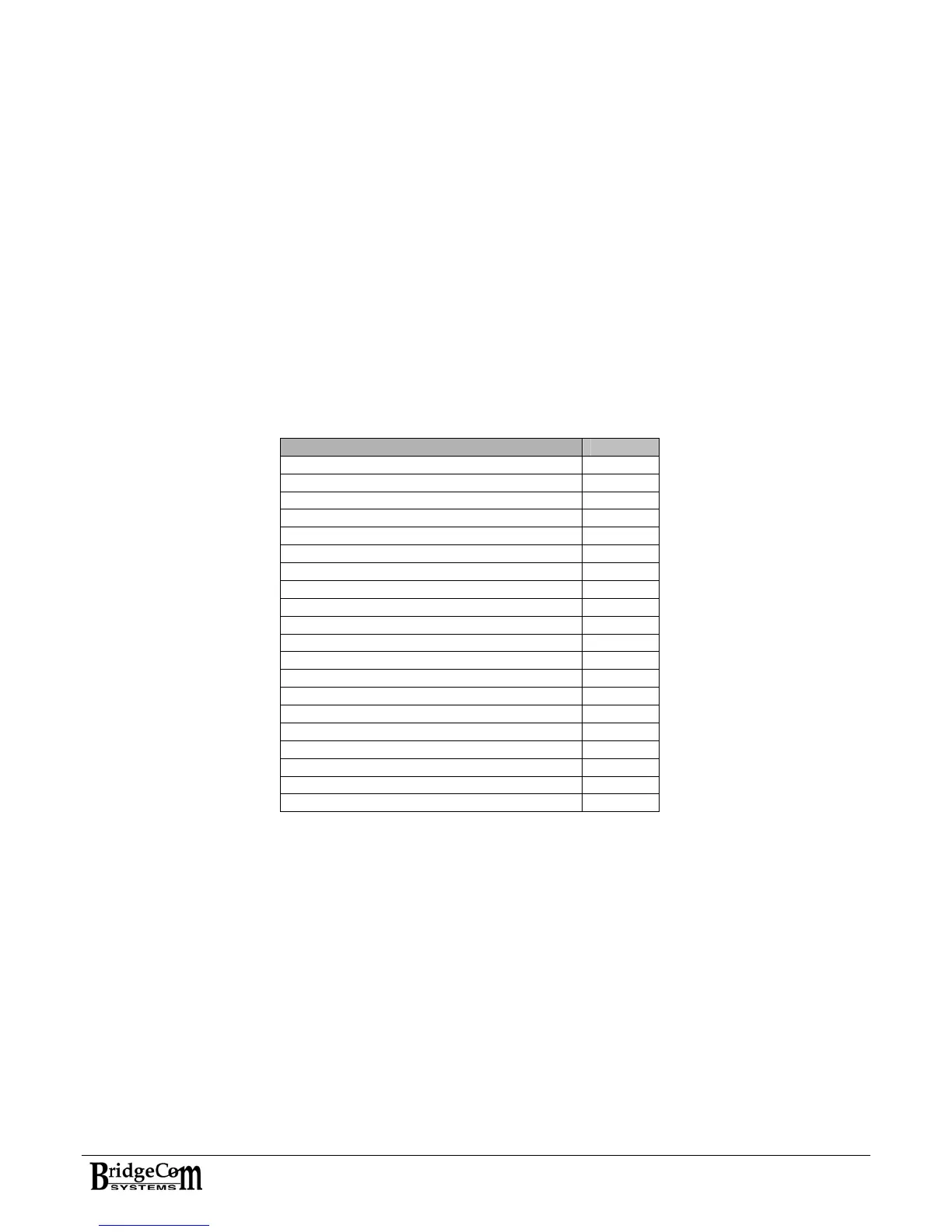
The table below is a list of the available tasks followed by their 2-digit command prefix:
Command Prefix
ENTER REMOTE MODE N/A
ADD USER 01
DELETE USER 02
ACTIVATE USER 03
DEACTIVATE USER 04
MODIFY USER TX SQUELCH OPTION 05
MODIFY USER RX SQUELCH OPTION 06
MODIFY USER TX DCS POLARITY 07
MODIFY USER RX DCS POLARITY 08
MODIFY USER TX HOLD TIME 09
MODIFY USER TONE IN TAIL 10
MODIFY USER COURTESY TONE 11
MODIFY CHANNEL ID INTERVAL 12
MODIFY CHANNEL MORSE RATE 13
MODIFY CHANNEL TX TIMEOUT 14
MODIFY RX MODULE OUTPUT 1 15
MODIFY RX MODULE OUTPUT 2 16
EXIT WITHOUT SAVE 98
SAVE AND EXIT 99
REBOOT 5555
The following pages contain a description of all the available commands. Throughout the descriptions, [0]
through [9] denotes a particular digit that must entered. [N] denotes a single digit that must be entered, the
value of which depends on your choice of settings. A [#] key must be entered after each command sequence
for the system to process the command.
Please note that for all multi-digit settings, you must enter the required number of digits, using zeroes as
placeholders where necessary. For example, if [N][N][N] is required and you want to enter 12, you must
enter 012.


 To Next Page