23
5.3.3 Identifying COM Port Number
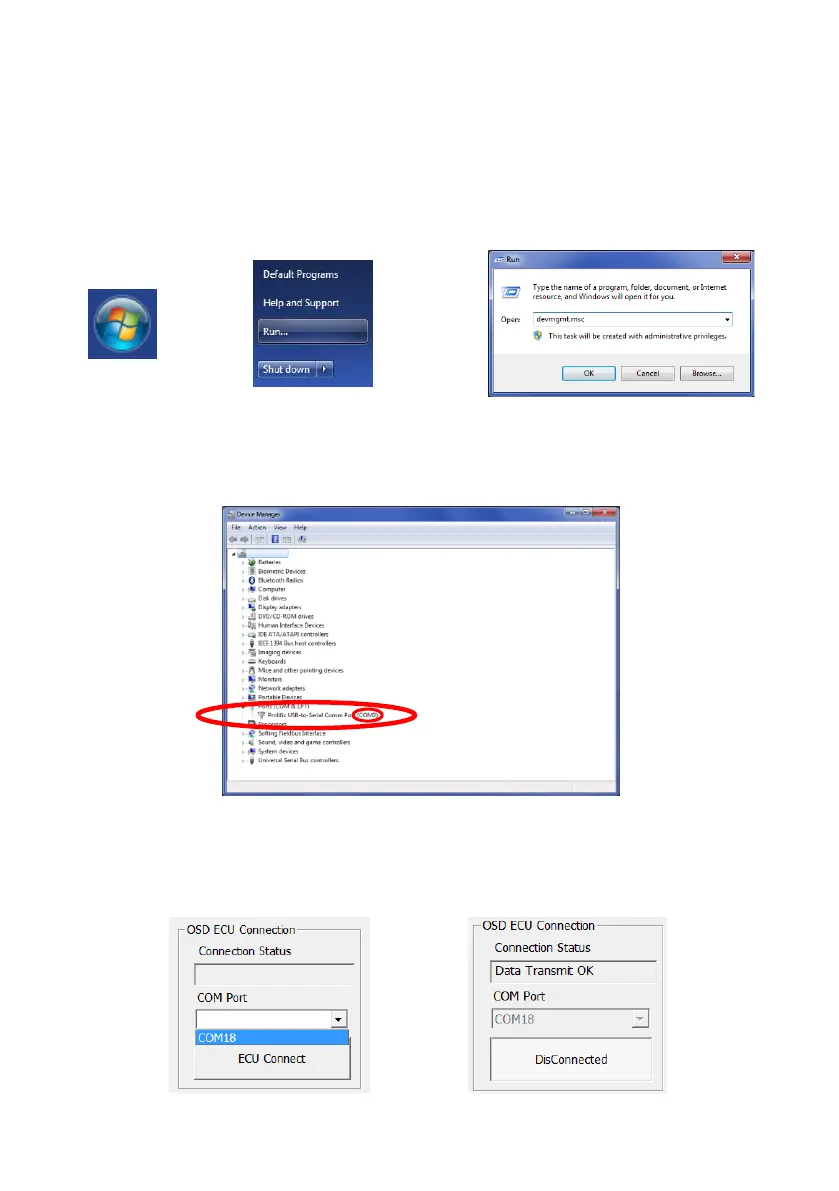
The communication port number should show automatically in the COM Port drop-down of the
main control window. In the event that there are multiple COM port numbers shown, it is
possible to check the COM port number of the connected BS-OSD-022 ECU by opening the
Windows “Device Manager”.
Click Windows Start button (typically on the bottom left on the screen) and select “Run…”. In
the “Run” dialogue box, type ‘devmgmt.msc’ and click “OK”; this will open the Device
Manager.
In the Device Manager window click “Ports (COM & LPT)” and check “Silicon Labs CP210x
USB to UART Bridge (COM##)”. The “##” represents the number of the port through which the
display is currently connected to the PC. In the image below the number is shown as “8” but
this can vary.
5.3.4 ECU Port Connection (ECU Connect)
When the COM port number for the BS-OSD-022 ECU is established, press the ECU Connect
button. The Connection Status field will display the message “Data Transmit OK” and the ECU
Connect button will change to show “Disconnect!”


 To Next Page