27
5.3.7 Detection Zone Configuration (Detection & Blind Zones)
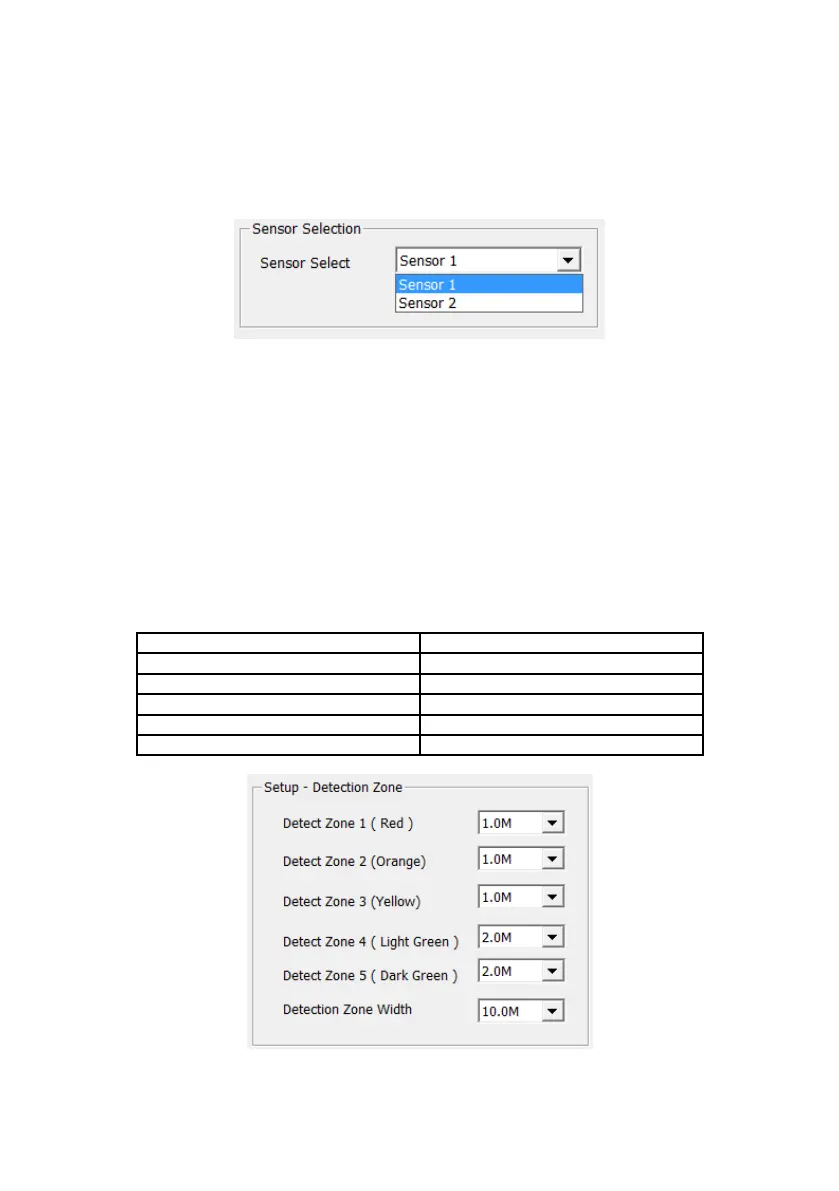
The Detection & Blind Zones window enables the user to configure the detection area of each
connected sensor from the maximum (30m x 10m), into five individual zones.
The user must first select the radar to be configured from the drop-down menu in the Sensor
Selection area. The available sensors are denoted by the references Sensor 1 and Sensor 2
(as opposed to their CAN ID values) as detailed in section 5.3.6. See image below.
Each zone may have a length from 0.5m to 28.0m selectable via drop-down menus. The
combined total length cannot exceed 30m and will prompt a warning message to appear if this
configurations over 30m in length are attempted.
The 5 detection zones represent different alerting colours for on-screen indicators as detailed
in section 4.6
Detection Zone Width ranges from 2.0m to 10.0m with a dependency on the total detection
length of all 5 detection zones. The Detection Zone Width is selectable from the drop-down
menu shown in the image blow. For applications where the radar sensor is centrally mounted
at the front or rear of the vehicle, Detection Zone Width would generally be set to
approximately the same width as the vehicle. For other applications (e.g. side or corner
mounting), alternative values for detection zone width may be desired.
Note: Brigade Backsense
®
automatically adjusts the minimum Detection Width to a higher
value for a longer Detection Length.
After Detection & Blind Zone setup is completed, the user must press the Save button. If the
Exit button is pressed, the configuration will not be saved!


 To Next Page