26
5.3.6 Activation Trigger Configuration (Trigger Input)
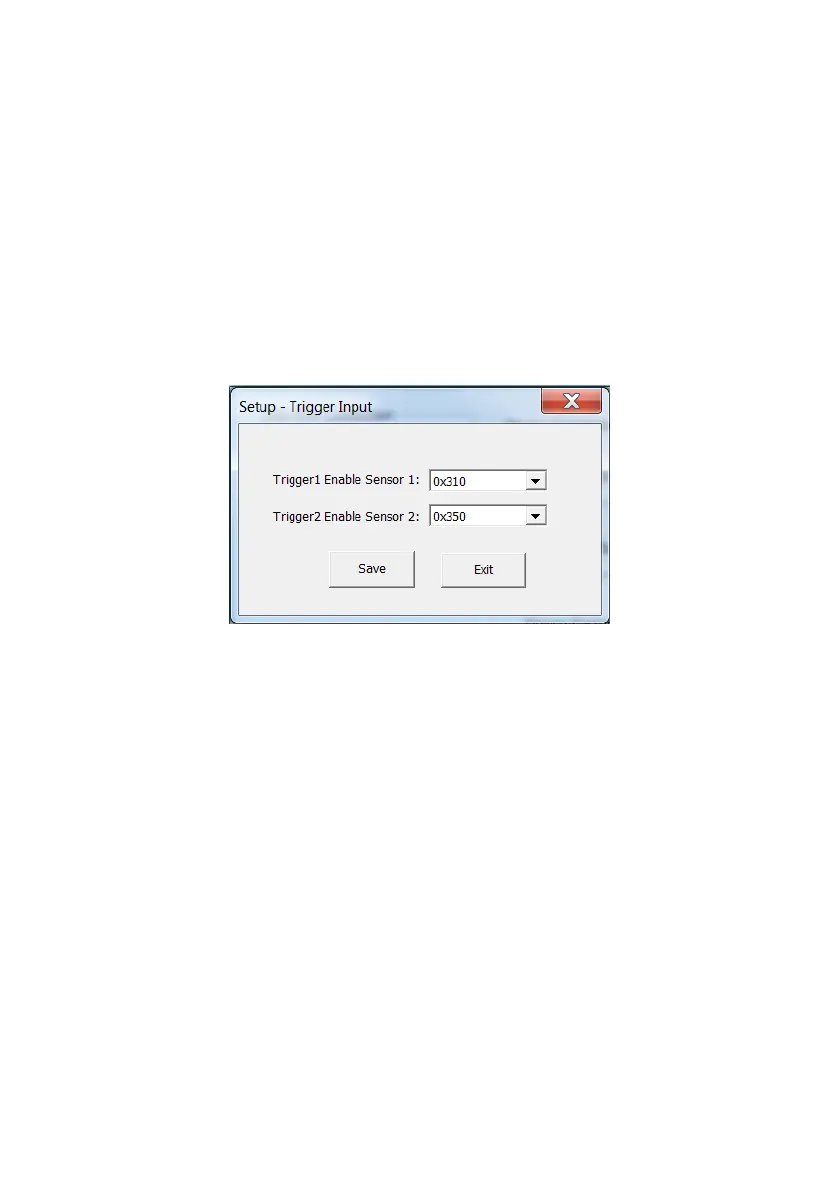
CAN ID values of connected BS-9000 radar sensors must be assigned to Trigger In 1 &
Trigger In 2 to activate each sensor and on-screen indication when either of these trigger
inputs are activated.
The Trigger Input window enables the user to assign the CAN ID of each connected sensor to
each Trigger via drop-down selection boxes.
The sensor with CAN ID assigned to Trigger 1 is designated “Sensor 1”.
The sensor with CAN ID assigned to Trigger 2 is designated “Sensor 2”.
These sensor designations are referred to when configuring subsequent detection and
alerting parameters.
For systems using only 1 radar sensor, the CAN ID value assigned to Trigger Input 2 is
irrelevant however that Trigger Input wire must be insulated and not used during operation as
detailed in section 3.10.
After CAN ID assignment is completed, the user must press the Save button. If the Exit button
is pressed, the configuration will not be saved!


 To Next Page