25
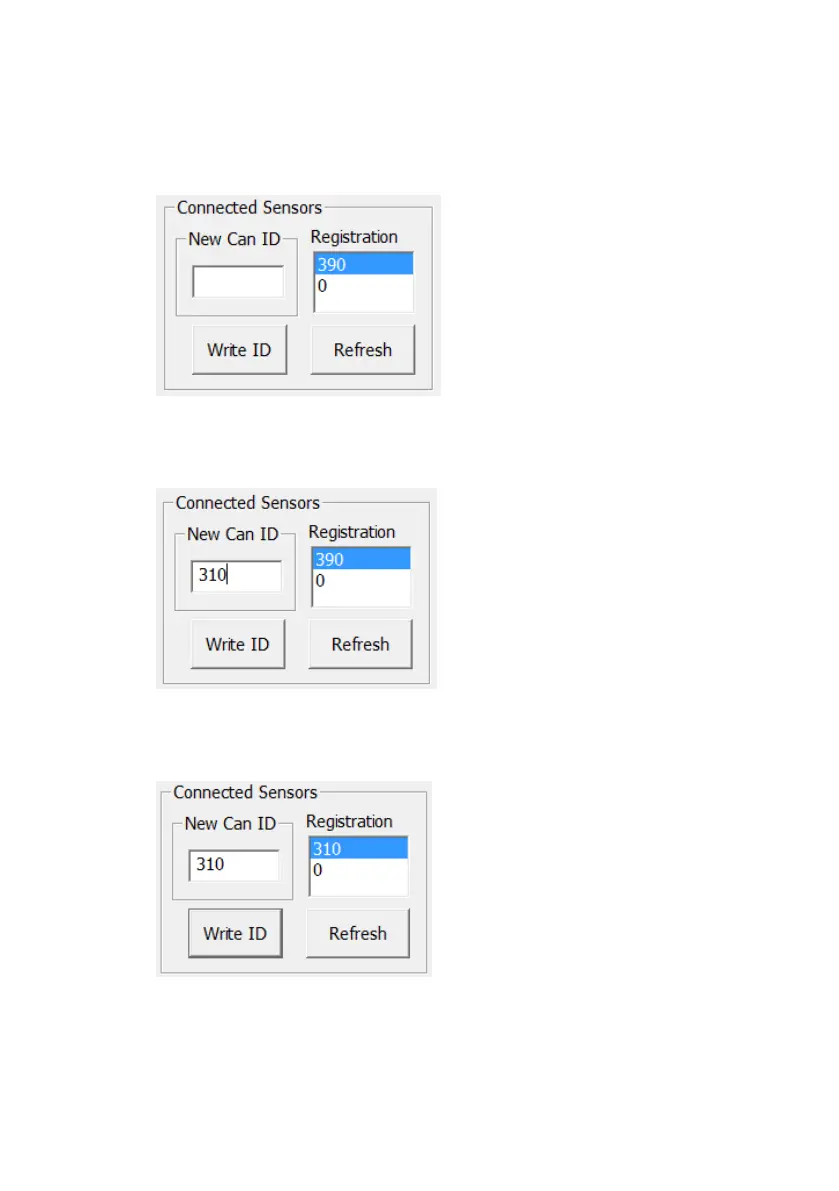
The procedure for changing the CAN ID of a connected BS-9000 is as follows:
1. Connect single sensor to the system. Disconnect second sensor (if applicable)
2. Press “Refresh” to view current CAN ID of connected BS-9000 sensor
3. Highlight the CAN ID to be changed in the “Registration” window
4. Enter the desired CAN ID for the sensor (from the range 0x310 – 0x380) into the
“New CAN ID” window
5. Press “Write ID”
6. The Registration window will now show the new CAN ID value written to the sensor
7. The BS-OSD-ECU will reset
8. The power supply to the re-configured sensor must be disconnected and re-
connected before the sensor is used for object detection.
9. Repeat from step 1 for second sensor if applicable


 To Next Page