29
5.3.9 On Screen Display Transparency (Detection & Blind Zones)
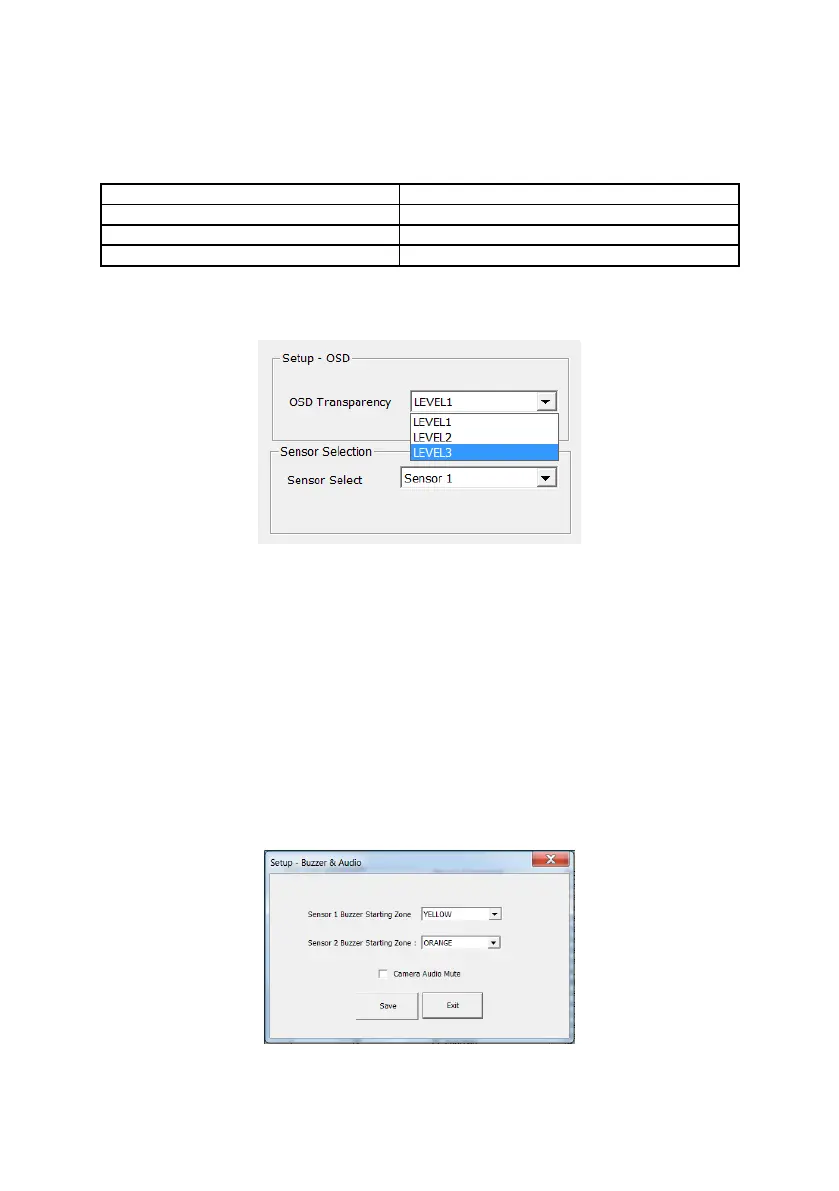
Transparency of on-screen detection indicators may be configured from one of 3 levels using
the OSD Transparency drop-down box. The approximate transparency percentages are
detailed in the table below.
OSD Transparency configures all on-screen indicators. Individual configuration per on-screen
indicator is not permitted.
5.3.10 Audible Alert Configuration (Buzzer & Audio)
The Backsense
®
audio alert function may be configured to begin in any of the 5 detection
zones for each connected BS-9000 sensor.
The Buzzer & Audio window enables the user to select (via drop-down boxes), the zones at
which objects detected by sensor 1 and sensor 2 would cause the audio alert to commence.
These are referred to as the Buzzer Starting Zones.
Users wishing to silence the audio from all cameras connected to the system may do so my
selecting the Camera Audio Mute check box.
The example below shows the Buzzer Starting Zone configured to the Yellow zone for Sensor
1 and Orange zone for sensor 2 In this example, whilst the on-screen indicators would alert
the machine operator to detections in all 5 zones for each sensor, the audible alert will only
sound when an object is detected in either the Yellow, Orange or Red zones of Sensor 1 or
the Orange or Red zones of Sensor 2
After Buzzer Starting Zone selections are completed the user must press the Save button. If
the Exit button is pressed, the configuration will not be saved!


 To Next Page