31
5.3.15 Viewing the Programming File (Programming File Generation)
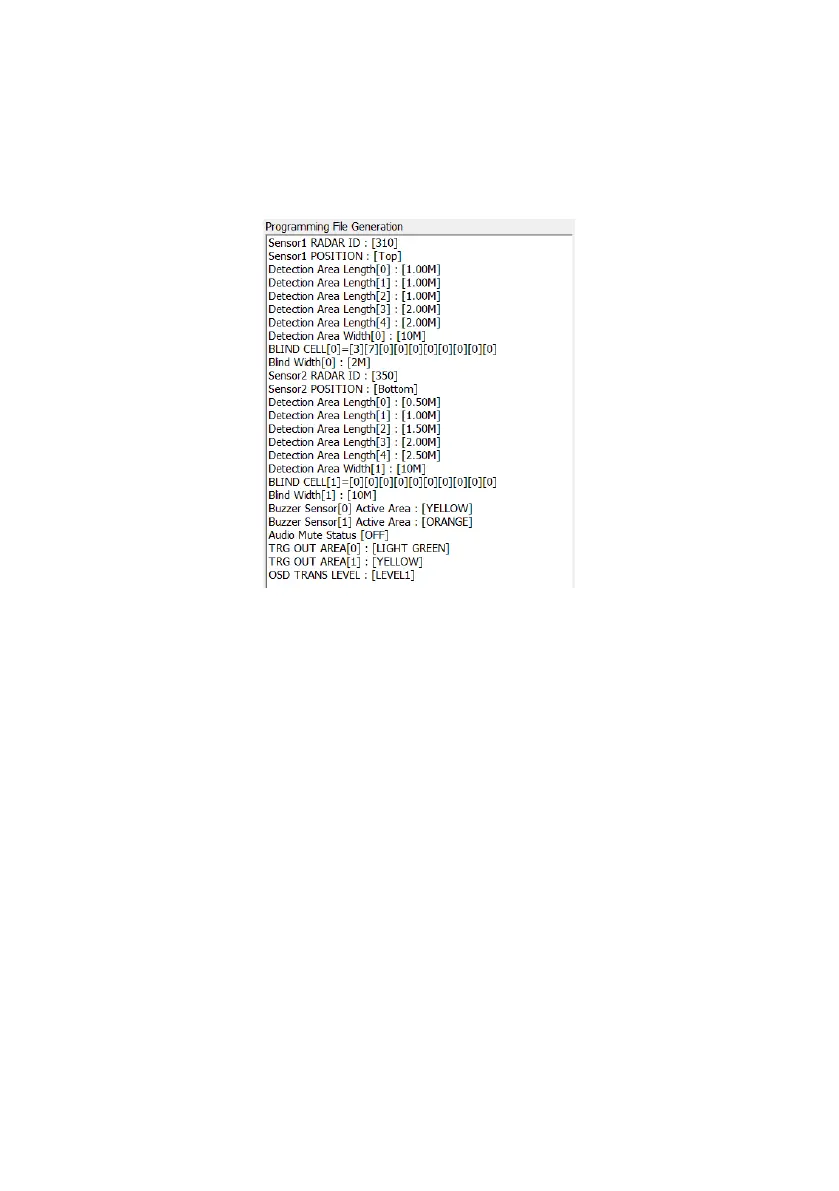
The Programming File contains all the parameters that have been selected in the Backsense®
OSD 2 Radar Sensor Configuration Tool.
The Programming File is available to view in the right-hand window of the main screen and is
updated when users press Save in each of the configuration sub menus. Example
Programming File is shown below.
Note 1: Configuration settings will always be shown for Sensor 2 even when the installed
system only utilises one BS-9000 sensor. For 1 sensor systems, Trigger In 2 must be isolated
as detailed in section 3.10.
5.3.16 Load configuration file from PC
All settings in the Backsense® OSD 2 Radar Sensor Configuration Tool can be loaded from a
previously saved file. The loading function is supported irrespective of whether the Brigade
Backsense
®
System is connected or not. Any current settings in the Backsense® OSD 2
Radar Sensor Configuration Tool will be lost.
Press the Load Configuration button in the PC Function area. A window will open for location
and selection of the previously saved configuration file. Select the desired configurations file
and press Open. The parameters from the selected file will be displayed in text format in the
Programming File Generation window.
5.3.17 Save configuration file to PC
All settings in the Backsense® OSD 2 Radar Sensor Configuration Tool can be saved to a file
at any point in time with or without being connected to the system.
Press the Save Configuration button in the PC Function area. A window will open enabling the
user to navigate to the desired location and choose the name for the file to be saved. The file
will be saved in both txt and .cfg formats. Configuration files must not be edited outside of the
Backsense® OSD 2 Radar Sensor Configuration Tool.


 To Next Page