EN
30
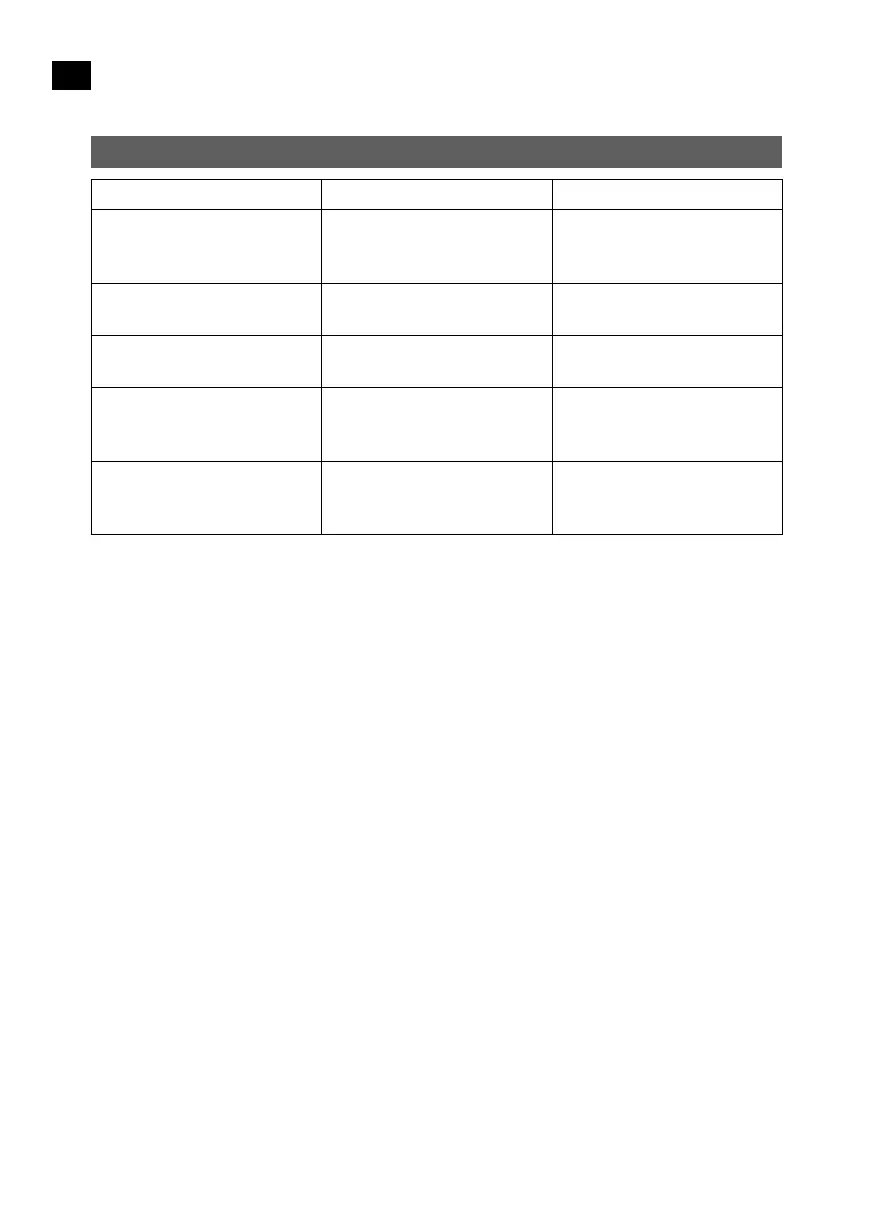
TROUBLESHOOTING
Fault indication Problem Step
Red and white status lights
ashing, and alarm is
sounding.
The vacuum cleaner has been
lifted up by an obstacle or
something similar.
Put the vacuum cleaner back
on the oor.
Red status light ashing slowly. Side brush stuck/overloaded.
Remove and clean the side
brush and reattach it.
Red status light ashing slowly
and alarm sounding.
Drive wheel stuck/overloaded.
Check and if necessary clear
left and right drive wheel.
Red and white status lights
alternately ashing, and alarm
sounding.
Bumper fault.
Tap the bumper repeatedly to
release it.
Red status light goes on and
stays on, and alarm sounds for
2 minutes.
The battery is discharged. Charge the battery.
Follow the instructions below if the above steps do not solve the problem:
– Press the power switch on the top of the vacuum o and on to restart it.
– Contact the retailer if the problem persists after the vacuum cleaner has been restarted.


 To Next Page