EasyManua.ls Logo

BRINKS BHS-4000A - 2 Mounting the Control Panel; 2.1 Panel Enclosure Mounting Procedures; 2.1.1 Choose a mounting location for the panel; 2.1.2 Remove wiring knockouts

BRINKS BHS-4000A
24 pages
Print Icon
To Next Page IconTo Next Page
To Previous Page IconTo Previous Page
Loading...
BHS-4000A
Installation
and
Proqramminq
Instructions
IMPORTANT
Please
read
and
fully
understand
the
BHS-4000A
user’s
manual
before
reading
this
manual
or
attempting
to
install
the
system.
The
user’s
manual
describes
the
system’s
features,
functions,
and
user
interface
requirements
in
great
detail.
That
information
is
not
repeated
in
this
manual.
2
Mounting
2.1.1
Choose
a
mounting
location
for
the
panel
Choose
a
mounting
location
that
is:
accessible
to
both
AC
power
and
telephone
service
protected
from
excessive
heat
or
cold
and
away
from
large
metal
objects,
like
heating
ducts
2.1.2
Remove
wiring
knockouts
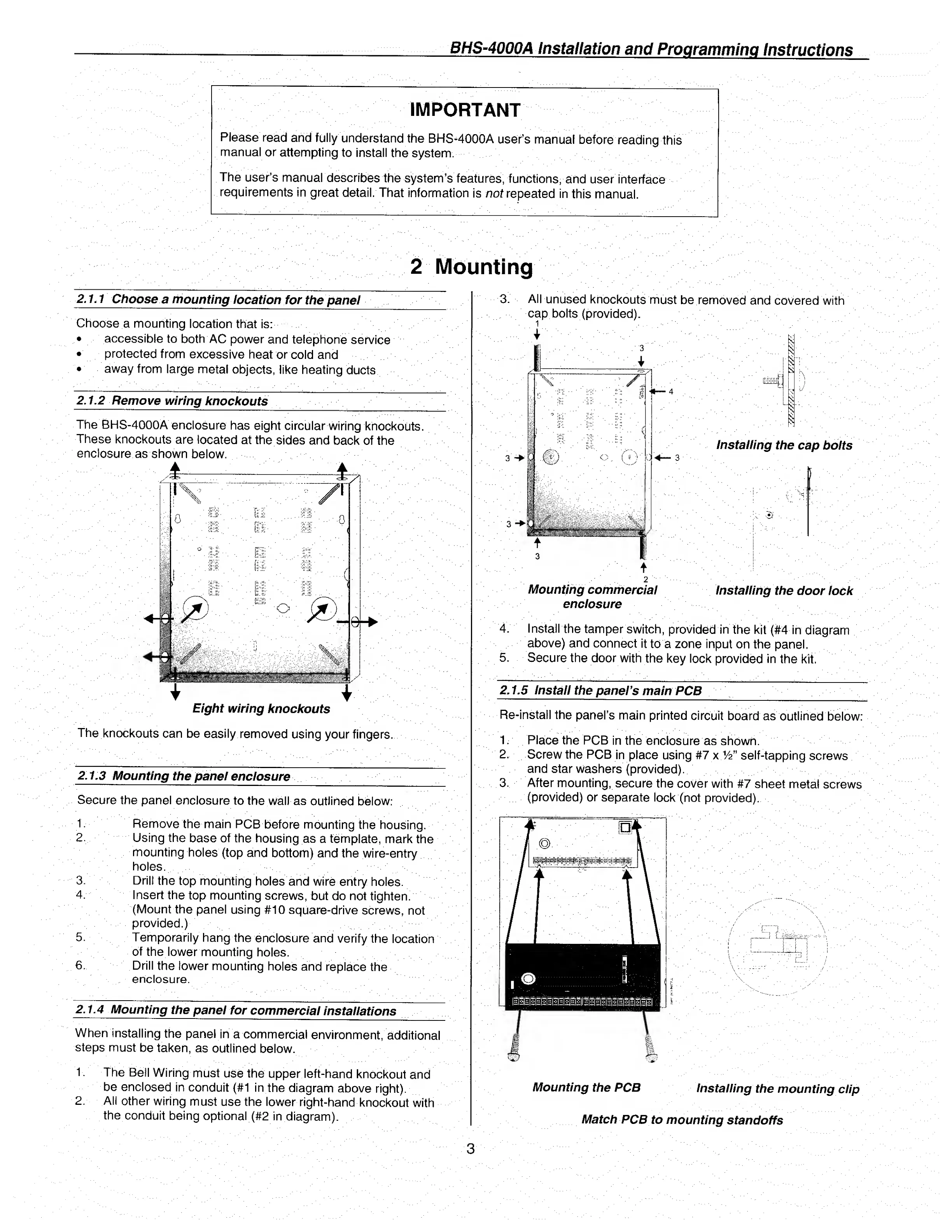
The
BHS-4000A
enclosure
has
eight
circular
wiring
knockouts.
These
knockouts
are
located
at
the
sides
and
back
of
the
enclosure
as
shown
below.
Eight
wiring
knockouts
The
knockouts
can
be
easily
removed
using
your
fingers.
2.1.3
Mounting
the
panel
enclosure
Secure
the
panel
enclosure
to
the
wall
as
outlined
below:
1.
Remove
the
main
PCB
before
mounting
the
housing.
2.
Using
the
base
of
the
housing
as
a
template,
mark
the
mounting
holes
(top
and
bottom)
and
the
wire-entry
holes.
3.
Drill
the
top
mounting
holes
and
wire
entry
holes.
4.
Insert
the
top
mounting
screws,
but
do
not
tighten.
(Mount
the
panel
using
#10
square-drive
screws,
not
provided.)
5.
Temporarily
hang
the
enclosure
and
verify
the
location
of
the
lower
mounting
holes.
6.
Drill
the
lower
mounting
holes
and
replace
the
enclosure.
2.1.4
Mounting
the
panel
for
commercial
installations
When
installing
the
panel
in
a
commercial
environment,
additional
steps
must
be
taken,
as
outlined
below.
1.
The
Bell
Wiring
must
use
the
upper
left-hand
knockout
and
be
enclosed
in
conduit
(#1
in
the
diagram
above
right).
2.
All
other
wiring
must
use
the
lower
right-hand
knockout
with
the
conduit
being
optional
(#2
in
diagram).
3.
All
unused
knockouts
must
be
removed
and
covered
with
cap
bolts
(provided).
t
2
Mounting
commercial
installing
the
door
lock
enclosure
4.
Install
the
tamper
switch,
provided
in
the
kit
(#4
in
diagram
above)
and
connect
it
to
a
zone
input
on
the
panel.
5.
Secure
the
door
with
the
key
lock
provided
in
the
kit.
2.1.5
I
nstall
the
panel’s
main
PCB
Re-install
the
panel’s
main
printed
circuit
board
as
outlined
below:
1.
Place
the
PCB
in
the
enclosure
as
shown.
2.
Screw
the
PCB
in
place
using
#7
x.^"
self-tapping
screws
and
star
washers
(provided).
3.
After
mounting,
secure
the
cover
with
#7
sheet
meta!
screws
(provided)
or
separate
lock
(not
provided).
Mounting
the
PCB
Installing
the
mounting
clip
Match
PCB
to
mounting
standoffs

Related product manuals