EasyManua.ls Logo

BRINKS BHS-4000A - 2.1.6 Mounting the keypad; 2.1.7 Cover unused emergency keys; 2.2 Mount the ZEM; 2.2.1 Mounting the ZEM inside the panel enclosure

BRINKS BHS-4000A
24 pages
Print Icon
To Next Page IconTo Next Page
To Previous Page IconTo Previous Page
Loading...
BHS-4000A
Installation
and
Programming
Instructions
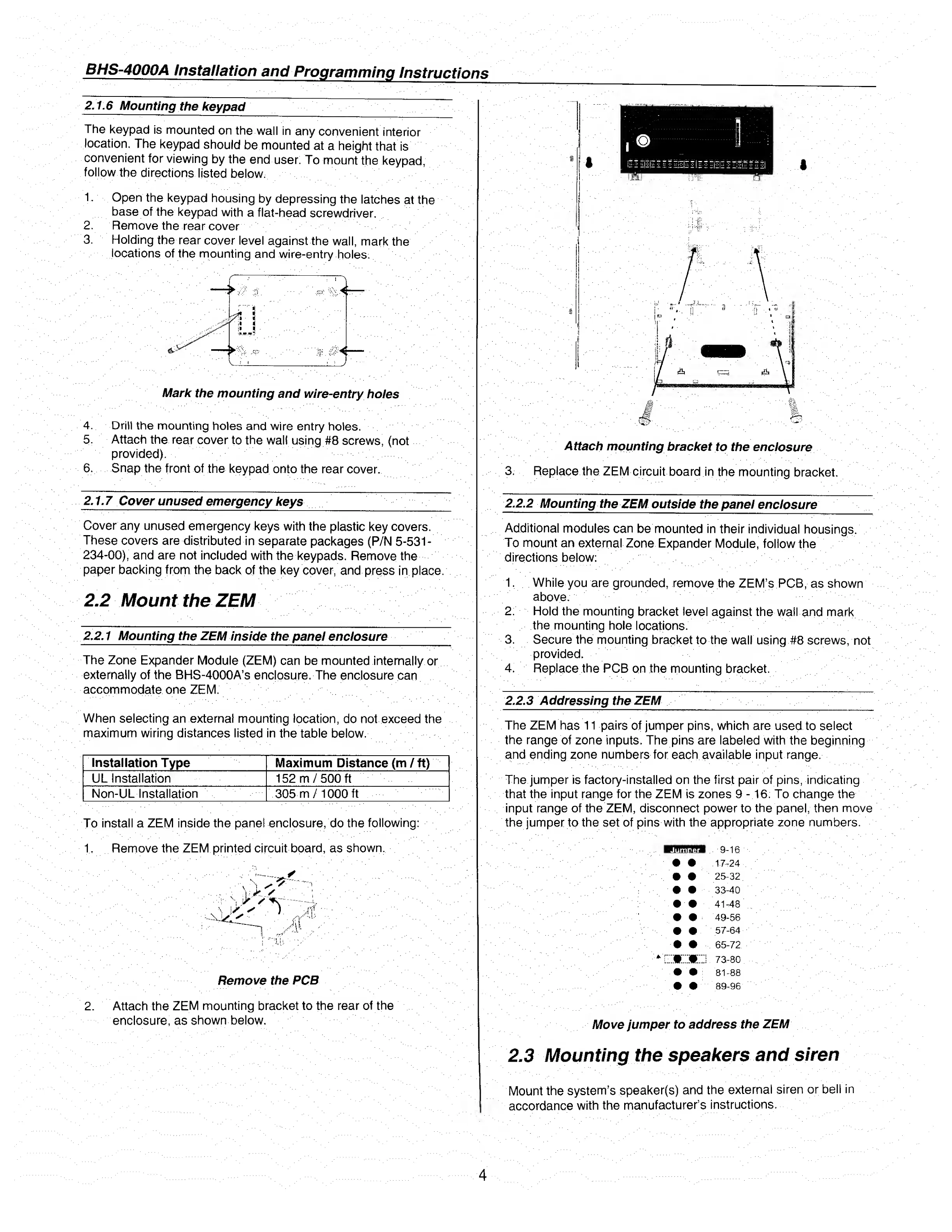
2.1.6
Mounting
the
keypad
The
keypad
is
mounted
on
the
wall
in
any
convenient
interior
location.
The
keypad
should
be
mounted
at
a
height
that
is
convenient
for
viewing
by
the
end
user.
To
mount
the
keypad,
follow
the
directions
listed
below.
1.
Open
the
keypad
housing
by
depressing
the
latches
at
the
base
of
the
keypad
with
a
flat-head
screwdriver.
2.
Remove
the
rear
cover
3.
Holding
the
rear
cover
level
against
the
wall,
mark
the
locations
of
the
mounting
and
wire-entry
holes.
Mark
the
mounting
and
wire-entry
holes
4.
Drill
the
mounting
holes
and
wire
entry
holes.
5.
Attach
the
rear
cover
to
the
wall
using
#8
screws,
(not
provided).
6.
Snap
the
front
of
the
keypad
onto
the
rear
cover.
2.1.7
Cover
unused
emergency
keys
____
Cover
any
unused
emergency
keys
with
the
plastic
key
covers.
These
covers
are
distributed
in
separate
packages
(P/N
5-531-
234-00),
and
are
not
included
with
the
keypads.
Remove
the
paper
backing
from
the
back
of
the
key
cover,
and
press
in
place.
2.2
Mount
the
ZEM
2.2.1
M
ounting
the
ZEM
inside
the
panel
enclosure
The
Zone
Expander
Module
(ZEM)
can
be
mounted
internally
or
externally
of
the
BHS-4000A’s
enclosure.
The
enclosure
can
accommodate
one
ZEM.
When
selecting
an
external
mounting
location,
do
not
exceed
the
maximum
wiring
distances
listed
in
the
table
below.
Installation
Type
Maximum
Distance
(m
/
ft)
UL
Installation
152
m/500
ft
Non-UL
Installation
305
m/1000
ft
To
install
a
ZEM
inside
the
panel
enclosure,
do
the
following:
1.
Remove
the
ZEM
printed
circuit
board,
as
shown.
Remove
the
PCB
2.
Attach
the
ZEM
mounting
bracket
to
the
rear
of
the
enclosure,
as
shown
below.
Attach
mounting
bracket
to
the
enclosure
3.
Replace
the
ZEM
circuit
board
in
the
mounting
bracket.
2.2.2
M
ounting
the
ZEM
outside
the
panel
enclosure
Additional
modules
can
be
mounted
in
their
individual
housings.
To
mount
an
external
Zone
Expander
Module,
follow
the
directions
below:
1.
While
you
are
grounded,
remove
the
ZEM’s
PCB,
as
shown
above.
2.
Hold
the
mounting
bracket
level
against
the
wail
and
mark
the
mounting
hole
locations.
3.
Secure
the
mounting
bracket
to
the
wall
using
#8
screws,
not
provided.
4.
Replace
the
PCB
on
the
mounting
bracket.
2.2.3
Addressing
the
ZEM
The
ZEM
has
11
pairs
of
jumper
pins,
which
are
used
to
select
the
range
of
zone
inputs.
The
pins
are
labeled
with
the
beginning
and
ending
zone
numbers
for
each
available
input
range.
The
jumper
is
factory-installed
on
the
first
pair
of
pins,
indicating
that
the
input
range
for
the
ZEM
is
zones
9
-16.
To
change
the
input
range
of
the
ZEM,
disconnect
power
to
the
panel,
then
move
the
jumper
to
the
set
of
pins
with
the
appropriate
zone
numbers.
9-16
17-24
25-32
33-40
41
-
48
49-56
57-64
65-72
73-80
81-88
89-96
Move
jumper
to
address
the
ZEM
2.3
Mounting
the
speakers
and
siren
Mount
the
system’s
speaker(s)
and
the
external
siren
or
bell
in
accordance
with
the
manufacturer’s
instructions.
Jumper
*
r:

Related product manuals