Need help?
Do you have a question about the Brocade Communications Systems ICX 7250-24G and is the answer not in the manual?
Covers items included, requirements, tasks, general, lifting, and power precautions.
Guides through preparing the site, installing the device (desktop, rack, wall).
Covers items, requirements, tasks, precautions, site prep, device install, PSU, cord, verification.
Outlines configuration steps, including PC/terminal attachment and password assignment.
Details IP address configuration for Layer 2/3 software and recovering lost passwords.
Details general cautions, electrical safety, equipment handling, and laser warnings.
 General
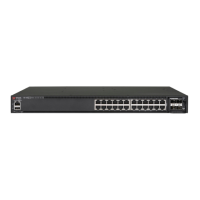
| Model | ICX 7250-24G |
|---|---|
| Switching Capacity | 128 Gbps |
| VLANs Supported | 4096 |
| Jumbo Frame Support | Up to 9216 bytes |
| Flash Memory | 512 MB |
| Ports | 24 x 10/100/1000BASE-T |
| MAC Address Table Size | 32, 000 |
| Operating Temperature | 0°C to 45°C (32°F to 113°F) |
| Form Factor | 1U |
| Storage Temperature | -25°C to 70°C (-13°F to 158°F) |
| Humidity | 5% to 95% non-condensing |

 To Next Page