6
LI-PO BATTERY WARNING
This device contains a Lithium-Polymer battery. The battery must be recycled or disposed
of properly. Contact your local waste management office for information on battery
recycling or disposal.
Use only the supplied cable to recharge the battery. Improper charging may damage the
battery and the device.
Do not attempt to open the rechargeable battery or battery pack. There are no
serviceable parts inside.
Keep the battery out of reach of children. If swallowed, consult a physician immediately.
Do not hit, throw, or drop the battery on any hard surface.
Do not immerse the battery in water; keep in a dry, cool place.
Do not overcharge the battery. Charge for one hour or less. Monitor the charging process.
When storing the battery, store it with a partial charge. Do not store when fully charged or
depleted.
Do not expose the battery to high temperatures or dispose of battery in a fire as it may
explode. The battery may also explode if damaged.
BC
AAA BATTERY PRECAUTIONS
Dispose of used batteries properly. Do not dispose of batteries in a fire.
Do not leave the batteries where a child or pet could play with or swallow them. If the
batteries are swallowed, contact a physician immediately.
The batteries may explode if mistreated. Do not attempt to recharge or disassemble the
batteries.
Use only fresh batteries of the required size and type. Do not mix old and new batteries,
different types of batteries, or rechargeable batteries of different capacities.
7
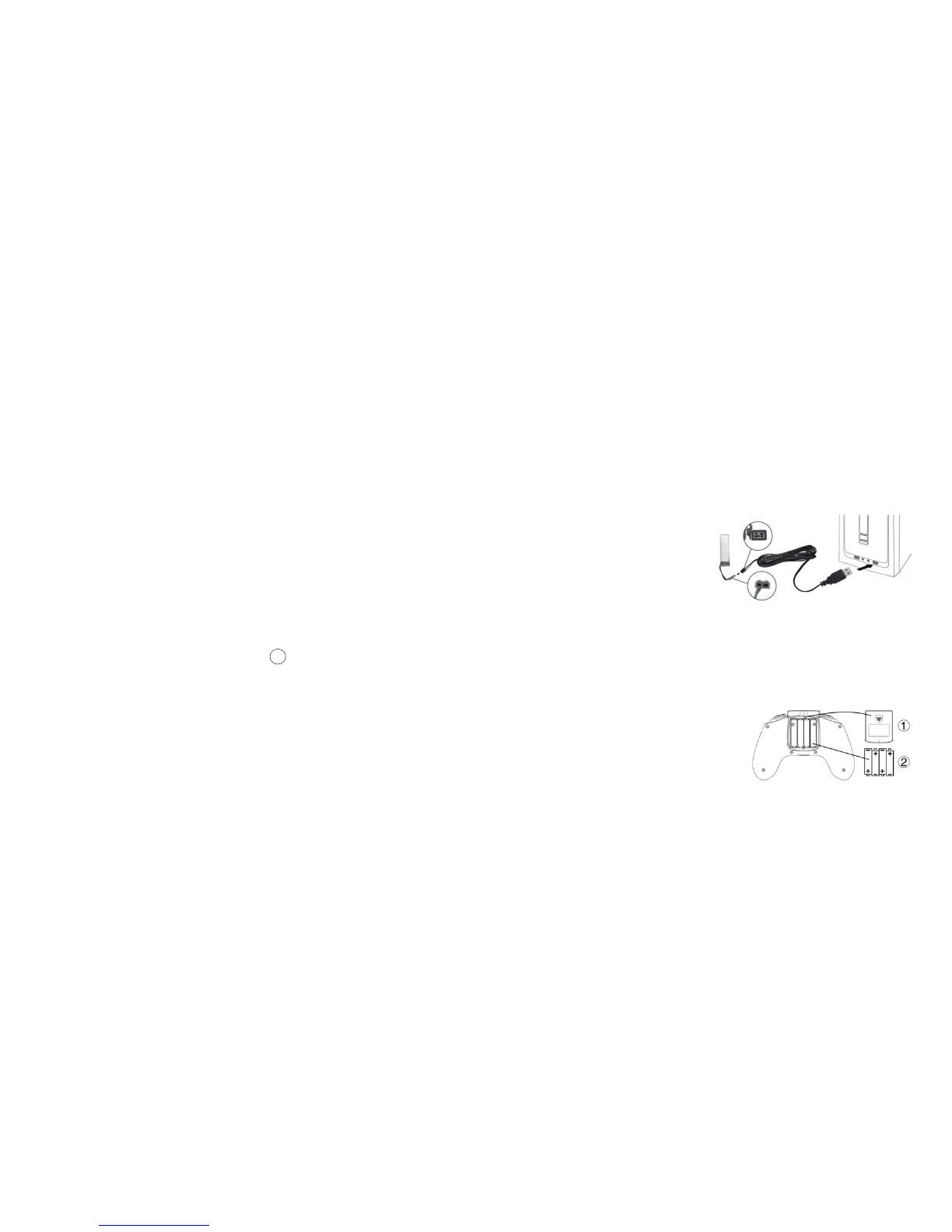
CHARGING THE DRONE'S BATTERY
The Racing Drone includes a rechargeable Lithium-Polymer battery. Charge the battery
before first use.
To charge the drone's battery:
1. Remove the battery from the compartment on the underside of the drone.
2. Connect the charging cable to the
charging terminal on the battery.
3. Insert the charging cable's USB
connector into a USB port on an
active device, such as a computer,
USB adapter, or power bank.
4. The Charging Indicator in the USB
end of the charging cable is red while
charging, and turns off when the battery is fully charged.
INSERTING THE CONTROLLER BATTERIES
The controller uses 4 AAA batteries (included) which must be inserted before first use.
To insert the controller's batteries:
1. Using the included screwdriver, open the
battery cover on the back of the controller.
2. Insert 4 AAA batteries, following the polarity
indicators.
3. Replace the battery cover.


 To Next Page