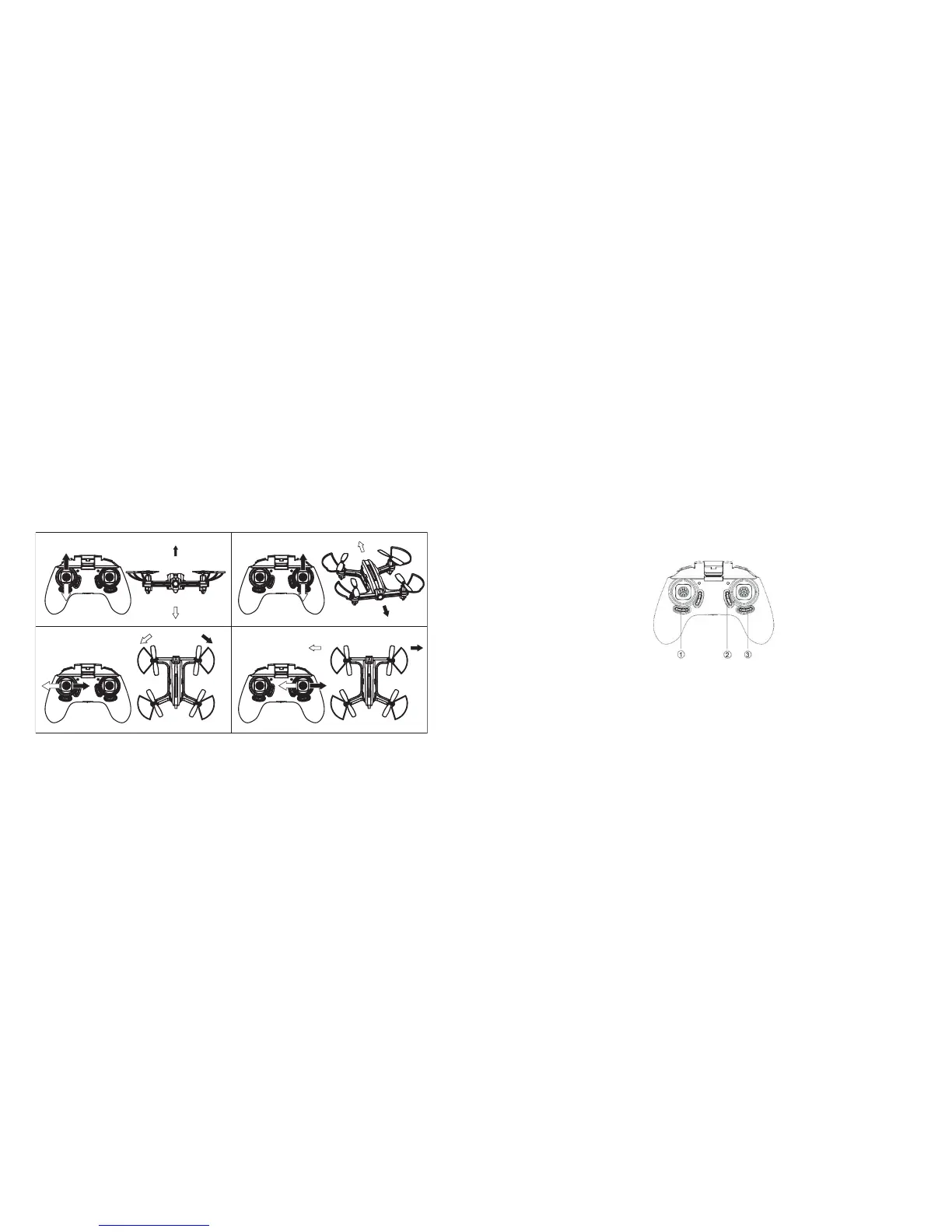
FLYING YOUR DRONE
Use the controller's control sticks to fly your drone. The left control stick controls the
ascent, descent, left turn and right turn. Move the stick slowly to avoid collisions and
crashes.
The right control stick controls the forward, backward and lateral displacement (moving
sideward without turning) in both directions.
10 11
TRIMMING THE DRONE
To ensure that your drone can fly straight and level, you must trim the aircraft. This can be
done manually or automatically.
MANUAL TRIM
Manual trim consists of calibrating the movement of your drone so it remains stable both
in takeoff and in flight.
NOTE: It is best to make final trim adjustments when the craft is airborne.
(1) Left/Right Rotate Trim: Corrects unintentional movement in which the drone rotates
left or right in a horizontal plane. Press in the opposite direction of the rotation. Press
until the rotation stops.
(2) Forward/Backward Trim: Corrects unintentional forward/backward motion . Press in
the opposite direction of the unintentional motion. Press until the motion stops.
(3) Left/Right Trim: Corrects unintentional lateral (side to side) movement. Press in the
opposite direction of the unintentional motion. Press until the motion stops.
ENDING FLIGHT
To end your flight, switch off the controller and remove the battery from the drone. If you
will not be flying again for several days, also remove the batteries from the controller.


 To Next Page