Swedish Rejuvenate Stretch Quick
Full Body Full Air Relax Energize
Massage Programs and Selections
Adjusting Automatic Program, Localized Area Program or Manual
Program Settings
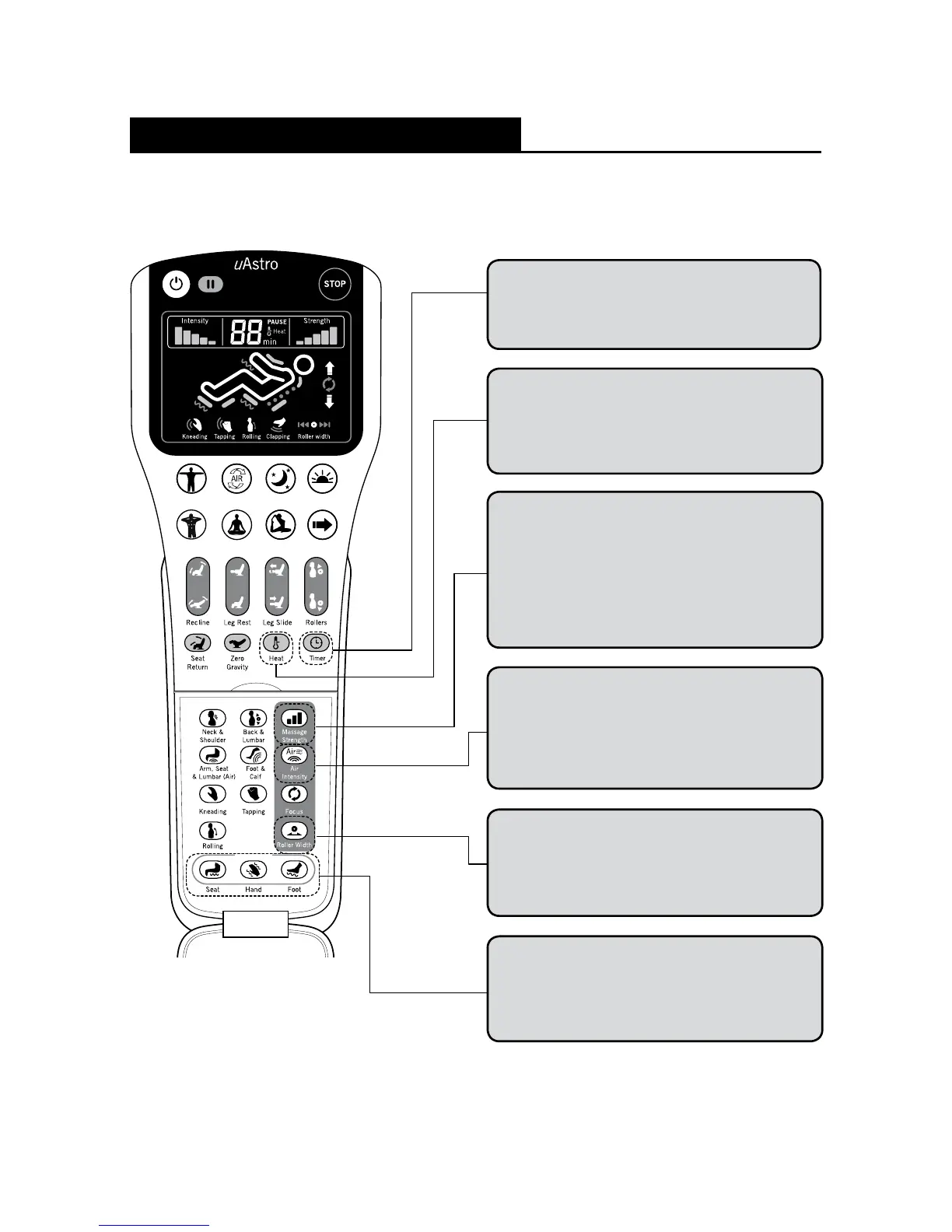
Timer Button
Default time is 15 minutes. User is able to change
the timer from a selection of 5, 10, 15, 20, 25 and
30 minutes.
Heat Button
Heat function is set to OFF by default. It is
applicable during any Automatic Program, Localized
Area Program or Manual Program. You may also
use the heat function on its own.
Massage Strength Button
The strength of the Standard massage starts at
level 3 by default. (The massage starts at level 2
for Swedish program and level 1 for Rejuvenate
program by default.) Each time the button is
pressed, the strength will increase by 1 level. The
maximum level is 5. If the program is changed, the
massage strength is reset to its default level.
Air Intensity Button
The intensity of the air massage starts off at
default level 3. Each time the button is pressed,
the intensity will increase by 1 level. The maximum
level is 5. If the program is changed, the intensity
level will reset to its default level.
Roller Width Button
The Roller Width function can only be activated
during Tapping and Rolling massage modes. By
default, the roller width is set at “Mid”. User may
change from Narrow, Mid and Wide roller widths.
Vibration Buttons
The vibration mode can be switched on or off
while any of the programs are running. User can
select from Seat, Hand or Foot area to switch
the vibration on or off.
19






 To Next Page