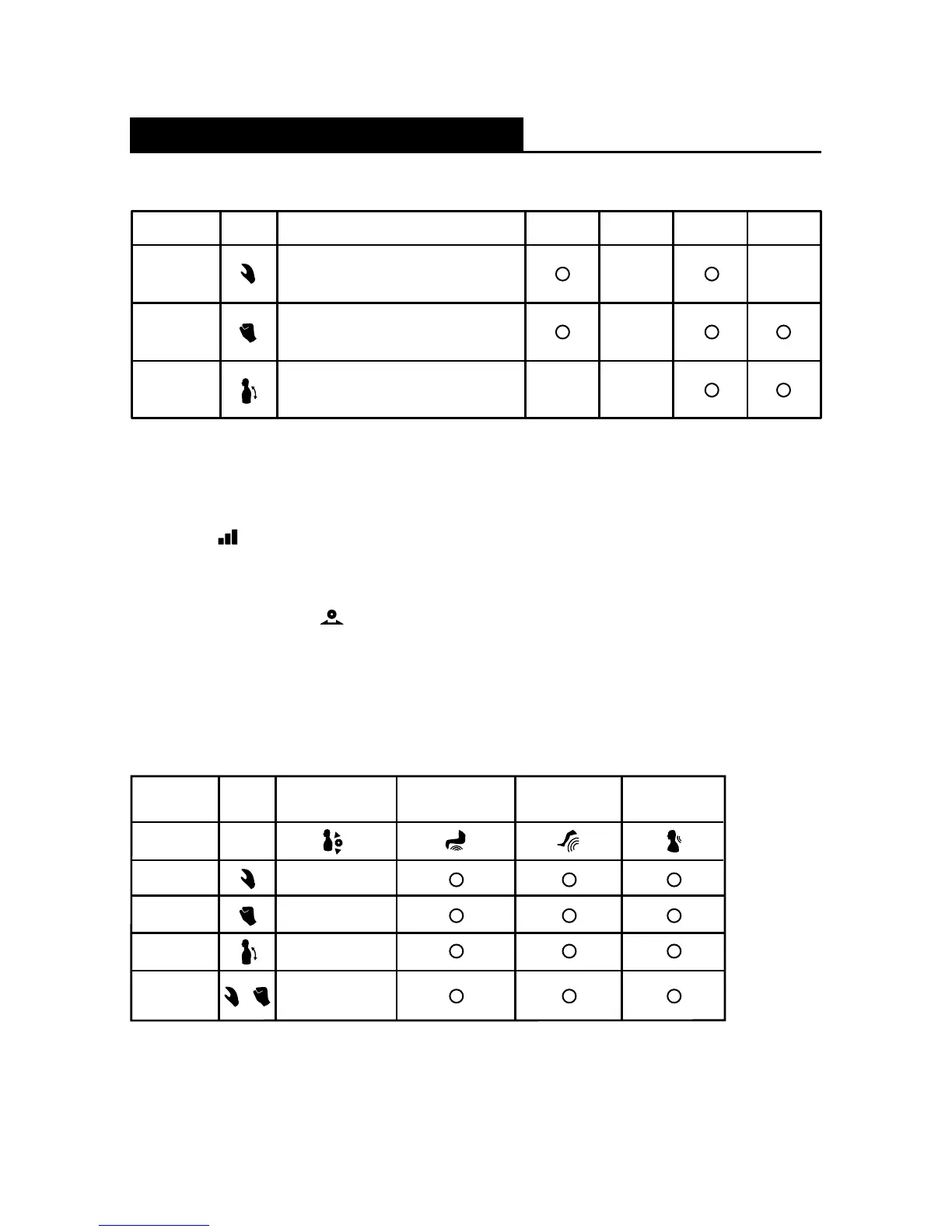
Manual Massage Mode
Kneading
Helps relieve tension and soreness
by loosening and stretching muscles.
Action Button IntensityStrengthDescription Timer
Tapping
Helps relieve pressure on
the entire back area.
Rolling
Helps relieve muscle tension, improve
circulation and relax the back.
Width
Massage Programs and Selections
The Kneading and Tapping massage can be used combined or individually.
When Rolling massage is selected, Kneading and Tapping cannot be activated.
By default, the strength and intensity for all massages are set at level 3.
Press the [
] (Massage Strength) button to change the massage strength
to your desired strength.
The width of the massage rollers can be adjusted only in Tapping or Rolling massage
modes by pressing the [
] button to switch between 3 different widths.
By default, the roller width is set at “Mid”.
Action
Button
Foot & CalfBack & Lumbar
Neck &
Shoulder
Kneading &
Tapping
Tapping
Rolling
Arm, Seat &
Lumbar (Air)
Kneading
+
Localized Area Massage Mode + Manual Massage Mode
You can combine each Localized Area Massage Program with the Manual Massage
Programs for your own personalized massage.
e.g.; Arm, Seat & Lumbar (Air)/Foot & Calf/Neck & Shoulder + Kneading/Tapping/
Rolling/Kneading and Tapping.
21






 To Next Page