To Next Page


Е
ЕленаApr 16, 2026
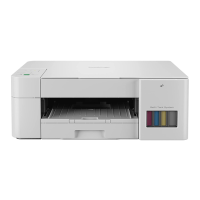
Здравствуйте. Скажите пожалуйста какой у него ip адре: Brother DCP-T225 крик души.

Здравствуйте. Скажите пожалуйста какой у него ip адре: Brother DCP-T225 крик души.
Detailed explanation of each button, LED, and indicator on the machine's control panel.
Comprehensive instructions for loading various paper types and sizes into the machine.
Detailed instructions for printing documents from a Windows PC using various options.
Step-by-step instructions for making standard document copies.
Steps for managing security certificates to ensure SSL/TLS communication.
Explanation of SSL/TLS and its benefits for secure network communication.
Decoding the meaning of LED status lights for errors and maintenance needs.
Procedures to safely locate and remove jammed paper from the machine.
General troubleshooting advice and links to related problem-solving topics.
Steps to reset machine settings to factory defaults for troubleshooting.
Detailed guide on how to refill the ink tanks with the correct ink bottles.
Instructions for performing various cleaning procedures on the machine's components.
Manual process to adjust and check print alignment via the machine's panel.
How to adjust and check print alignment using the Web Based Management interface.
How to customize machine features and settings via a web browser interface.
 General
| Type | Inkjet |
|---|---|
| Functions | Print, Copy, Scan |
| Scanner Type | Flatbed |
| Connectivity | USB, Wi-Fi |
| Display | LCD |
| Print Resolution | 1200 x 6000 dpi |
| Scan Resolution | 1200 x 2400 dpi |
| Copy Resolution | 1200 x 600 dpi |
| Paper Capacity | 150 sheets |
| Ink Type | Ink Bottle |
| Paper Sizes | A4, A5, A6, Letter, Legal |
| Operating Systems | Windows, macOS, Linux |