EasyManua.ls Logo

Brother FAX-2920 - User Manual

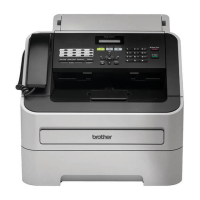
Brother FAX-2920
148 pages
Print Icon
To Next Page IconTo Next Page
Loading...
USER’S GUIDE
FAX-2820
FAX-2920
MFC-7225N
Version A

Table of Contents

Questions and Answers

  • C
    Cheryl AllisonAug 20, 2025
    What to do if my Brother FAX-2920 All in One Printer says 'No Paper Fed'?
    • L
      Leslie SimpsonAug 20, 2025
      If your Brother All in One Printer displays 'No Paper Fed', it means the machine is out of paper, or the paper is not properly loaded in the paper tray. Refill the paper in the paper tray and then press Start.
  • H
    Hannah JensenAug 22, 2025
    What to do if my Brother FAX-2920 All in One Printer displays 'Toner Life End'?
    • J
      julie09Aug 22, 2025
      If your Brother All in One Printer shows 'Toner Life End', it could be due to the toner cartridge and drum unit assembly not being installed properly, or the toner being used up. Try reinstalling the toner cartridge and drum unit assembly. If that doesn't work, replace the toner cartridge with a new one.
  • T
    tonihowardAug 25, 2025
    Why does my Brother FAX-2920 say 'Change Drum Soon'?
    • P
      powerselizabethAug 25, 2025
      The 'Change Drum Soon' message on your Brother All in One Printer indicates that the drum unit is near the end of its life. Use the drum unit until you have a print quality problem; then replace the drum unit with a new one.
  • C
    Christina EllisonAug 26, 2025
    Why does my Brother FAX-2920 say 'Out of Memory'?
    • B
      Bradley VillaAug 27, 2025
      The Brother All in One Printer displays 'Out of Memory' because its memory is full. To resolve this, press Start to send or copy the scanned pages.
  • M
    mallorymejiaAug 28, 2025
    Why is my Brother FAX-2920 displaying 'Wrong Paper Size'?
    • E
      Elijah HaynesAug 28, 2025
      Your Brother All in One Printer displays 'Wrong Paper Size' because the loaded paper is not the correct size. Load the correct size of paper (Letter or A4) and then press Start.
  • R
    Renee OrtegaAug 30, 2025
    What to do if my Brother FAX-2920 says 'Unable to Init. (Initialize) Unable to Print Unable to Scan'?
    • V
      Victor SmithAug 30, 2025
      If your Brother All in One Printer displays 'Unable to Init. (Initialize) Unable to Print Unable to Scan', it indicates a mechanical problem. Turn off the machine's power switch and then on again. If the error message continues, leave the machine for several minutes and then try to print, copy, or scan again.
  • L
    lstevensonSep 1, 2025
    Why is my Brother FAX-2920 displaying 'Cover is Open'?
    • N
      Nancy NewmanSep 1, 2025
      The 'Cover is Open' message on your Brother All in One Printer means that the front cover is not completely closed. Close the front cover of the machine.
  • M
    Michael AustinSep 3, 2025
    What to do if my Brother FAX-2920 displays 'Machine too Hot'?
    • M
      Madison LeeSep 3, 2025
      If your Brother All in One Printer displays 'Machine too Hot', it means the inside of the machine is too hot. Listen to the machine to check that the cooling fan is spinning. Make sure that the air vents are not covered up or blocked.
  • B
    Brandon MckeeSep 5, 2025
    Why does my Brother All in One Printer say 'Back Cover Open'?
    • R
      Rebecca BirdSep 5, 2025
      The 'Back Cover Open' message on your Brother All in One Printer indicates that the back cover is not completely closed. Close the back cover of the machine.
  • K
    Kimberly ScottSep 7, 2025
    Why is my Brother FAX-2920 showing 'No cartridge' error?
    • N
      nandersonSep 7, 2025
      The 'No cartridge' error on your Brother All in One Printer means that the toner cartridge and drum unit assembly is not installed or is not installed properly. Reinstall the toner cartridge.

Summary

Introduction

Control Panel Overview

Details the keys and functions of the machine's control panel for FAX-2820/2920 and MFC-7225N.

Getting Started

Initial Setup

Covers setting the date and time, and dialling modes (Tone/Pulse).

Security

Details TX Lock, Memory Security, and Setting Lock features for unauthorized access prevention.

Setup Send

How to Fax

Explains automatic and manual fax transmission methods, including ADF usage.

Setup Receive

Choosing the Receive Mode

Describes the four receive modes: Fax Only, Fax/Tel, External TAD, and Manual.

Quick-Dial Numbers and Dialling Options

Remote Fax Options

Setting Up Fax Forwarding

Configures the machine to store received faxes and forward them to another number.

Remote Retrieval

Explains how to access machine features and retrieve fax messages remotely.

Making Copies

Using the Machine as a Copier

Guide to using the machine for making single or multiple copies.

Software and Network Features (MFC-7225 N only)

Important Information

Important Safety Instructions

Crucial safety precautions for operating the machine to prevent hazards.

Troubleshooting and Routine Maintenance

Error Messages

Lists common error messages, their causes, and recommended actions for resolution.

Paper Jams

Step-by-step instructions for clearing document and paper jams.

If You Are Having Difficulty with Your Machine

Troubleshooting tips for printing, receiving, phone lines, and copy quality issues.

Improving the Print Quality

Provides recommendations for resolving poor print quality issues.

Specifications

Fax Specifications

Technical specifications related to fax compatibility, modem speed, document size, and polling.

Brother FAX-2920 Specifications

General IconGeneral
Printing TechnologyLaser
Print Speed (Black)20 ppm
Print Resolution600 x 600 dpi
Copier Speed20 cpm
Fax Modem Speed33.6 Kbps
Memory16 MB
Paper Capacity250 sheets
Scanner TypeFlatbed
TypeAll-in-One
FunctionsPrint, Copy, Scan, Fax
Paper HandlingAutomatic Document Feeder, Duplex Printing
Scanner Resolution600 x 1200 dpi (optical)
ConnectivityUSB 2.0
Fax Transmission SpeedApproximately 3 seconds per page

Related product manuals