EasyManua.ls Logo

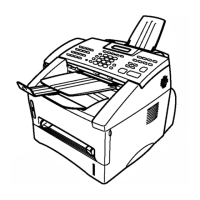
Brother FAX4100 - User Manual

Brother FAX4100
239 pages
Print Icon
To Next Page IconTo Next Page
Loading...
FACSIMILE EQUIPMENT
SERVICE MANUAL
MODEL: MFC8500/FAX4100/FAX4750e/FAX5750e
MFC9660/FAX8360P

Table of Contents

Question and Answer IconNeed help?

Do you have a question about the Brother FAX4100 and is the answer not in the manual?

Summary

Safety Information

Chapter II. Installation

Installing the Update Data

Procedure for updating the facsimile machine's software and firmware.

Chapter IV. Disassembly;Reassembly and Lubrication

Disassembly;Reassembly

Step-by-step guide for disassembling and reassembling the equipment.

Chapter V. Maintenance Mode

Entry into the Maintenance Mode

Procedure to access the equipment's service and diagnostic functions.

Chapter VI. Error Indication and Troubleshooting

Error Indication

How the equipment displays error messages and codes.

Troubleshooting Procedures

Step-by-step guidance for diagnosing and resolving equipment issues.

Summary

Safety Information

Chapter II. Installation

Installing the Update Data

Procedure for updating the facsimile machine's software and firmware.

Chapter IV. Disassembly;Reassembly and Lubrication

Disassembly;Reassembly

Step-by-step guide for disassembling and reassembling the equipment.

Chapter V. Maintenance Mode

Entry into the Maintenance Mode

Procedure to access the equipment's service and diagnostic functions.

Chapter VI. Error Indication and Troubleshooting

Error Indication

How the equipment displays error messages and codes.

Troubleshooting Procedures

Step-by-step guidance for diagnosing and resolving equipment issues.

Brother FAX4100 Specifications

General IconGeneral
BrandBrother
ModelFAX4100
CategoryFax Machine
LanguageEnglish

Related product manuals