18
Deleting text
● To remove characters to the left of the cursor’s current position, press b until
all of the characters that you wish to delete are removed.
● To delete all of the text:
1 Press g, then b.
2 Press u or d to select either TEXT ONLY (to erase just the text) or
TEXT&FORMAT (to erase all of the text and return all formatting functions
to their default settings).
3 Press n.
Entering an accented character
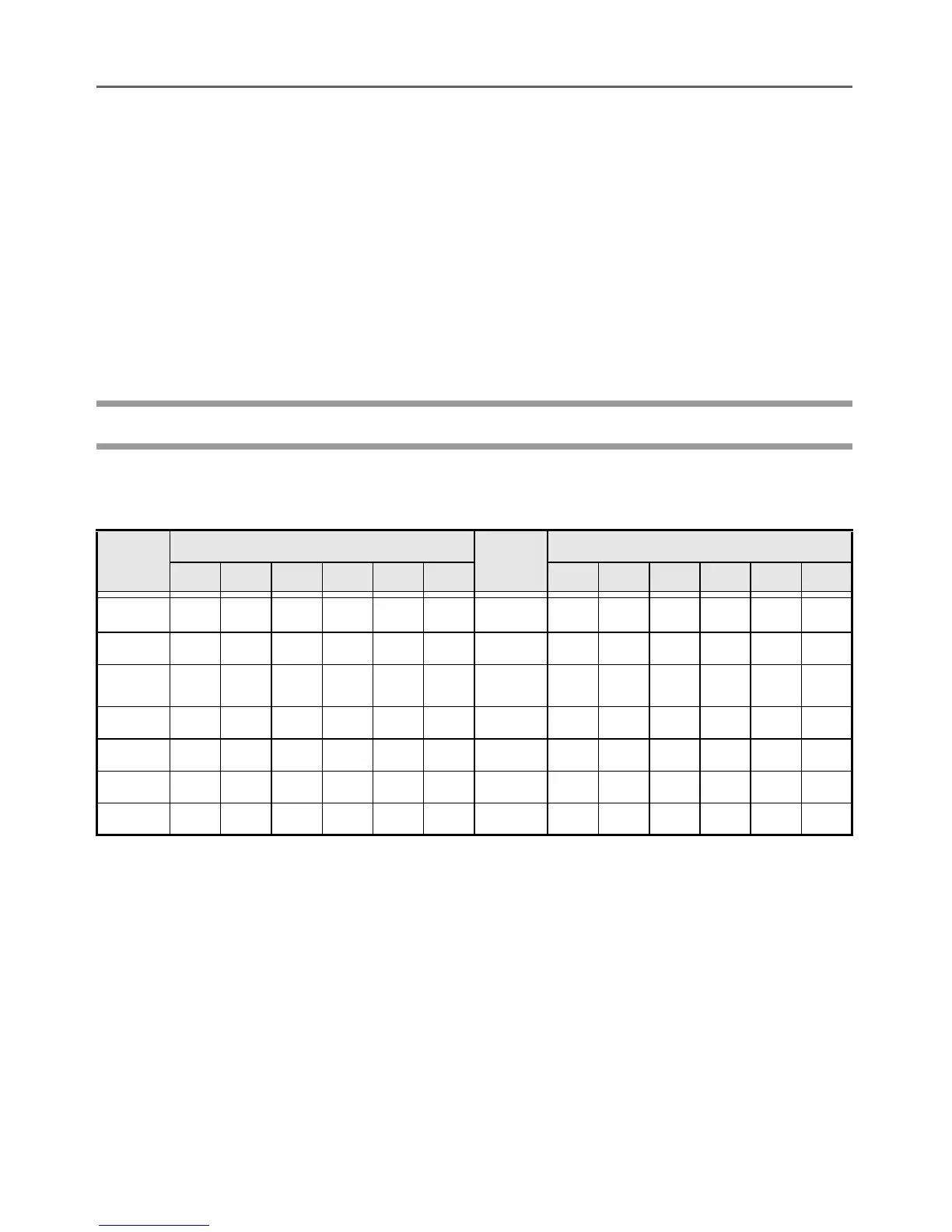
There are various accented characters available with the Accent function.
The following accented characters are available.
1 Press g, then s. The message “ACCENT a-u/A-U?” appears.
2 Press the key of the letter in the desired accented character until the desired
character is selected.
3 Add the accented character(s) to the text.
• To add a single accented character or the last one in a series, skip to step
5.
• To add a series of accented characters to the text, press g, then n.
4 For each additional accented character, repeat steps 2 and 3.
5 Press n.
Letter
Accented Characters
Letter
Accented Characters
0 1 2 3 4 5 0 1 2 3 4 5
A ÀÁÄÂÃÆ a àáäâãæ
CÇ c ç
E ÈÉËÊ e èéëê
I ÍÏÎ i íï î
NÑ n ñ
O ÓÖÔÕ o óöôõ
U ÙÚÜÛ u ùúüû
E
~
e
~



 To Next Page
 Loading...