30
a
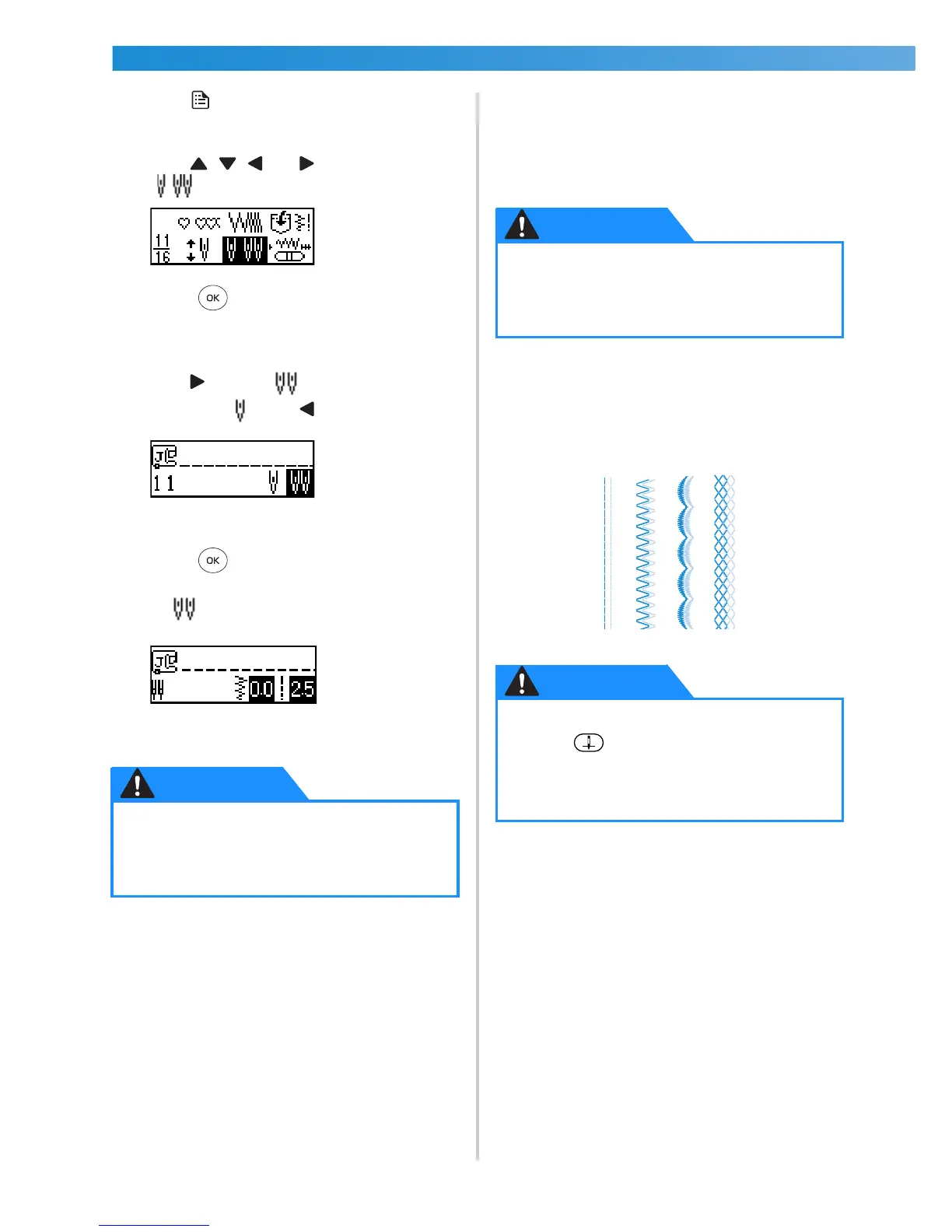
Press (settings key) in the operation panel.
X The settings screen appears.
b
Press , , and (arrow keys) until
is selected.
c
Press (OK key).
X The screen for selecting the twin needle
appears.
d
Press to select .
To return to , press .
X The twin needle can now be used.
e
Press (OK key).
X The initial stitch screen appears again, and
appears in the lower-left corner of the
screen.
• Even after the sewing machine is turned off,
the twin needle setting is not cancelled.
f
Select a stitch.
• For details on selecting a stitch, refer to
“Selecting stitching” (page 68).
• For details on the stitches that can be sewn
with the twin needle, refer to “Stitch
Settings” (page 128).
g
Start sewing.
• For details on starting to sew, refer to
“Starting to sew” (page 49).
X Two lines of stitching are sewn parallel to
each other.
● When using the twin needle, be sure to
select the twin needle setting, otherwise
the needle may break or the machine
may be damaged.
● When using the twin needle, be sure to
select an appropriate stitch, otherwise
the needle may break or the machine
may be damaged.
● When changing the sewing direction,
press (needle position button) to
raise the needle from the fabric, and then
raise the presser foot lever and turn the
fabric.








 To Next Page