Replacing the Presser Foot 39
1
Adjusting the pressure of
the presser foot
The amount of pressure that the presser foot applies
to the fabric can be adjusted.
1
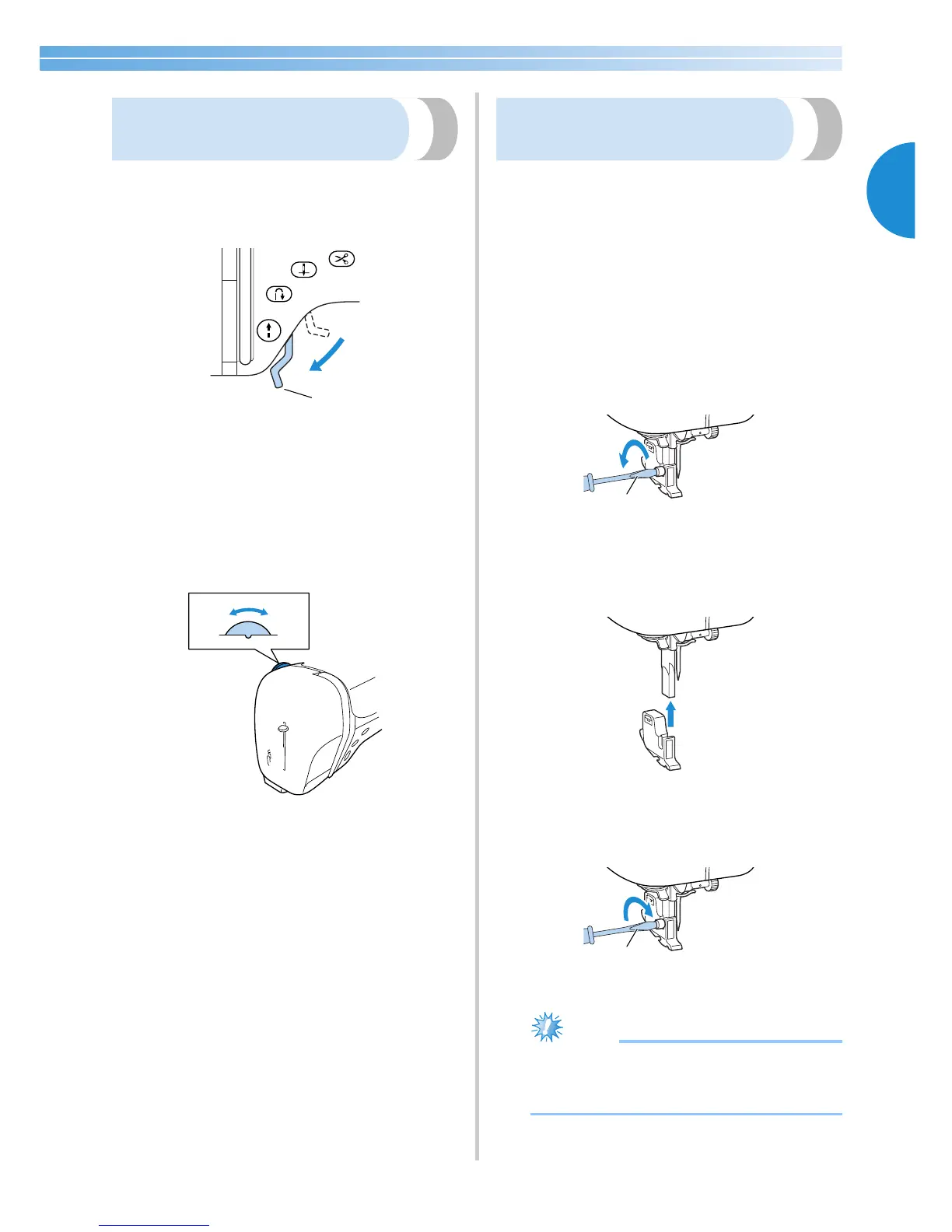
Lower the presser foot lever.
1 Presser foot lever
2
Turn the presser foot dial at the back of the
sewing machine.
The scale on the dial indicates the range from
1 (weak) to 4 (strong). Turn the dial to the right
(smaller number) to decrease the pressure.
Turn the dial to the left (larger number) to
decrease the pressure.
3
When you are finished sewing, reset the dial
to 3 (standard).
Removing the presser foot
holder
Remove the presser foot holder when cleaning the
sewing machine or when installing a presser foot that
does not use the presser foot holder, such as the
quilting foot. Use the screwdriver to remove the
presser foot holder.
■ Removing the presser foot holder
1
Remove the presser foot.
• For details, refer to “Replacing the presser
foot” (page 37).
2
Use the screwdriver to loosen the presser foot
holder screw.
1 Screwdriver
■ Attaching the presser foot holder
1
Align the presser foot holder with the lower-
left side of the presser bar.
2
Hold the presser foot holder in place with
your right hand, and then tighten the screw
using the screwdriver in your left hand.
1 Screwdriver








 To Next Page